How Does Advantage+ Campaign Budget Split Spend?
How does Advantage+ campaign budget split spend across ad sets?
You set one campaign budget and Meta distributes it across ad sets in real time to the best opportunities, so one ad set may take most of the spend. Read results at campaign level, keep to 70 ad sets or fewer, do not pause low-delivery ad sets, and use ad set spend limits sparingly.
You gave each ad set a budget and Meta spent most of it on one. That is not a bug if you use Advantage+ campaign budget; it is the design. The skill is knowing when that design helps and what habits spoil it.
How does it work?
Meta says Advantage+ campaign budget, also called Campaign budget or Budget with Advantage+ on, automatically manages your campaign budget across ad sets to get the overall best results. You set one central budget, daily or lifetime, which continuously distributes in real time to ad sets with the best opportunities (About Advantage+ campaign budget). It is best suited to campaigns with at least 2 ad sets, and it may not spend equally: with two active ad sets, Meta says it might spend most of the budget on one if that gives the best overall result. For that reason Meta says to analyse results at the campaign level, not the ad set level.
Meta’s budget strategy page adds that in the Sales, App promotion and Leads objectives, you choose a budget strategy at campaign level, that a campaign with one ad set works the same as an ad set budget, and that ad set budget lets you set different bid strategies or budget schedules for multiple ad sets (Choose your budget strategy).
What are Meta’s best practices?
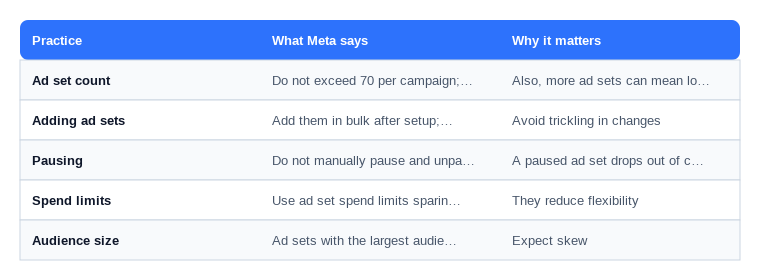
From Meta’s guidance (Best practices for Advantage+ campaign budget):
| Practice | What Meta says | Why it matters |
|---|---|---|
| Ad set count | Do not exceed 70 per campaign; beyond it, edits after publishing are limited | Also, more ad sets can mean longer learning |
| Adding ad sets | Add them in bulk after setup; a new active ad set can take about 2 hours for the budget to re-adjust | Avoid trickling in changes |
| Pausing | Do not manually pause and unpause ad sets | A paused ad set drops out of consideration |
| Spend limits | Use ad set spend limits sparingly or not at all | They reduce flexibility |
| Audience size | Ad sets with the largest audiences likely get the most budget | Expect skew |
| Low delivery | Do not pause ad sets with low delivery | Pausing today prevents finding tomorrow’s opportunities |
| Reading results | Analyse at campaign level | Ad set splits are not independent |
| Settings changes | Input changes in bulk | One by one can reset learning each time |
When should I use ad set budgets instead?
Meta says that if you have strict budget requirements for each ad set, consider ad set budgets. Typical cases: you want a fixed test budget per audience, you need different bid strategies per ad set, or you run budget schedules per ad set. Use campaign budget when you want the system to find the best use of a shared pool and you accept uneven spend.
How do I read a campaign with uneven spend?
- Look at the campaign’s cost per result and total results, not each ad set’s.
- Check whether each ad set can deliver; an ad set that is not delivering is not encountering opportunities, and Meta says it cannot receive budget.
- Compare audience sizes: a large one will draw spend.
- If one ad set takes 90% and performs, that may be fine. If it takes 90% and performs poorly, the other ad sets may have a delivery or creative problem.
- Change one thing at a time, in bulk where you must, and log the date.
For the learning-phase side of these edits see Significant edits and How do I fix learning limited on Facebook ads? if that is your problem, or How should budget pacing change as I scale?.
What mistakes do people make?
Pausing the “underperformer” after day two. Adding ad sets one at a time every morning. Setting a spend limit on every ad set “to be safe”. Judging an ad set by its own cost per result while its budget moves daily. Mixing very different audience sizes and then wondering why the big one wins. Each defeats the system’s flexibility. The Meta ads audit checklist includes a structure check that flags too many ad sets.
Can software help?
Bach.ai reviews budget and bidding and flags spend on weak ad sets and pacing issues, and proposes changes for your approval by default on a paid plan. It cannot see why Meta’s system favours one ad set, and it does not override Meta’s distribution; use it to question the structure, not to micro-manage the split. See How does AI budget allocation work on Meta and Google Ads?.
FAQ
Is uneven spend a sign something is wrong?
Not by itself. Meta says Advantage+ campaign budget may not spend equally across ad sets.
Should I cap an ad set with a spend limit?
Meta advises using spend limits sparingly or not at all, because they lock budget and reduce flexibility.
How many ad sets should I use?
Meta says not to exceed 70, and that more ad sets and ads may lengthen the learning phase. Fewer, well-differentiated ad sets are easier to read.
Can I switch from ad set budgets to campaign budget?
Yes, but treat it as a significant change and watch learning. Make the change in bulk and log the date.
Sources: Meta Business Help Center, About Advantage+ campaign budget, Best practices for Advantage+ campaign budget, Choose your budget strategy for Advantage+ campaigns, Significant edits and learning phase (checked 25 Nov 2026); Bach.ai capabilities from our features page.