What Do Advantage+ Creative AI Edits Change?
What do Advantage+ creative AI enhancements change in my ads?
They can animate images, add music, overlays, product tags, brightness changes and text variations, tailored to who sees the ad. Meta says some may be on by default and you can turn them off at any time. Check the preview of each ad in every placement before you publish.
You upload one image and a caption. The ad that people see may not be exactly that. Meta’s Advantage+ creative can adjust media and text for different viewers. That can help performance, and it can also put something on your ad you never approved. This guide lists what Meta says it changes and where the controls are.
What does Advantage+ creative do?
Meta says that with Advantage+ creative on, your images and videos are optimized into versions your audience is more likely to interact with, and the media and text you upload may be adjusted to improve performance while maintaining the core message (About Advantage+ creative). Which enhancements are available depends on ad format, placements and whether you use a catalog. Meta adds that enhancements may vary depending on who sees the ad, that some may be on by default, and that you can turn them off at any time.
Which enhancements use generative AI?
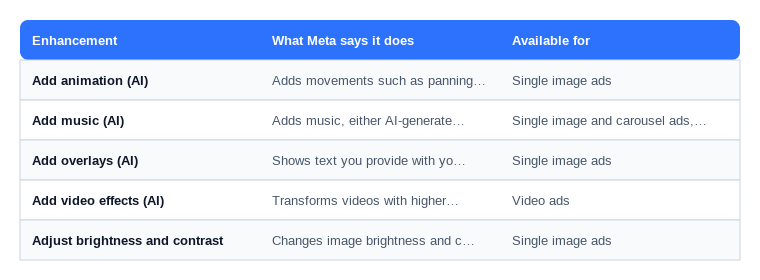
Meta labels enhancements that use or can use generative AI. Examples on its page:
| Enhancement | What Meta says it does | Available for |
|---|---|---|
| Add animation (AI) | Adds movements such as panning, zooming and rotating to turn images into short videos; text in images may be animated | Single image ads |
| Add music (AI) | Adds music, either AI-generated or from the library; automatic or manual selection | Single image and carousel ads, with AI music on Facebook Reels |
| Add overlays (AI) | Shows text you provide with your creative when it is likely to improve performance | Single image ads |
| Add video effects (AI) | Transforms videos with higher contrast and more vibrant colours | Video ads |
| Adjust brightness and contrast | Changes image brightness and contrast if it may improve performance | Single image ads |
| Add product tags | Can add tags automatically when creative matches catalog products; may be on by default for traffic and sales campaigns with an eligible catalog | Instagram Feed only |
| Dynamic overlays | Shows catalog information such as prices or discounts on the ad media | Advantage+ catalog ads on Facebook Feed |
Meta also notes that if the branding feature is on, it will try to use your brand preferences in some enhancements.
What about text?
Meta’s text guidance lists text generation, which can produce up to 5 variations of your primary text and headline from your inputs, and multiple text options, where you enter several versions and the system tests variations based on machine-learning models (Creative best practices for text in ads). Placement asset customization lets you tailor copy to Facebook, Messenger, Instagram, WhatsApp and Meta Audience Network, for example shorter copy on Stories. Meta also states that its Ad Creative Generative AI Terms apply to these features. The terms are referenced in Create an ad with text generation, which lists text generation, text improvements, background generation and expand image as covered.
How should I review and turn them off?
- In Ads Manager, open the ad and go to the creative section; look for the enhancements list.
- Read each enhancement’s description and turn off any that conflict with your brand rules, claims or legal wording.
- Check the ad preview in each placement, not only Feed. Meta says product tags show only in Instagram Feed, for example.
- If product tags were added automatically, Meta says you will see a notification and can update, remove or manually add tags.
- Save a screenshot of the approved preview with the date for your records.
- After a week, compare ads with and without enhancements in a test rather than judging by averages.
Should I disclose AI-edited creative?
That depends on what the edit is and where you advertise. Read Do I have to disclose AI-generated content in Meta ads? and check Meta’s current rules before you decide. Do not assume an automatic edit is exempt.
When is switching them off the right call?
Switch off animation, overlays or video effects when your product’s true colour matters (cosmetics, fabric), when your claims must appear in exact words, when a regulator or retailer has approved specific creative, or when you are running a clean creative test and need one variable to change at a time. For testing structure, How many creative variants should I test at once on Meta? explains why uncontrolled changes muddy results, and the Meta ads audit checklist covers creative review in an audit.
Can software help?
Bach.ai checks creative fatigue and drafts a next angle to test, and Pro includes 50 and Agency 200 creative generations a month per the pricing page. It does not control Meta’s on-platform enhancements; those are settings in Ads Manager that you review yourself.
FAQ
Are Advantage+ creative enhancements on by default?
Meta says some enhancements may be turned on by default and you can turn them off at any time, so check each ad rather than assuming.
Do the changes show in my Ads Manager preview?
Use the preview in each placement to see what is shown, and remember Meta says enhancements may vary by viewer, so a preview is a sample.
Can I use text generation without Advantage+ creative?
Meta lists text generation as a separate generative AI feature in creative text guidance, producing up to 5 variations of primary text and headline.
Do I see the same enhancements on every ad?
No. Meta says which enhancements are available depends on your ad format, placements and whether you use a catalog, so the list differs by ad.
Sources: Meta Business Help Center, About Advantage+ creative, Creative best practices for text in ads (checked 25 Nov 2026); Bach.ai capabilities from our features page and pricing.