Can AI Check My Ad Against Meta's Policies?
Can AI check my ad against Meta's policies before I submit?
AI can catch common problems such as exaggerated claims, a broken landing page or missing disclosures, using Meta's own checklist as the test. It cannot approve an ad or know every current rule. Meta's review decides, so run the checks, then handle any rejection through Business Support Home.
A rejected ad costs time, and repeated rejections can put an account at risk. AI assistants are good at reading text against a list, which makes a pre-check tempting. The question is what the check can honestly promise.
What can an AI pre-check do?
It can read your ad text, landing page copy and creative description against a written list and flag likely problems. Meta publishes a policy basics checklist that is a good test list, noting that it is not exhaustive (Advertising policy basics checklist). Items on it include: a website that works, is relevant to the ad and has no disruptive content; ads that accurately represent the product and do not include potentially misleading claims or unrealistic expectations; no images portraying non-existent functionality, such as a play button that does not play; and no sensationalised language or withholding of key information to entice a click. Meta’s guidance on improving ad quality and performance defines sensationalised language as exaggerated headlines or commanding a reaction from people.
What can it not do?
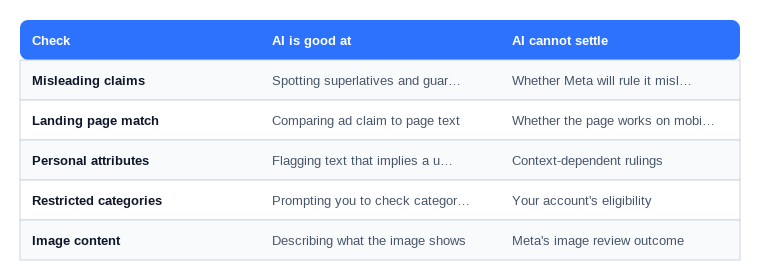
It cannot know how Meta’s review will rule, and it may not know recent policy changes. Meta says it reviews ads against its Advertising Standards, which prohibit harmful, inappropriate and other violating content, and that the checklist covers selected requirements only. An AI assistant that tells you an ad is “compliant” has made a guess. Phrase the output as “likely issues to check”, not “approved”.
| Check | AI is good at | AI cannot settle |
|---|---|---|
| Misleading claims | Spotting superlatives and guarantees | Whether Meta will rule it misleading |
| Landing page match | Comparing ad claim to page text | Whether the page works on mobile in each region |
| Personal attributes | Flagging text that implies a user trait | Context-dependent rulings |
| Restricted categories | Prompting you to check category rules | Your account’s eligibility |
| Image content | Describing what the image shows | Meta’s image review outcome |
How should I run a pre-check?
- Paste the ad text, headline and landing page copy into your assistant with the checklist items from Meta’s page.
- Ask it to list each checklist item as “possible issue”, “no issue seen” or “cannot tell”, with the exact words that triggered it.
- Fix every “possible issue”, especially claims about results, health, finance or personal traits.
- Open the landing page yourself on a phone and confirm it loads and matches the ad.
- Submit, and record the date and the version you submitted.
What happens if the ad is rejected anyway?
Meta says that when an ad is rejected you receive an email and a link to Meta Business Support Home, where you can find the reason (How to troubleshoot a rejected ad). You can edit the ad, in which case it is automatically submitted for another review, create a new ad, or request another review if you believe it was incorrectly rejected. Meta warns that if you delete the ad you may lose the ability to request another review. Do not delete a rejected ad before you decide whether to appeal.
For the whole rejected-ad flow see Why was my Facebook ad rejected for misleading claims?, and for stuck reviews Why is my Facebook ad stuck in review?.
What should the prompt ask for?
A good prompt is narrow. Ask for the checklist item, the exact words that triggered it and a suggested plain rewrite, not a general opinion. Ask it to quote the landing page sentence that supports each claim in the ad; if it cannot find one, the claim needs support or removal. Ask it to flag any statement about a person’s characteristics, health, finances or results, because those are where small wording changes cause rejections. Run the check on every variant, since a fix to the headline does not clear the description.
Then add a human pass. One person reads the live landing page, the ad and the checkout flow in sequence as a customer would. That pass catches what text-only checks miss: a pop-up that appears after three seconds, a price that differs between ad and page, a play button on a still image.
How do I keep the check honest?
Use Meta’s list, not the model’s memory, as the standard. Give the model the page, not your summary of it. Keep a log of ads it passed that were later rejected, because that log tells you where it fails. And never use an AI check to justify a claim you cannot support: Can I use customer reviews in Facebook ads? shows the standard of proof for testimonials.
Can software help?
Bach.ai audits connected ad accounts for tracking, budget and creative issues, and can draft next-angle creative; it does not pre-approve ads against Meta policy and does not claim to. For policy questions the authoritative sources are Meta’s Advertising Standards and Business Support Home. The Meta ads audit checklist includes a creative and policy review step.
FAQ
Will an AI check reduce rejections?
It can reduce obvious ones if you give it a good checklist and the real page text. Measure your own rejection rate before and after instead of assuming.
Does an overturned rejection count against my account?
Meta says a successfully overturned rejection will not count as an ad violation. It also says severe or repeated violations can lead to a restriction from advertising.
Should I let an AI write ad copy for regulated products?
Have a person who knows the rules approve it, because the AI can produce claims that read well and break policy.
What should I keep as evidence?
Keep the submitted version, the date, the rejection reason from Business Support Home and any appeal text.
Sources: Meta Business Help Center, Advertising policy basics checklist, How to troubleshoot a rejected ad (checked 25 Nov 2026); Bach.ai capabilities from our features page.