Can AI Write My Weekly Meta Ads Report?
Can AI write my weekly Meta ads report?
Yes, if you hand it a clean Ads Manager export with the date range, attribution setting and currency stated, then check every number it quotes against the table before sharing. AI summarises well but cannot know what the export left out, such as deleted campaigns or columns Meta will not export.
An AI assistant can turn a spreadsheet into a readable weekly report in a minute. The risk is not the writing. It is that the model summarises whatever you gave it, with total confidence, even when the export is missing the thing that explains the week. This guide covers how to export, what to ask for and how to check the output.
What data should I give the AI?
Give it one export per question, not the whole account. Meta’s default export from the reporting table downloads as a .csv, includes summary totals and does not include deleted campaign data (Export performance data). That last point matters: if you deleted a campaign mid-week, the spend it took is not in a default export, so the AI’s total will be lower than what Meta billed.
You can customise the export to choose the format and to include summary totals and deleted campaign data. Meta also lists columns that cannot be exported at all, among them Tags, Age, Gender, Location, Body, Destination Type and Link (URL). If your report needs age or location splits, check how breakdowns behave first.
Which breakdowns and settings should I fix before exporting?
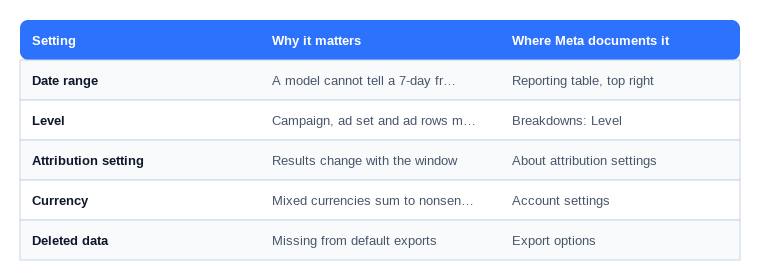
Fix these before you export, and write them on the first line of your prompt:
| Setting | Why it matters | Where Meta documents it |
|---|---|---|
| Date range | A model cannot tell a 7-day from a 28-day table | Reporting table, top right |
| Level | Campaign, ad set and ad rows must not be mixed | Breakdowns: Level |
| Attribution setting | Results change with the window | About attribution settings |
| Currency | Mixed currencies sum to nonsense | Account settings |
| Deleted data | Missing from default exports | Export options |
Meta notes that when you break down conversions, those it cannot attribute show as “Uncategorized” (breakdowns and metrics). An AI will treat that row as a real segment unless you tell it otherwise.
How do I ask the AI for the report?
Use steps, not a vague request:
- Paste the export and state date range, attribution setting, currency and level in one line.
- Ask for three outputs: what changed against last week, the three biggest movers by spend, and anything that looks like a data problem.
- Tell it to quote numbers only from the table and to say “not in the data” otherwise.
- Ask for a list of every figure it used, with the row it came from.
- Spot-check five of those figures against Ads Manager before sending.
What should I check before sending?
Three checks catch most errors. First, totals: compare the AI’s spend total to the summary row in Ads Manager for the same range. Second, attribution: Meta says results cannot be compared in the Campaign Overview table across ad sets that use different attribution models, so a figure compared across weeks with a changed model or setting is not a trend. Tell the AI which model each ad set uses. Third, the store: compare reported purchases with your own order count. Our guide on why Meta shows more purchases than Shopify explains the usual gaps.
Why should the report be weekly, not daily?
Meta says that on some accounts it may spend up to 75% over your daily budget on some days and less on others, but will not spend more than 7 times the daily budget in a week (Understand fluctuations in ad performance). It also advises looking at overall results, not narrow breakdowns such as by hour, which can show swings that average out. A daily AI summary will therefore explain noise as if it were a trend. Ask for a seven-day view, compare it with the previous seven days, and let the model flag a day only when something broke, such as a payment failure or a disapproval.
Give the model that rule in the prompt: “Do not explain single-day changes unless spend fell to zero.” It removes a whole class of confident but meaningless commentary.
Can I automate the weekly send?
Partly. Meta lets you schedule a recurring report from Ads Reporting and email it, but only for single-account reports; cross-account reports cannot be scheduled for email, and you need administrator, advertiser or analyst access to the ad account (Run a recurring report). That gives you the data on a timer. The AI step, reading the file and drafting commentary, stays manual unless you build it.
If you report to clients, How do I report Meta ads results to clients? covers structure, and the Meta ads audit checklist lists what a baseline should hold.
Can software help?
Bach.ai answers questions about your account from synced data with the math shown, so the source of each figure is visible, and ranks audit findings by estimated recoverable spend in your own currency. Those figures are estimates, not promised savings, and a missing or stale input can leave a finding inconclusive. If a one-page weekly summary is all you need, an export and the steps above are enough.
FAQ
Is it safe to paste ad data into an AI assistant?
Exports contain spend and performance, not customer details, but they may name products and campaigns you consider private. Check your company policy and the assistant’s data settings before pasting, and strip anything you would not share.
Why does the AI total differ from Ads Manager?
Common causes are deleted campaign data excluded from the export, a different date range, a different attribution setting, or rows you filtered out. Re-export with summary totals included and compare again.
How often should I run the report?
Weekly suits most accounts, because daily numbers swing with small conversion counts. Match the cadence to how often you actually make decisions.
Can the AI explain why results changed?
It can propose reasons, but treat them as hypotheses. Meta’s fluctuation guidance (linked above) is the place to start; test each reason against your own data.
Sources: Meta Business Help Center, Export performance data, Run a recurring report, About breakdowns, metrics and filtering, About attribution settings, Understand fluctuations in ad performance (checked 25 Nov 2026); Bach.ai capabilities from our features page.