What AI Max for Shopping Campaigns Changes
What is AI Max for Shopping and should a store use it?
AI Max for Shopping is a beta suite for Shopping campaigns with two settings: text customization, which rewrites product titles to match queries, and final URL expansion, which adds feed-powered text ads and dynamic landing pages. Final URL expansion requires text customization. Google reports about 5 percent more conversions at similar CPA on average. Test it with an experiment.
Shopping campaigns have always run on your feed as it is. AI Max for Shopping, in beta, lets Google rewrite parts of what shoppers see and widen where they land. For a store it can mean more long-tail coverage and less feed maintenance, and also less control over what appears under your name. This guide follows Google’s help pages, read on 25 November 2026, and is cautious because the feature is a beta.
What is AI Max for Shopping?
Google calls it a beta suite of features that uses Google AI to optimise your Shopping campaigns and connect ads with shoppers making complex, conversational searches, bridging the gap between static ad formats and how people search today. Its stated benefits: more relevant creative, wider reach for long-tail searches that Shopping campaigns miss, and a one-click toggle with insights to monitor results. Google reports that advertisers who activate it will typically see about 5% more conversions or conversion value at a similar CPA or ROAS on average, citing its own 2026 internal data for retail advertisers. That is a vendor average, not a promise.
What are the two main settings?
| Setting | What it does |
|---|---|
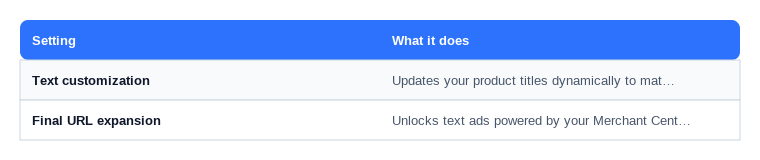
| Text customization | Updates your product titles dynamically to match shopper queries and intent, using your Merchant Center feed content; helps Shopping ads serve on new AI-driven surfaces such as AI Overview |
| Final URL expansion | Unlocks text ads powered by your Merchant Center feed and dynamic landing pages for research-based searches |
You can use both or text customization only, because Google says final URL expansion requires text customization so ad copy matches the landing page. Other settings you can combine include brand settings, URL exclusions and text guidelines. Text customization is currently limited to English feeds.
What safeguards does Google describe?
Google says generated titles use extractive techniques from your feed and website content plus generative AI, and pass guardrails: titles are checked to be grounded in your actual product offerings; customised titles serve only if predicted to perform better than your uploaded title, otherwise your original serves; and quality filters check formatting. It says the feature aims to reduce manual feed maintenance. For your own feed standards see how to write Google Shopping titles, since your uploaded title is the baseline.
What does final URL expansion do?
On Search, Google says Final URL expansion sends traffic to URLs on your domain that are query relevant and themed to your ad group, and you can exclude URLs. The Shopping version unlocks dynamic landing pages from your site. Landing pages chosen by Google show as Automatically selected in the landing pages report, so check them; use URL exclusions for pages you do not want, such as policies or out-of-stock pages.
How do I monitor it?
Google says to wait at least 2 weeks after enabling before making changes, such as adding text guidelines, so the system can learn. Then use the reports:
- Asset report, Expanded final URL assets tab: assets and URL combinations served, including titles created by text customization; remove unfavourable ones.
- Landing pages report: URLs served, with Automatically selected for expanded ones; set URL exclusions.
- Search terms report: the queries matched.
- Product titles report: how titles changed.
How should a store test it?
Do not switch it on everywhere. Run an experiment on one campaign or a duplicate, keep conversion tracking and margin clean, and judge by profit, not conversions; see how to run a Google Ads experiment, track profit instead of revenue and Google AI Max for Search. Check Shopping policies and keep text guidelines in mind: how to control the text Google AI writes.
What should I check before turning it on?
- Audit your feed first. Text customization starts from your uploaded titles, so a weak title gives the system poor raw material; fix titles and missing attributes before testing.
- Check that your product pages state price, availability and shipping clearly, because expanded landing pages will send shoppers there.
- Set URL exclusions for pages you never want shown, such as policy pages, gift cards or out-of-stock items.
- Record a baseline: conversion value, cost per conversion and top search terms for the four weeks before.
- Decide in advance what result counts as a win, for example profit per order at or above the baseline, so a rise in conversions at a lower margin is not mistaken for success.
Where does Bach.ai fit?
Bach.ai is our product. It audits connected Google Ads accounts and, with your store connected, compares ad-reported revenue with real orders so an AI-driven change can be judged on real sales. On an active paid plan any supported change waits for your approval, by default.
FAQ
Is it available to everyone?
Google calls it a beta suite. Availability may vary, so check your account.
Can I use final URL expansion alone?
No. Google says final URL expansion requires text customization to be turned on.
What if the generated title is worse?
Google says customised titles serve only when predicted to perform better than your original; otherwise your title serves. You can also remove assets in the asset report.
Does it work for non-English feeds?
Google says text customization is currently limited to English feeds.
Sources
Sources, each opened and read on 25 Nov 2026: Google Help pages, About AI Max for Shopping campaigns (beta); About reporting in AI Max for Shopping campaigns; About Final URL expansion in Search. Menu names and limits change, so check the page before you act.