Meta Automated Rules or an AI Agent: Which to Use?
Should I use Meta automated rules or an AI agent?
Use automated rules for fixed, one-sentence checks such as pausing an ad set when cost per purchase passes a number. Use an AI agent when the decision needs judgment across many ads. In both cases, limit what the tool may change and keep your approval on anything that raises spend.
The two tools solve different problems. A rule is a sentence you wrote in advance: if this number crosses that line, do this. An agent reads the account, decides what matters and proposes or makes changes. This post sets out what Meta documents for each, so you can decide where the line falls for your account.
What do Meta’s automated rules actually do?
Meta describes automated rules as checks that run on your campaigns, ad sets and ads and then update them or notify you (About automated rules). Each rule has three parts: the criteria that trigger it, the action it takes, and the active campaigns, ad sets or ads it covers. Rules apply at the ad account level, so they work whoever in your team makes the ads.
The available actions are turning objects off or on, sending a notification only, adjusting a daily or lifetime budget, adjusting a manual bid, and scaling a budget or bid (About actions for automated rules). You can stack conditions: Meta’s example pauses an ad set when cost per purchase is above $10 and purchases are above 500 (Set multiple conditions).
What does an AI agent add?
Meta’s ads AI connectors let a conversational agent connect to your ad account to pull reporting, create and edit ads, ad sets and campaigns, manage custom audiences and catalogs, read signal health and view activity logs (Meta ads AI connectors). Meta states that any action taken on your behalf requires your authorization through the AI agent, and that draft mode saves new campaign work for review before publishing.
That is a wider reach than a rule has, which is the point and the risk. A rule can only do what its action list allows. An agent can do whatever its permissions allow.
How do the two compare?
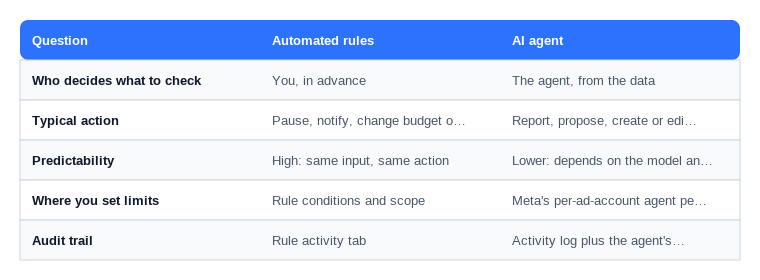
| Question | Automated rules | AI agent |
|---|---|---|
| Who decides what to check | You, in advance | The agent, from the data |
| Typical action | Pause, notify, change budget or manual bid | Report, propose, create or edit, within permissions |
| Predictability | High: same input, same action | Lower: depends on the model and the data |
| Where you set limits | Rule conditions and scope | Meta’s per-ad-account agent permissions |
| Audit trail | Rule activity tab | Activity log plus the agent’s own record |
| Cost to start | Built into Ads Manager | Depends on the tool |
Where do rules fail?
They fail quietly when the condition is a poor proxy. A rule that pauses an ad set at a high cost per result will also pause one that is still in its learning phase. Meta lists changes that count as significant edits and send an ad set back into learning: targeting, creative, optimization event, a new ad, a bid strategy change, or a pause of seven days or more (Significant edits). Budget changes may or may not be significant depending on size; Meta’s example is that going from $100 to $101 is not likely to trigger learning again.
Two practical consequences follow:
- Do not write a rule that changes budget by large steps. A big step can itself be the edit that resets learning.
- Do not write a rule that turns ads back on after a pause of seven days or more without expecting a new learning period.
Where do agents fail?
An agent can act on a wrong reading of the data. Meta tells you where to cap that risk: if you have full control of a business portfolio you can set which actions agents may take on each ad account, such as editing budgets or creating campaigns, and Meta’s MCP server enforces those rules (Meta ads AI connectors). If you share an ad account with a partner, they can set rules that apply to their own employees.
How should I choose?
Follow these steps:
- Write down every check you do each week. Mark the ones you can state as “if X then Y”.
- Build those as rules, starting with notify-only actions. Read the Activity tab for a week before you let a rule turn anything off (Manage automated rules).
- Leave the rest, the checks that need judgment, for an agent or a person.
- Set agent permissions to the narrowest set that does the job. Block campaign creation if you only want reports.
- Review results at a fixed cadence and keep a dated note of what changed.
Can software help?
Bach.ai is our product, so weigh this accordingly. It runs an audit on a connected Meta or Google Ads account and ranks each finding by estimated recoverable spend, and by default it applies a supported change only after you approve it. Auto-Pilot is off unless you switch it on for chosen action types. It is the wrong choice if what you need is a single fixed rule, because Ads Manager already does that for free. For the wider tool landscape see best Meta ads tools, and for guardrails see How do I build an approval workflow for AI ad changes? and How do I design a safe ad automation workflow?.
FAQ
Are Meta’s automated rules free?
Meta presents automated rules as a feature of Ads Manager and does not describe a separate charge for them in its documentation. The ad spend they act on is billed as usual. Check your own account for what is available.
Can an automated rule scale a winning ad set?
Yes, within the actions Meta lists: adjust budget, adjust manual bid, or scale budget or bid. Keep steps small, because Meta says budget changes can be significant edits depending on their size.
Can I stop an AI agent from creating campaigns?
If you have full control of the business portfolio, Meta lets you block specific actions per ad account, such as creating campaigns, and the MCP server denies those requests.
Should I run rules and an agent together?
You can, but give them different jobs. Let rules handle fixed guard checks and the agent handle analysis, then compare the rule Activity tab with the agent’s log each week so they do not act on the same ad set.
Sources: Meta Business Help Center, About automated rules, About actions for automated rules, Set multiple conditions, Manage automated rules, Significant edits and learning phase, Manage ads from an AI agent with Meta ads AI connectors (all checked 25 Nov 2026); Bach.ai capabilities from our features page.