Can an Agency Use Claude for Read-Only Ad Reporting?
Can an agency use Claude for read-only ad reporting?
Yes, with a read-only connection scoped to one brand. Meta's own ads connectors can create and edit unless you block those actions per ad account, so restrict them first. Bach.ai's connector is read-only, scoped to the brand you authorise, cannot execute changes and today accepts Claude as the client.
An agency that handles thirty accounts wants an assistant that can answer “how did spend and ROAS move last week?” for any of them without anyone opening Ads Manager. The risk is giving that assistant write access. This guide sets out how to get reading without writing.
What can Meta’s connector do?
Meta says its ads AI connectors, enabled by an ads model context protocol server and a command line interface, securely connect a conversational AI agent to your ad account. The agent can pull reporting, create and edit ads, ad sets and campaigns, manage custom audiences and catalogs, read signal health, run A/B tests and conversion lift studies, search help articles and see activity logs; any action taken on your behalf requires your authorisation through the agent, and draft mode saves new campaign work for review (Manage ads from an AI agent). Meta also documents the developer tools for ad creation and management (Ad creation and management tools).
The key point for an agency: the connector can write as well as read. Reading only is something you configure.
How do I make it read-only?
Meta says that if you have full control of a business portfolio, you can manage rules for what AI agents may do on each ad account, such as editing budgets, creating campaigns or editing catalogs, and the MCP server enforces them. Steps, per Meta’s page:
- In Settings in Meta Business Suite, under Integrations, select Ads MCP server.
- Select the ad account or catalog.
- Allow or block specific actions, for example switch Create campaigns from Allowed to Blocked.
- Check that Limited shows beside Take actions in this ad account.
Meta adds that when you give a partner access to your ad account, they can also set rules for the agents of their own employees. As a partner, set yours to block every write action before you connect anything. Do it before the first connection, not after. What permissions should an AI agent have on my ad account? lists the full set.
What does Bach.ai’s connector do?
Bach.ai describes its AI assistant connector as read-only and scoped to the brand you authorise; it cannot execute campaign changes, and today it accepts Claude (claude.ai and the Claude apps) as the client. Availability and the connector URL are shown in Settings, AI assistant connector. See How do I connect Claude or ChatGPT to my Meta ads read-only? for the setup path and the connector guide for details.
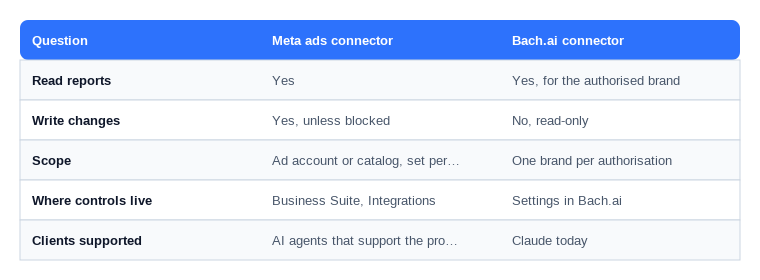
| Question | Meta ads connector | Bach.ai connector |
|---|---|---|
| Read reports | Yes | Yes, for the authorised brand |
| Write changes | Yes, unless blocked | No, read-only |
| Scope | Ad account or catalog, set per account | One brand per authorisation |
| Where controls live | Business Suite, Integrations | Settings in Bach.ai |
| Clients supported | AI agents that support the protocol | Claude today |
What should I tell the client?
Before you connect a client account, tell them in writing which assistant you use, that it is read-only, which data it can see and where that data goes. Check your contract and the client’s data policy; client performance data may be confidential. Keep a log of which accounts are connected and when access ended. If a client refuses, do not connect it.
What should I ask the assistant?
Ask for summaries and comparisons, not actions: spend and ROAS by campaign for the last seven days, the biggest movers, anything that looks like a data problem. Ask it to name the figure’s source and date range, and compare tools in best Meta ads tools. Check three numbers against Ads Manager every time, as in Can AI write my weekly Meta ads report?. Do not ask it to pause or change anything; do that yourself, with the change log in How do I prove what I changed in a client’s ad account?.
What are the risks of read-only access?
Read-only does not mean risk-free. The assistant sees performance data, campaign names and sometimes audience or product details, which may be confidential. It can also summarise wrongly and sound sure. Three controls help. First, scope: one brand per authorisation, never a whole portfolio, so a question about one client cannot pull another’s data. Second, verification: check three figures against Ads Manager each time before you send anything to a client. Third, retention: know where the assistant keeps the conversation and delete what you no longer need.
Also separate who may connect. A junior team member should not be able to connect an assistant to every client account. Keep a list of connected accounts, who connected them and when, and review it with your access review each quarter, using your normal access review. When a client leaves, disconnect the brand on the same day you remove partner access, as in How do I offboard a client from Meta ads?.
Can software help?
Bach.ai is the product behind the connector described here, so weigh this section accordingly. Its read-only connector answers questions from synced data with the math shown, estimates are not guaranteed savings, and availability depends on your plan; check the pricing page first. It is the wrong tool if your assistant must be something other than Claude today, or if you need the assistant to make changes.
FAQ
Can the assistant change my budgets?
Through Meta’s connector it can if the action is allowed. Through Bach.ai’s connector it cannot, because that connector is read-only.
Can I connect ChatGPT?
Bach.ai says today the connector accepts Claude as the client. Meta’s own connectors are for AI agents that support its protocol; check each agent’s documentation.
Who can set the Meta rules?
Meta says people with full control of the business portfolio, and partners for their own employees’ agents.
Is the data safe?
Meta describes secure connections, but your obligations come from your contract and the client’s policy. Ask before you connect.
Sources: Meta Business Help Center, Manage ads from an AI agent with Meta ads AI connectors; Meta for Developers, Ad creation and management tools (checked 25 Nov 2026); Bach.ai connector facts from our features page and connector guide.