What Is Google AI Max for Search?
What is Google AI Max for Search?
AI Max for Search is a Google feature set that uses AI for search term matching and asset optimization, including Final URL expansion and text customization. Test it with an AI Max experiment, which splits traffic inside one campaign into control and trial, and wait at least two weeks before making changes.
Google is steering Search advertisers toward AI Max, and it has already set a date for older Dynamic Search Ads. Before you switch a campaign on, you need to know what it changes on your landing pages and ad text, and how to test it without gambling the whole campaign.
What does AI Max for Search do?
Google describes AI Max for Search as a set of AI tools to reach more customers in real time, with two main features: search term matching and asset optimization (About AI Max experiments). Within asset optimization sit two settings you should understand before you opt in: text customization, which was formerly called automatically created assets, and Final URL expansion.
Final URL expansion is an opt-in, campaign-level setting available through AI Max. Google says it sends traffic to the most relevant URLs on your domain when that is likely to give better performance, and only to URLs that are query relevant and themed to your ad group. It is turned on by default when you opt in to AI Max, and you can switch it off during setup or in campaign settings (About Final URL expansion). You can exclude URLs, and apply URL inclusions.
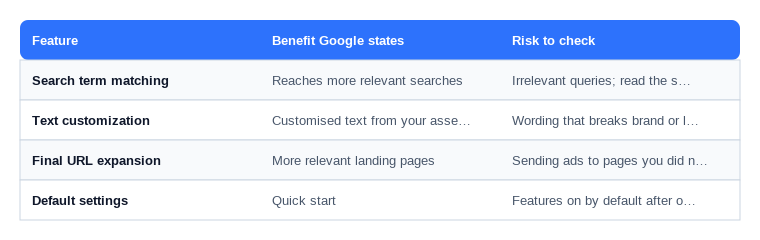
What should I worry about?
| Feature | Benefit Google states | Risk to check |
|---|---|---|
| Search term matching | Reaches more relevant searches | Irrelevant queries; read the search terms report |
| Text customization | Customised text from your assets | Wording that breaks brand or legal rules |
| Final URL expansion | More relevant landing pages | Sending ads to pages you did not intend |
| Default settings | Quick start | Features on by default after opt-in |
Google says you can regularly review and optimise text customization, easily removing anything that does not align with your brand (About reporting in AI Max for Search). Treat that as a standing weekly task, not a one-off.
How do I test it?
Google’s AI Max experiments run a test inside an existing campaign. They divert traffic and budget within the campaign instead of copying it: the control is the share of the campaign with the AI Max toggle off, and the trial is the remaining share with it on. Google lists these benefits: faster results, minimal setup errors because both arms are updated in the same campaign, and a shorter learning period (About AI Max experiments). After completing the test you choose whether to apply it, which turns on AI Max for the campaign. The steps:
- In Google Ads, open Experiments under Campaigns.
- Click the plus button and choose Campaign features and settings.
- Select AI Max for Search campaigns and continue.
- Select the campaigns to include.
- Configure arms, dates, name and auto-apply settings; for a single campaign you can set granular controls such as text customization and Final URL expansion.
- Run it for the planned period without editing the campaign.
- Compare control and trial on conversions and cost per conversion, then decide.
What should I do after turning it on?
Google advises waiting at least 2 weeks after enabling AI Max for a new or existing Search campaign before making changes, such as adding negative keywords, to let the system learn. After that, use the reports Google lists for AI Max: the search terms report, the keyword report, the asset report and the landing pages report. The match type column in the search terms report can show AI Max as a match type, and Google notes a filter for it may show lower numbers because it does not consider other search terms. Our guide How do I read Google Ads search terms and add negatives? shows how to act on that report.
What about Dynamic Search Ads?
Google’s AI Max reporting page states that, starting in February 2027, campaigns using Dynamic Search Ads will be automatically upgraded to AI Max. If you rely on DSA, plan a test now so you decide the terms of the switch, not Google’s schedule. The date is Google’s statement as fetched on 25 November 2026; check it before you plan.
How does this fit with other automation?
AI Max is one of several AI features. Auto-applied recommendations are another; see Should I turn on Google Ads auto-apply recommendations?. The rule that applies to both is the same: change one thing at a time, keep a written baseline and a rollback plan. The Meta ads audit checklist works as a template for a Google audit before and after the test.
Can software help?
Bach.ai reviews connected Google Ads accounts and ranks findings by estimated recoverable spend; on a paid plan it applies a supported Google Ads change only after your approval by default. It does not run Google’s AI Max experiment for you, and it does not claim to predict what AI Max will do on your account.
FAQ
Is AI Max the same as Performance Max?
No. Google lists AI Max for Search campaigns and Performance Max as separate campaign types in its help navigation.
Can I turn off Final URL expansion?
Yes. Google says to uncheck it during setup or in campaign settings.
How long should an AI Max experiment run?
Google’s page I fetched gives no fixed length; run it long enough for both arms to collect conversions, and do not edit during the test.
Does AI Max replace negative keywords?
No. Google advises waiting 2 weeks before adding negatives, not avoiding them.
Sources: Google Ads Help, About AI Max experiments, About Final URL expansion in Search, About reporting in AI Max for Search campaigns (checked 25 Nov 2026); Bach.ai capabilities from our features page.