How to Automate Google Ads Campaign Setup Safely
How do I automate Google Ads campaign setup safely?
Pick the lightest method that fits your skills: bulk-upload spreadsheets, Google Ads Editor, scripts or the API. Build in draft, set each item's status explicitly because Google enables a new item by default when status is blank, review the proposed changes, then post. An AI agent can propose the same changes, but you should approve them first.
Automating campaign setup means building campaigns from a template instead of clicking through the interface each time. It saves hours when you launch many campaigns, and it creates one new risk: a template mistake repeats at scale, and unlike a single bad campaign it can start spending in a hundred places at once. This post compares the five main routes using Google’s own documentation, read on 24 November 2026.
What are the ways to automate Google Ads campaign setup?
The right route depends on how many campaigns you launch and who builds them. All limits below are from Google’s pages.
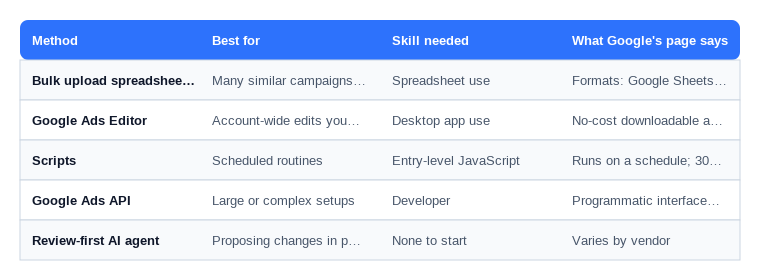
| Method | Best for | Skill needed | What Google’s page says | Safety control |
|---|---|---|---|---|
| Bulk upload spreadsheets | Many similar campaigns, keywords, budgets | Spreadsheet use | Formats: Google Sheets, .xls, .xlsx, .tsv, .csv; 50MB or less; 1 million rows or less; uploads time out after 2 hours | Status column set explicitly |
| Google Ads Editor | Account-wide edits you want to review first | Desktop app use | No-cost downloadable app; works offline; edits are viewable in draft before posting | Draft, then post; export for colleagues to review |
| Scripts | Scheduled routines | Entry-level JavaScript | Runs on a schedule; 30-minute maximum execution time for a single account script | Preview and logging in your code |
| Google Ads API | Large or complex setups | Developer | Programmatic interface for large or complex setups | Your own review step |
| Review-first AI agent | Proposing changes in plain language | None to start | Varies by vendor | Approval per change |
How do bulk uploads and templates work?
Google publishes a Templates page with ready examples for the most common bulk uploads, including creating new campaigns, editing campaign budget amounts, adding keywords and pausing or enabling campaigns. You download a template, fill in the rows, and upload the file.
Two details matter for safety. First, Google says that if you do not specify the status column of a new item, the item is enabled by default, so a blank status can launch a campaign you meant to review. Second, Google says you cannot edit the keyword or match type of an existing keyword by upload: the old keyword is removed and a new one created, which resets its history.
What does Google Ads Editor add?
Google describes Google Ads Editor as a no-cost, downloadable application that lets you work offline and make bulk changes. It lets you search and replace text, move items across campaigns and undo or redo, and see your edits in draft before posting them to your campaigns. You can also export and import files so colleagues can review and propose changes.
Its import flow is built for review: after you import a CSV, Editor lists errors and warnings, then you select Review imported changes, and Google says you can still revert the import later. That draft step is the main reason to prefer Editor over a raw upload when a mistake would be expensive.
When should I use scripts or the API?
Use scripts when you want a routine to run on its own. Google says scripts use JavaScript in a browser-based tool, can manage campaigns, ad groups, keywords and ads, can adjust bids, budgets and status, and can run on a schedule from hourly to monthly. Only entry-level JavaScript familiarity is needed, and a single account script has a 30-minute maximum execution time.
Use the API when setup is large or driven by your own systems. Google describes it as a programmatic interface suited to large or complex setups, and recommends it for developers comfortable with that work. With either, you carry the review step yourself: build your own preview, dry-run and log.
Can an AI agent set up Google Ads campaigns safely?
It can, if it works draft-first and you approve each change. Opteo’s page says its Agent can make almost any change, “from targets and budgets to entire campaigns”, and that you review each one, then decide whether to push it live. Bach.ai connects to Google Ads from Starter, proposes supported fixes and applies them, by default, only after you approve (Auto-Pilot is opt-in), with every change logged; check its feature list before assuming it builds a campaign from scratch, because it is built to audit and fix an existing account.
Whichever you use, ask the vendor three things: whether new campaigns start paused, what it can change without you, and where the change log lives.
What is a safe step-by-step setup routine?
- Write the campaign brief first: goal, budget, locations, conversion action and the one thing you will check to call it a success.
- Build one campaign by hand and keep it as the reference every template must match.
- Fill the template, setting the status column explicitly on every new row rather than leaving it blank.
- Import into Google Ads Editor, or your tool’s draft mode, and select Review imported changes before posting.
- Post a small batch first, such as one campaign of ten, and confirm tracking records a test conversion.
- Open Change History in Google Ads after each batch and check that only the intended items changed.
- Scale the batch size only after two clean runs.
If the first campaign then fails to spend, our fixes are in Why is my Google Ads campaign not spending its budget?. For the broader choice between manual and automated management, see alternatives to managing Google Ads manually, and for the tools around it, the best Meta ads tools.
FAQ
Does Google Ads have a built-in way to bulk create campaigns?
Yes. Bulk uploads let you create campaigns from spreadsheets in Google Sheets, .xls, .xlsx, .tsv or .csv format, using templates Google publishes. Google Ads Editor is the other built-in route and adds a draft review before you post.
Will an automated setup start spending immediately?
It can. Google says a new item without a status value is enabled by default. Set the status explicitly in the file, or use a draft step such as Google Ads Editor’s review, so nothing goes live before you have checked it.
Do I need to know how to code to automate Google Ads?
No. Spreadsheets and Google Ads Editor need no code. Google says scripts need only entry-level JavaScript familiarity, and the API is aimed at developers. Start with spreadsheets and move to scripts when a routine needs to run on a schedule.
Can I undo an automated campaign setup?
Partly. Google says you can revert an import in Google Ads Editor, and Change History lists what was applied. A campaign that has already spent cannot get that money back, so test with a small batch first and keep daily budgets low until results are verified.
Sources
Sources, checked 24 Nov 2026: Google Ads Help, Format spreadsheets for bulk uploads, Templates and examples for bulk upload, Import a CSV file in Google Ads Editor; Google Ads Editor; Google for Developers, Google Ads scripts, Google Ads API; vendor page: Opteo; Bach.ai access rules from our pricing page.