Google Ads Account Hacked? What to Do Next
What should I do if my Google Ads account is compromised?
Report it to Google as soon as possible with timestamps from Change history, unauthorised manager account IDs, budget or rule changes and your IP address, then follow the guided recovery. Google suspends the account, pauses only campaigns the intruder touched, removes unauthorised users and sends a change log for admins to approve.
Few things hurt a store as fast as someone else spending its ad budget. Google has a defined process for compromised accounts, and its results depend on how quickly you report and how good your evidence is. This guide follows Google’s help pages, read on 25 November 2026, and assumes you still control at least your email.
What does Google do if it thinks the account is compromised?
Google says that if it believes your account has been compromised for any reason, the Google Ads account will be temporarily suspended to stop ads serving, and your Google account may also be disabled to minimise damage, in which case products tied to it, such as YouTube or Gmail, are unavailable until resolved. Recovery is guided.
What should I do first?
Report the compromised account to Google as soon as possible. Google asks you to summarise the timeline of unauthorised changes and the login credentials you think are compromised. If you can still sign in, open Change history to find changes you do not recognise; see how to read Change history. Gather before reporting:
- Timestamps from Change history showing unauthorised access, such as new users.
- Manager account IDs that you did not link.
- Evidence of budget increases or automated rules that deviate from normal management.
- Your current IP address for verification.
What happens during recovery?
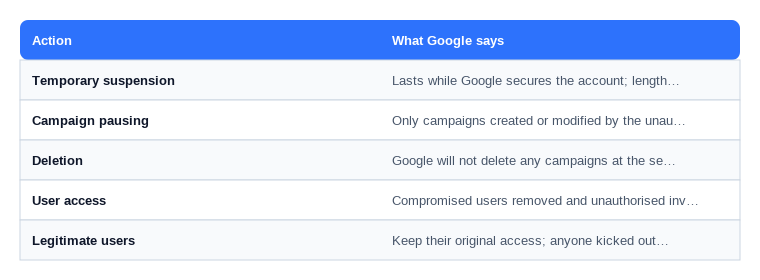
You answer questions to confirm the account is yours. If unauthorised activity is confirmed, Google secures the account with these automatic actions:
| Action | What Google says |
|---|---|
| Temporary suspension | Lasts while Google secures the account; length varies |
| Campaign pausing | Only campaigns created or modified by the unauthorised user; others keep running |
| Deletion | Google will not delete any campaigns at the secure stage |
| User access | Compromised users removed and unauthorised invitations deleted |
| Legitimate users | Keep their original access; anyone kicked out receives a new invitation |
| Account linking | Unauthorised manager accounts unlinked; new sub-accounts created without permission get spending limits set to zero |
What is the change log review?
After the account is secured Google generates a detailed account activity change log of all modifications during the event and emails it for your cleanup decision. Only users who held an Admin role before the confirmed compromised date can approve change log requests, and the administrators able to review vary with where the unauthorised access occurred. Google’s activity log lists the activity, the associated user (blank if a system process or Google security protocol acted), the security action taken, time and cleanup status.
What about the money?
Google’s page has a section on requesting reimbursement. Keep invoices, the change log and your report as evidence, check your card statements, and contact your card issuer if charges appear after the incident. Review your bank statements, as Google’s best-practice page advises when you suspect billing exposure.
How do I reinforce security afterwards?
Turn on 2-Step Verification, set up passkeys, remove inactive users and move to individual logins; see how to secure your Google Ads account. Check recovery options: Google has a page on enabling account recovery options and using them if you cannot sign in. Review tracking templates, conversion actions and linked accounts for changes that survive the cleanup, and compare against auto-tagging and tracking template settings.
How can I prepare before it happens?
Treat it like a fire drill. Keep a one-page runbook with the account ID, the owner’s email, the second administrator, the support contact route and where the payment method details sit. Make sure two people can approve a change log, since Google says only users with Admin role before the compromise date can. Keep recovery phone numbers and emails current, and test sign-in from a second device. Set billing alerts with your bank so unusual spending triggers a message within hours. Export a monthly snapshot of campaigns, budgets, users and linked accounts, so after an incident you can compare quickly. And rehearse who tells whom: the owner, the agency, the card issuer. A drill that takes an hour can save days when something goes wrong.
What should I check after the account is restored?
Review billing: the payment profile, recent charges and any new payment methods. Review users, manager links and invitations. Check conversion actions and tracking templates for changes, since a hijacker can redirect clicks or measurement. Check for new ad assets, URLs or campaigns that point to domains you do not own, and review automated rules and scripts. Compare budgets with your records. Re-enable paused campaigns only after you have confirmed each one is yours and compliant. Then note the lessons in your runbook: how it started, how long it took to notice and what would have caught it sooner.
Where does Bach.ai fit?
Bach.ai is our product. On an active paid plan any change it applies waits for your approval, by default, and is logged, which makes unexpected changes easier to spot. It is not a security product and cannot recover a compromised account.
FAQ
Will Google delete my campaigns?
Google says it will not delete any campaigns during the secure stage and pauses only campaigns created or modified by the unauthorised user.
Who can approve the cleanup?
Only users who held an Admin role before the confirmed compromised date, per Google’s page.
Can I keep running ads meanwhile?
The account is temporarily suspended while Google secures it. Untouched campaigns resume as normal once it is restored, per Google’s description.
What if I cannot sign in?
Use Google’s account recovery options, set up in advance if possible.
Sources
Sources, each opened and read on 25 Nov 2026: Google Help pages, What to do if your account is compromised; Secure your Google Ads account: Best Practices; About account activity change logs. Menu names and limits change, so check the page before you act.