How to Set Up Enhanced Conversions on Shopify
How do I set up enhanced conversions for a Shopify store?
In Google Ads, go to Goals, Settings, expand Enhanced conversions, turn it on and accept the customer data terms. Select Google tag as the method, enter your store domain and choose automatic detection, CSS selectors or a code snippet. Then validate the setup and expect impact results after about 30 days.
Enhanced conversions let your Google Ads purchase tag pass a hashed email address, and optionally a phone number or address, so Google can match more conversions to the ads that earned them. For a Shopify store the practical value is simple: fewer purchases go unattributed when cookies are missing, and bidding learns from a more complete signal. This guide follows Google’s setup steps and flags the points where a Shopify store usually needs a developer or a closer look.
If your conversion count has recently fallen, rule out basic tag problems first with why Google Ads conversions dropped. Enhanced conversions supplement a working conversion tag; they do not repair a broken one.
What do enhanced conversions actually send?
Google says the feature supplements your existing conversion by sending hashed first-party conversion data, such as email addresses, from your website tags to Google. The data is hashed with SHA256, a one-way algorithm, before sending, and is then matched with signed-in Google accounts to attribute conversions to ad events such as clicks or views (About enhanced conversions).
Two limits to know before you start. Conversions measured by importing Google Analytics goals are not supported for enhanced conversions; Google suggests creating a new Google Ads conversion action with the Google tag or Tag Manager. And collection will not begin until you accept the terms of service in Google Ads or Analytics, and where applicable the consent parameters are set to granted.
What do you need before you start?
- A working Google Ads purchase conversion action, with the exact URL where it fires, usually the order confirmation page, and its trigger.
- Someone who can make small code changes on your store, if you choose the snippet method.
- Confirmation that you can comply with the enhanced conversion customer data policies in Google Ads.
- Customer data available at the moment the tag fires. Google notes the fields must be present on the conversion page where the event snippet fires.
How do you turn it on?
- In Google Ads, open Goals, then Settings.
- Expand the Enhanced conversions section and check “Turn on enhanced conversions”.
- Review and agree to the customer data terms, which also confirms the Google Ads Data Processing Terms apply.
- Choose Google tag as the method for setting up and managing user-provided data.
- Enter your store’s website domain and select Check URL.
- If you see a message that your tag will collect user-provided data from your website, select Save. Otherwise select Tag details to choose a method.
Google states that if you send enhanced conversions data in a way that differs from the method you selected, it may not be processed. For instance, choosing Google tag and then sending through the Google Ads API means the API data will not be processed (Set up enhanced conversions for web).
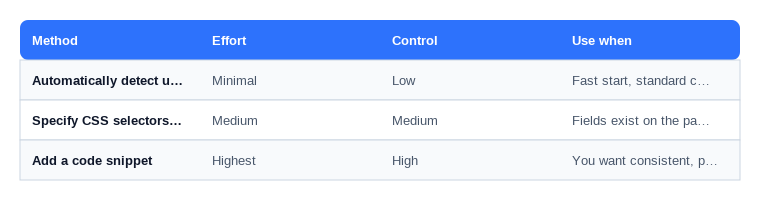
Which collection method should a Shopify store use?
| Method | Effort | Control | Use when |
|---|---|---|---|
| Automatically detect user-provided data | Minimal | Low | Fast start, standard checkout fields |
| Specify CSS selectors or JavaScript variables | Medium | Medium | Fields exist on the page but are not detected |
| Add a code snippet | Highest | High | You want consistent, properly formatted data |
Google says automatic detection works for most advertisers and that you can combine methods, for example automatic detection everywhere plus a snippet for a specific event; snippet data is always prioritized. It also notes that some content management systems offer this configuration directly in their own interface, so check whether your Shopify setup already exposes it before writing code.
How should the customer data be formatted?
If you send unhashed data, Google normalizes and hashes it for you. If you hash it yourself, Google specifies:
- Provide at least an email address (preferred), or a full address with first name, last name, postal code and country.
- Trim leading and trailing whitespace and convert text to lowercase.
- Format phone numbers to E.164, with a plus sign and country code and no dashes, brackets or spaces.
- For Gmail and Googlemail addresses, remove periods before the domain.
- Hash with hex SHA256, and pass every value as a string.
How do you validate it?
After you save, validate the implementation in Google Ads so you know the hashed fields arrive. Google says about 30 days after a successful implementation you can see the impact in your conversion action table. Do not judge it earlier, and do not compare it to the week before without allowing for conversion delay.
What can go wrong on Shopify?
- Fields missing on the confirmation page. Automatic detection needs the email to be present where the tag fires; check the page the customer lands on after paying.
- Duplicate or competing tags. If a Shopify app and a manual tag both fire a purchase conversion, counts can double. Audit which one is live before you add enhanced data.
- Consent. If Consent Mode is on, the ads cookie follows the ad_storage consent status, so conversions from visitors who decline will not carry the data.
- Expecting extra revenue. Enhanced conversions improve measurement of existing sales. They do not create orders.
After setup, compare Google’s count with Shopify orders again; why Shopify and Google Ads conversion counts differ explains what should and should not move.
Where does Bach.ai fit?
Bach.ai reads Google Ads and, from Starter, a read-only Shopify connection, so after you enable enhanced conversions it can compare the conversions Google reports with real store orders and flag a gap. It never changes your store or your tag. Any Google Ads change it proposes is applied only on a paid plan and, by default, after you approve it.
What to do next
Turn the setting on with automatic detection, validate it, and revisit in about 30 days. If you also run Meta, the equivalent signal work is covered in the Meta pixel and Conversions API guide, and the Meta ads audit checklist covers the matching tracking checks on that side. A free 7-day Bach.ai trial needs no card; Google Ads and Shopify connections are included in the 7-day trial and from Starter (pricing).
FAQ
Is enhanced conversions the same as server-side tracking?
No. It adds hashed first-party data to your existing conversion tag. Google notes that with server-side Google Tag Manager the data goes to your server container first, where the Google Ads tag encrypts it, but that is an option, not a requirement.
Does it work with imported Google Analytics goals?
No. Google says conversions measured by importing Analytics goals are not supported. Create a Google Ads conversion action with the Google tag or Tag Manager. An imported goal will not carry the hashed customer data, so use a native conversion action for this setup.
Is customer data sent in plain text?
No. Google states the data is hashed with SHA256 before sending. With Google tag gateway or server-side Tag Manager, Google Ads tags also encrypt it before transmission. Google receives the hashed values rather than the raw customer details.
How long until I see results?
About 30 days after a successful implementation, you can view impact results in the conversion action table. Do not expect impact figures sooner than that, because they appear only after the 30 days that follow a successful implementation.
Sources
Checked 24 Nov 2026: About enhanced conversions; Set up enhanced conversions for web using the Google tag.