Does Google Refund Invalid Clicks?
Does Google refund invalid clicks on my ads?
Mostly, you are never charged for them. Google filters invalid clicks it detects before billing out of your metrics and invoice, and credits clicks found after you were billed, where appropriate and possible. You can track this on the Invalid traffic card and the Invalid Activity Credit Report, and request an investigation.
Click fraud worries every advertiser who sees a spike in clicks and no sales. Google’s position is that you are not meant to pay for invalid traffic at all, and it publishes where the evidence appears. This guide separates what Google says it does from what you still have to check yourself. Sources are Google’s help pages, read on 25 November 2026.
What counts as an invalid click?
Google defines invalid clicks as clicks on your ads that don’t represent genuine interest in your business. Its examples: accidental clicks caused by poor ad placement; automated traffic from tools, bots or other deceptive software; and manual clicks that increase your ad costs or inflate publisher profits. A broader page lists non-human traffic from bots and automated software that mimic how humans browse, accidental clicks such as ads placed too close to navigation buttons, and fraudulent ad placements, including clickjacking.
Will I be charged for them?
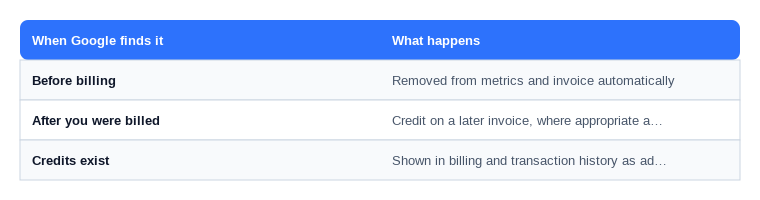
Google says you won’t be charged for invalid clicks or impressions. When its automated protections determine clicks are invalid, those interactions are filtered out of your campaign metrics and removed from your billing. It adds that invalid traffic found before the end of your billing cycle is automatically removed, so no refund is needed. If Google detects invalid clicks after you were billed, you receive a credit on your next invoice where appropriate and possible.
| When Google finds it | What happens |
|---|---|
| Before billing | Removed from metrics and invoice automatically |
| After you were billed | Credit on a later invoice, where appropriate and possible |
| Credits exist | Shown in billing and transaction history as adjustments |
Where do I see the credits?
Google lists three places. The Invalid traffic card on your Overview page summarises protection and credits for the date range. The billing and transaction history shows credits as line-item adjustments. And the Invalid Activity Credit Report breaks those credits down by campaign and network, including the clicks and interactions associated with them, so you can see a net performance view after credits. Google’s April 2026 announcement says the report is available in Report Editor for Search and Performance Max campaigns and adds Adjusted Cost, Adjusted Clicks and Adjusted Conversion Rate.
What should a store check itself?
Google’s filters cannot tell a real person who never buys from a bot. Before you call it fraud, rule out ordinary causes:
- Compare conversion rate by campaign, device and network for the last 28 days, looking for one segment with clicks and no sales.
- Read the search terms report for irrelevant queries and add negatives.
- Check the landing page loads and works on mobile; a broken page looks like fake traffic.
- Verify conversion tracking records purchases, see why Google Ads conversions dropped.
- Segment by network to see whether search partners drive the poor clicks; see whether to turn off search partners.
- Request an investigation through Google’s route if a pattern remains. Google’s page lists a request for investigation into possible invalid traffic.
What about leads from forms?
Google also publishes a page on preventing invalid leads, which is relevant if you run lead forms or newsletter sign-ups rather than purchases. For a store, the same logic applies to any conversion you count that is not a sale: if fake sign-ups count as conversions, Smart Bidding learns from them. Count purchases as the primary goal.
What is a sensible monthly check?
Once a month, open the Invalid traffic card on the Overview page and note the share of clicks Google filtered. Open billing and transaction history to see whether credits appear. Then check three store-side signals: click-to-session ratio in Analytics, since a gap can suggest bot clicks or slow pages; conversion rate by network and device; and search terms with many clicks and no engagement. If a pattern persists after you have ruled out your own page and tracking problems, document it with dates, campaigns and numbers and use Google’s route to request an investigation. Keep expectations realistic: Google says it filters invalid traffic and credits where appropriate and possible, but poor-quality human traffic is a targeting problem you solve with negatives and exclusions, not a refund. See Search Partners and negative keywords.
Where does Bach.ai fit?
Bach.ai is our product. It audits Google Ads accounts and, with your store connected, compares ad-reported conversions with real orders, which is the check that separates fake traffic from a tracking fault. On an active paid plan it can apply a supported change after you approve it, by default. It cannot decide whether Google owes you a credit.
FAQ
Is every bad click invalid?
No. Invalid means the click does not represent genuine interest, such as bots or accidental clicks. A real shopper who bounces is a valid click, and the fix is targeting or the landing page, not a credit.
Can I see which clicks were invalid?
Google says you can track invalid clicks and interactions in your campaign reports, and the Invalid Activity Credit Report lists credits by campaign and network.
Do credits appear automatically?
Yes. Google says credits are issued where appropriate and possible, appearing as adjustments on your invoice and in transactions. You do not usually need to claim them.
Does invalid traffic affect Smart Bidding?
Google says invalid traffic detected before the end of the month is removed from your campaign reports. Counting non-purchase conversions such as fake sign-ups can still teach bidding the wrong signal.
Sources
Sources, each opened and read on 25 Nov 2026: Google Help pages, Invalid clicks: Definition; About invalid traffic; About the Invalid Activity Credit Report. Menu names and limits change, so check the page before you act.