What Is Ask Advisor in Google Ads?
What is Ask Advisor in Google Ads?
Ask Advisor is a beta conversational assistant inside Google Ads, built within Gemini capabilities, that answers account questions, helps troubleshoot performance and policy issues and suggests creatives. It applies suggested changes after you accept them, is not available in manager accounts, and Google says to verify billing and appeal outcomes in account settings.
Google has put a chat assistant inside the Ads interface. For an advertiser that sounds like a shortcut to answers, and for an agency it raises a question about trust: how far should you rely on it? This guide sets out what Google says it does and where it tells you to check for yourself.
What does Ask Advisor do?
Google describes Ask Advisor as an agentic conversational experience built within Gemini capabilities, designed to help maximise performance based on your business goals (Ask Advisor in Google Ads (beta)). It gives personalised answers, helps you understand and improve campaign performance, troubleshoot performance or policy issues, and suggests new text and image creatives. You can use it to find areas of improvement and apply suggested changes after you accept them. It appears as an Ask Advisor icon with a Beta badge in the top-right navigation if your account is eligible, or you can type a question in the Google Ads search bar.
What can I ask it?
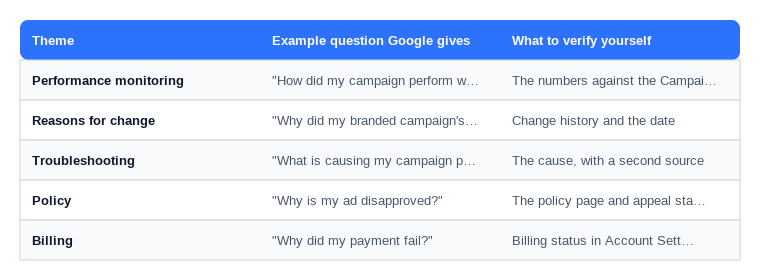
Google lists example uses by theme:
| Theme | Example question Google gives | What to verify yourself |
|---|---|---|
| Performance monitoring | “How did my campaign perform week over week?” | The numbers against the Campaigns table |
| Reasons for change | “Why did my branded campaign’s clicks decrease?” | Change history and the date |
| Troubleshooting | “What is causing my campaign performance to drop?” | The cause, with a second source |
| Policy | “Why is my ad disapproved?” | The policy page and appeal status |
| Billing | “Why did my payment fail?” | Billing status in Account Settings |
| Optimisation | Campaign suggestions | The expected effect and the risk |
| Saved context | “Remember that I only care about ROAS metrics” | That the saved info is still true |
Google also says you can save business context, such as preferences about targeting, under saved info.
Where does Google say to be careful?
Four points from the page. First, you keep full editorial control over AI-generated assets and should always review suggested content. Second, generated images are either sourced from your landing page or generated by Google AI. Third, Google says to verify critical billing status, identity verification documents and policy appeal outcomes directly in your Google Ads Account Settings. Fourth, Ask Advisor is not available in manager (MCC) accounts, so an agency working from a manager account has to open the client account to use it. Google also asks for thumbs up or down feedback on each response.
How should an agency use it?
Treat it as a fast first reader, not as the decision maker. A workable routine:
- Ask it for a week-over-week summary, then check three figures against the Campaigns table.
- Ask for reasons behind a change, then confirm with the change history; see How do I prove what I changed in a client’s ad account? for the Meta equivalent.
- Ask for suggested changes, but do not approve any you cannot explain to the client in one sentence.
- Log every approved change with the date and reason.
- Never let it be the only record of a decision.
The same discipline applies to any AI assistant on any platform; How should I govern an AI marketing agent? sets out a longer policy.
What about AI-made creative?
If Ask Advisor suggests images or text, the labelling rules still apply. See Do I have to label Google Ads assets made with AI?. Keep a register of AI-assisted assets, and use the Meta ads audit checklist creative section as a review template for any platform.
What questions should I not delegate to it?
Anything where being wrong costs money or access. Do not rely on a chat answer for an appeal decision, an identity verification step or a billing change; Google tells you to check those in Account Settings. Do not accept a suggested budget or bid change without looking at the account’s last 30 days yourself. And do not let it decide strategy, such as which market to enter, because it can only see account data and your saved notes. Use it for the work it is good at: summarising, finding the likely area of a problem and drafting options.
A useful habit is the “show me the source” follow-up. After any answer, ask which report or setting the answer came from, then open that report yourself. If the assistant cannot point to one, treat the answer as a guess. Record the questions that led to useful findings and share them with your team, so the value of the tool becomes a routine, not a one-off.
How does it differ from auto-apply?
Auto-apply applies Google’s recommendations on a schedule without you reviewing each one; Ask Advisor, per Google, applies suggested changes after you accept them. Compare the two in Should I turn on Google Ads auto-apply recommendations?. Which you prefer depends on how much change you want to review, not on which is smarter.
Can software help?
Bach.ai is a separate product: it audits connected Meta and Google Ads accounts, ranks findings by estimated recoverable spend in your own currency, and by default applies a supported change only after you approve it. It does not replace Google’s own assistant, and the two can disagree; resolve differences by checking the account data.
FAQ
Is Ask Advisor available to everyone?
Google labels it beta and says the option appears if your account is eligible. If you do not see it, you may not have access yet.
Can it change my account without asking?
Google says changes are applied after you accept them. Read each proposed change before you accept.
Does it work in manager accounts?
No. Google says Ask Advisor is not available in MCC accounts.
Can I trust its billing answers?
Verify billing status, identity documents and appeal outcomes in Account Settings, as Google advises.
Sources: Google Ads Help, Ask Advisor in Google Ads (beta), Use AI content label settings and disclosures, About applying recommendations automatically (checked 25 Nov 2026); Bach.ai capabilities from our features page.