Should I Turn On Google Ads Auto-Apply?
Should I turn on Google Ads auto-apply recommendations?
Turn on auto-apply only for recommendation types you have already applied by hand and understood. Google says auto-applying will not raise your budget, and you can review the queue and dismiss items. Check the History and Change History pages weekly, because changes land on ads, assets and bidding without a per-change approval.
Google Ads can apply its own recommendations to your account on a schedule. That saves time and also hands over decisions, so the useful question is which ones to hand over. This guide sets out what Google documents, what it leaves open and a staged way to switch it on.
What does auto-apply actually do?
Google says that when you turn on “Automatically apply recommendations”, recommendations apply regularly, and you can review the queue on the Recommendations page, look at details and dismiss anything that does not fit your goals (About applying recommendations automatically). You choose from bundles (“Maintain your ads” or “Grow your business”) or tick individual recommendations. It works at account level only, and some recommendations may apply often while others never apply, because they apply only when relevant.
Three limits to note from the same page:
- Auto-applying does not increase your budget, and Google notes budget raising is not included in auto-apply, so you still need to read the Recommendations page for budget-limited campaigns.
- You can turn it off at any time.
- Recommendation types change over time. Google notes that from 26 January 2026 the “Add responsive search ads” recommendation no longer suggests or applies new responsive search ads.
What kinds of change can it make?
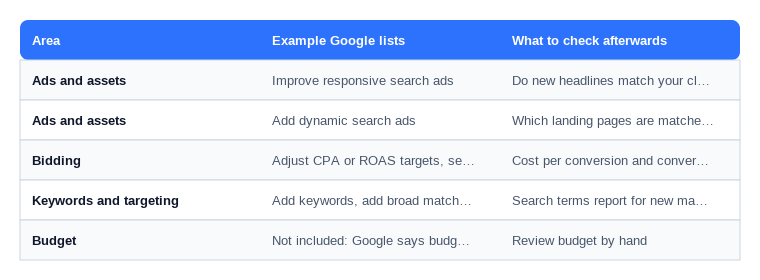
Google groups auto-applicable types under ads and assets, bidding, and keywords and targeting. Examples on the page include improving responsive search ads using existing content from your final URL or ad group, adding dynamic search ads, using optimized ad rotation, adjusting CPA and ROAS targets, adding keywords and removing redundant ones. Pinned asset preferences are respected.
| Area | Example Google lists | What to check afterwards |
|---|---|---|
| Ads and assets | Improve responsive search ads | Do new headlines match your claims and policy? |
| Ads and assets | Add dynamic search ads | Which landing pages are matched? |
| Bidding | Adjust CPA or ROAS targets, set a target CPA or ROAS | Cost per conversion and conversion value next week |
| Keywords and targeting | Add keywords, add broad match keywords, remove redundant keywords | Search terms report for new matches |
| Budget | Not included: Google says budget raising is not in this iteration of auto-apply | Review budget by hand |
How does optimization score fit in?
Google describes optimization score as an estimate of how well your account is set up to perform, from 0 to 100%, with a list of recommendations that each show how much the score would move if applied (About optimization score). It is calculated in real time from your statistics, settings and recommendation history, and applying or dismissing a recommendation changes it.
Read that carefully: it measures how closely the account follows the recommendations, against a focus such as conversions. It is not a measure of profit. Meta’s own score carries a similar warning; see Should I apply Meta’s opportunity score recommendations?. A high score is an input to your judgment, not a grade.
How do I switch it on safely?
- Open Recommendations and review each type for two weeks, applying a few by hand.
- Record the metric you expect to move for each, such as click-through rate or cost per conversion, and the date.
- Turn on auto-apply for one bundle or a few types, not all.
- Check the History tab and the Change History page weekly. Google says both show what was applied.
- Dismiss a type you disagree with, and turn auto-apply off for it.
- Check your budget separately each week, because auto-apply will not touch it.
For where such tools sit in the wider stack, see Facebook ads tools and AI agents. If you need a stricter control layer, How do I build an approval workflow for AI ad changes? sets out a model that works for any platform.
When should I leave it off?
Leave it off when your account is new and has too little data to judge a change, when brand or legal wording has to be cleared by a person before it runs, or when several people edit the account and you cannot yet tell which changes came from whom. Google says you can turn the feature on or off at any time, so staying manual while you learn costs nothing. It can also be a poor fit when your focus is a bid strategy Google flags as not understood: the optimization score page describes a yellow question mark where the focus is based on recommendations, and a red minus where the score defaulted to a conversion focus.
Can software help?
Bach.ai reviews connected Google Ads accounts alongside Meta, ranking findings by estimated recoverable spend in your own currency. On a paid plan it applies a supported Google Ads change only after you approve it by default, and every change is logged. Auto-Pilot is opt-in. It does not replace Google’s own recommendation queue, and its figures are estimates, not promised savings. See How does AI budget allocation work on Meta and Google Ads? for how budget decisions are reviewed.
FAQ
Does auto-apply change my budget?
Google says auto-applying recommendations will not increase your budget. Budget recommendations still need you to review them on the Recommendations page.
Where do I see what was applied?
Google points to the History tab on the Recommendations page for a summary of recent applications, and to the Change History page for individual changes.
Can I apply recommendations automatically for one campaign only?
Google states auto-apply works at the account level only. If you need campaign-level control, apply recommendations manually instead.
Does a 100% optimization score mean good results?
No. Google describes it as an estimate of how well the account is set to perform, with 100% meaning it can perform at its full potential, not a guarantee of results.
Sources: Google Ads Help, About applying recommendations automatically, About optimization score (checked 25 Nov 2026); Bach.ai capabilities from our features page.