What Demand Gen AI Creative Enhancements Do
Which AI creative changes does Demand Gen switch on by default?
In Demand Gen, Google AI can resize videos, make shorter cuts, upscale small images, generate text and pre-generate videos from your images and text. Shorter videos, resized videos, landing page previews and generated text are ticked by default and can be turned off at ad level. Set brand guidelines for fonts and colours, and add AI labels where required.
Demand Gen is where Google’s creative AI is most visible: it can cut your video shorter, crop it vertical, upscale a small image and write headlines. That saves a small team time, and it also means the ad a shopper sees may not be the file you uploaded. This guide lists what Google says it does and where to switch things off, from its help pages read on 25 November 2026.
What can the AI change?
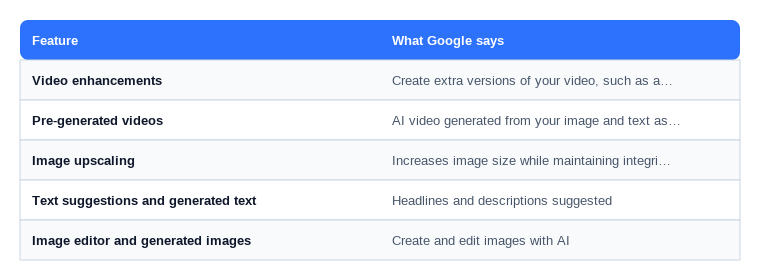
Google says that with creative enhancement features in Demand Gen you can create a variety of assets and content, edit and enhance existing assets, and generate headlines and descriptions. Its feature list:
| Feature | What Google says |
|---|---|
| Video enhancements | Create extra versions of your video, such as a vertical video from a horizontal one, or a shorter video that better captures attention in the first 5 seconds |
| Pre-generated videos | AI video generated from your image and text assets, previewed on the campaign review page, accepted in one click and editable for colour and font |
| Image upscaling | Increases image size while maintaining integrity to meet minimum requirements, for example a square image of at least 300 x 300 |
| Text suggestions and generated text | Headlines and descriptions suggested |
| Image editor and generated images | Create and edit images with AI |
| Landing page previews | Show landing page previews in the ad |
For pre-generated videos Google lists minimum assets: 1 logo, 2 images, 2 generic texts (Demand Gen requires at least 1 headline and 1 description) and 1 business name.
What is on by default?
Google says Shorter videos, Resized videos, Landing page previews and Generated text are ticked by default, and video enhancements are enabled by default for new campaigns. You can opt out of each by hovering over the setting and choosing Turn off, or open Manage in the asset optimisation menu and select only the options you want. After publishing, creative automation controls remain at ad level, so you can edit an existing ad to adjust them. For a store with a fixed look, a legal disclaimer or a price in the video, turn off anything that can crop, shorten or rewrite.
What do brand guidelines do?
Google says brand guidelines let you control how your brand is represented in Demand Gen, including brand font and colours, to keep a consistent look. You set them at campaign level and can change them during or after construction, and reuse brand assets across campaigns. Use them with the creative pack in Demand Gen sizes.
What about AI labels?
Google notes that AI regulations in the European Union, India, New York, California, South Korea and Vietnam require that ads with certain AI-generated or edited assets include disclosures or labels. You can add labels directly to creatives or use the AI label setting in Google Ads and related tools. It also says using the setting does not guarantee compliance with any regulation and advises seeking legal guidance. See do I have to label Google Ads assets made with AI.
How should a store review AI output?
- Preview every generated video and image before publishing, and reject anything that misstates a product.
- Check price, materials and claims in generated text against your site.
- Turn off what you cannot supervise, then enable one option at a time and compare in an experiment; see how to run a Google Ads experiment.
- Keep a log of which enhancements were on during which dates.
- Review the asset report for low-quality flags and policy rejections.
How do I decide which enhancements to keep?
Run each as a controlled choice. Start with everything off for a core campaign, record results for two weeks, then switch on one option, for example shorter videos, in a duplicate campaign using an experiment so results are comparable. Keep what improves conversion value at an acceptable cost and what a human reviewer finds accurate; drop what shows anything you would not publish yourself. Pay particular attention to generated text for claims about price, material, delivery or health, and to resized videos where a product can be cropped. Keep screenshots of what was served, so if a customer or regulator asks, you can show the exact ad. Review again when Google adds new defaults, since settings you chose can be joined by new ones.
Where does Bach.ai fit?
Bach.ai is our product. It audits connected Google Ads accounts and, with your store connected, compares ad-reported results with real orders so an AI change can be judged on sales. On an active paid plan any supported change waits for your approval, by default.
FAQ
Are enhancements on by default?
Google says Shorter videos, Resized videos, Landing page previews and Generated text are ticked by default for new campaigns.
Can I opt out?
Yes, per option, by turning each off or choosing only the options you want in Manage.
What do I need for a pre-generated video?
Google lists 1 logo, 2 images, 2 generic texts and 1 business name as minimum.
Do brand guidelines stop the AI changing my ad?
They set brand font and colours for consistency; they do not replace turning off enhancements you do not want.
Sources
Sources, each opened and read on 25 Nov 2026: Google Help pages, About creative enhancements and generative AI tools in Demand Gen; About image upscaling enhancement for Demand Gen campaigns; About brand guidelines in Demand Gen. Menu names and limits change, so check the page before you act.