Connect Claude or ChatGPT to Meta Ads, Read-Only
How do I connect Claude or ChatGPT to my Meta ads read-only?
Use a remote MCP server and give it read permission only. Meta's official server at mcp.facebook.com/ads works with Claude and ChatGPT via OAuth but includes write tools, so grant only ads_mcp_management and ads_read, the minimum Meta lists, test that writes fail on a test account and keep approvals on.
Asking an assistant “which campaign has the highest cost per purchase?” and getting the answer from your live account is the most useful thing the Model Context Protocol does for an advertiser. It is also the point where a careless setup lets the assistant change something. This guide shows the connection steps for Claude and ChatGPT, and how to keep the access read-only in practice.
What is MCP, in one paragraph?
The Model Context Protocol is an open standard for connecting AI applications to tools and data. A server exposes tools, resources and prompts; a client discovers them with tools/list and runs them with tools/call (MCP architecture). Claude’s help centre adds that remote MCP servers are hosted on the internet and that Claude connects to them from Anthropic’s cloud, so the server must be reachable over public HTTPS on port 443 (custom connectors). What matters here: the server decides what tools exist, and read-only is a property of the server and of the permissions, not of the chat app.
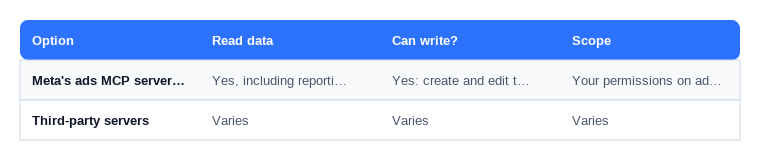
Which MCP servers can read Meta ads data?
| Option | Read data | Can write? | Scope | Source |
|---|---|---|---|---|
| Meta’s ads MCP server (mcp.facebook.com/ads) | Yes, including reporting | Yes: create and edit tools exist | Your permissions on ad accounts | Meta overview |
| Third-party servers | Varies | Varies | Varies | Read each vendor’s page; see official vs third-party |
Meta’s server is documented as remote-hosted, working with any MCP-compatible agent, and grouped into reporting, ad creation and management, catalogs, signals, help, A/B tests and activity logs. Its write tools create entities paused and ask the client to confirm activation, but a separate update tool exists, so do not assume the server is read-only because creation is paused.
How do I connect Claude to Meta’s server read-only?
- In the Meta developer dashboard, create or reuse an app and add the “Create & manage ads with ads MCP server” use case.
- Choose OAuth, so you sign in with Facebook Login for Business and approve the permissions yourself.
- Request only ads_mcp_management and ads_read, the minimum Meta lists; do not add ads_management.
- Add the server in Claude Code with Meta’s command:
claude mcp add --transport http --client-id <META_APP_ID> meta-ads https://mcp.facebook.com/ads. - Run “List my ad accounts”, then ask for the tool list and look for create, update and activate tools.
- On a test account, ask Claude to change a budget and confirm the call is refused.
For Claude on the web, Anthropic’s custom connector steps apply: on Team and Enterprise plans an Owner adds the connector under Organization settings, Connectors, Add, Custom, Web, enters the server URL exactly as documented and chooses the authentication; members then connect individually. Free plans are limited to one custom connector.
How do I connect ChatGPT?
Meta’s get-started page gives the pattern:
- Set your Meta app’s redirect URL according to ChatGPT’s specification.
- In ChatGPT’s connector settings, choose OAuth as the authentication method.
- Enter https://mcp.facebook.com/ads as the Server URL.
- Under Advanced OAuth Settings, enter your Meta app ID as the OAuth Client ID.
- Complete the sign-in and approve only the read permissions.
If you use OpenAI’s API instead, the Responses API’s MCP tool has a require_approval setting, and OpenAI’s documentation says tool calls can be allowed automatically or restricted with explicit approval (OpenAI MCP guide). Keep approvals on for any server that can write. Whether a given ChatGPT plan offers custom connectors is set by OpenAI, so check your plan before planning around it.
How do I check a “read-only” claim?
Do not trust a label. Check:
- The tool list. Any tool named create, update, delete, activate, boost or upload can change something.
- The permission. Meta’s page lists ads_read and ads_management separately; grant the narrower one.
- A refused write. Ask for a harmless edit on a test account and expect a failure.
- Activity history. In Ads Manager, open Activity history and filter Changed by, to confirm nothing changed.
Can an AI agent manage my Meta ads? covers what happens when you do allow writes, and What permissions should an AI agent have on my ad account? covers the access model in detail.
What can I ask once it is connected?
Start with questions where an answer can be checked: “Which three campaigns spent the most in the last 7 days, with currency?”, “Which ad sets are Learning limited?”, “How did spend change week on week?” Ask the assistant to state the date window and the attribution setting. Be wary of one that offers a figure without naming both. For ad-level diagnosis, use the Meta ads audit checklist.
Can software help?
Bach.ai has an AI assistant connector of its own. It is read-only and scoped to the one brand you authorise, and it cannot execute campaign changes. Today it accepts sign-ins from Claude only (claude.ai, Claude Desktop and Claude Code via your claude.ai connectors), so ChatGPT and other MCP clients cannot use it yet. Availability and the URL are shown in your account under Settings, AI assistant connector; if none appears, it is not available on your account yet, and we do not claim a listing in any assistant’s connector directory. The connector guide has the setup and troubleshooting.
In the app, the chat answers questions from your synced data with the math shown, and changes are proposed there and applied, by default, only after you approve them (Auto-Pilot is opt-in) on an active paid plan. The connector gives your assistant the reading side only.
FAQ
Is Meta’s official MCP server read-only?
No. Meta documents tools that create and edit campaigns, ad sets and ads, upload and update audiences, and activate entities. New entities are created paused, and activation asks for confirmation, but the server can write when the token allows it.
Can ChatGPT connect to my ad account directly?
Meta’s documentation describes connecting ChatGPT to its ads MCP server with OAuth, a server URL and your app ID. Whether you can add a custom connector depends on your ChatGPT plan, so check OpenAI’s help for current availability.
Do I need a developer app?
Not always. Meta’s get-started page says owning a Meta app is not a prerequisite, and points to a separate setup for Meta ads AI connectors. The steps above are the route when you do use your own app.
Is it safe to give an assistant ad data?
It is safer when the access is narrow and revocable. Anthropic advises connecting only trusted servers, limiting requested scopes and watching for prompt injection. You can disconnect the connector in Claude’s settings or revoke access in Meta at any time.
Sources: Model Context Protocol, Architecture overview; Meta for Developers, Ads MCP server overview, Get started, Ad creation and management tools; Claude Help Center, Custom connectors using remote MCP; OpenAI, MCP and connectors; Bach.ai connector facts from llm-info and the connector guide (all checked 24 Nov 2026).