Alternatives to Manual Google Ads Management (2026)
What are the alternatives to managing Google Ads manually?
Start with Google's own automation: Smart Bidding, Performance Max and auto-applied recommendations, which cost nothing extra. Add a third-party tool if you need more control or more accounts: Optmyzr, Opteo, AdScale or Bach.ai. Choose by who approves each change and how it is priced. Prices below were read on 24 Nov 2026.
Managing Google Ads manually means you adjust bids, budgets, keywords and ads yourself. The alternatives sit on a ladder of control: Google’s built-in automation, rule and recommendation tools, and AI agents that propose changes for you to approve. You can climb as far as you trust.
Disclosure: Bach.ai is our product. It is one of the options below and it is not ranked first; the options are ordered from least to most outside tooling. Each vendor line is taken from that vendor’s own pages, read on 24 November 2026. Prices change, so confirm on the linked page before you buy.
What are the alternatives to managing Google Ads manually?
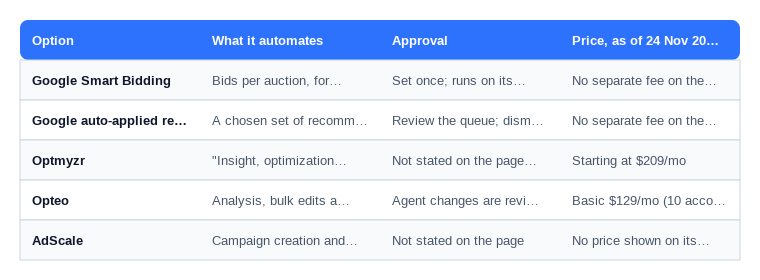
The Approval column is the deciding fact: who clicks before a change reaches your account.
| Option | What it automates | Approval | Price, as of 24 Nov 2026 | Trial |
|---|---|---|---|---|
| Google Smart Bidding | Bids per auction, for conversions or conversion value | Set once; runs on its own | No separate fee on the help page | n/a |
| Google auto-applied recommendations | A chosen set of recommendations, applied regularly | Review the queue; dismiss any you do not want | No separate fee on the help page | n/a |
| Optmyzr | “Insight, optimization, and automation tools”; a rule engine | Not stated on the page; ask | Starting at $209/mo | 14 days |
| Opteo | Analysis, bulk edits and an AI agent that makes changes | Agent changes are reviewed, then pushed live by you | Basic $129/mo (10 accounts, $25,000 spend/mo); Professional $249/mo (25 accounts, $100,000); Agency $499/mo (75 accounts, $250,000) | Free trial, length not stated |
| AdScale | Campaign creation and “24/7 Automated AI optimization” across Google and Meta | Not stated on the page | No price shown on its page (pricing not public) | Free trial |
| Bach.ai (ours) | Audits Google Ads, proposes fixes, applies approved ones | By default you approve each change (Auto-Pilot is opt-in on paid plans) | Starter $99/mo, Pro $149/mo, incl. $10k spend, then 1% or 1.5% | 7 days, no card |
Bach.ai’s pricing in full: Starter $99/mo and Pro $149/mo, each including $10k/mo of ad spend, then 1% (Starter) or 1.5% (Pro) of spend above $10k. Google Ads is included from Starter, and the 7-day free trial runs on Starter limits, so you can connect Google Ads during it. At $30k a month of spend, Starter is $99 + 1% × $20k = $299.
How much of Google Ads can Google’s own automation handle?
More than most advertisers use. Google describes Smart Bidding as strategies that use Google AI to optimize for conversions or conversion value in every auction, and Performance Max as a goal-based campaign type that reaches all Google Ads inventory from a single campaign.
Auto-applied recommendations are the middle step. Google says that when you turn on “Automatically apply recommendations”, the recommendations apply regularly, you can review which will run on a given day from the queue on the Recommendations page, and you can dismiss any that do not match your goals. It also says auto-applying will not increase your budget, that you can only apply recommendations automatically at the account level, and that a History tab and the Change History page show what was applied.
The catch is control. You choose recommendation types at the account level, not per campaign, and Opteo’s page says it finds auto-applied recommendations and platform settings and turns them off “in a click”, which tells you some advertisers see this as a problem to manage rather than a feature.
When do I need a third-party tool for Google Ads?
You need one when Google’s tools leave a gap you are paying for. Three are common:
- Many accounts. Opteo prices by account count and spend, and Optmyzr by spend; both fit agencies better than a single store.
- Rules you want to own. Optmyzr describes a rule engine for custom strategies and insights.
- Fixes you want proposed and sized. An AI agent that reads the account, proposes a change and, by default, waits for approval, as Opteo’s Agent and Bach.ai describe.
If you run one account and Smart Bidding is working, you may not need any of them. Our guide to why spend stalls is Why is my Google Ads campaign not spending its budget?.
How do I move off manual Google Ads management safely?
Work through these steps one at a time, so you can see which change moved results:
- Fix conversion tracking first. Smart Bidding optimizes for whatever you report as a conversion, so a broken tag teaches it the wrong goal.
- Switch one campaign, not the account, to a Smart Bidding strategy and keep the rest as they are for a full cycle.
- Turn on auto-applied recommendations for one low-risk category and review the queue daily for the first week.
- Open the Change History page in Google Ads weekly and check what was applied automatically.
- Add a third-party tool in read-only or review-first mode before you let it push changes live.
- Compare results with the manual baseline over the same period, using your own revenue numbers, not only the platform’s.
For the Meta-versus-Google money question, see How do I split my ad budget between Meta and Google Ads?, and for a wider tool list, the best Meta ads tools.
When is Bach.ai the wrong choice for Google Ads?
Bach.ai is the wrong choice if you want a rule engine you script yourself, where Optmyzr is built for the job. It is wrong if you manage dozens of client accounts at a low price per account; Opteo’s tiers are priced for that. It is wrong if you want changes applied with no approval step: Auto-Pilot exists on paid plans but is off by default, and high-risk changes always wait for you. And it is wrong if you only run Google Ads, since Meta is where its audits go deepest.
FAQ
Is Google’s auto-apply safe to leave on?
It is safe only if you watch it. Google lets you review the queue and dismiss recommendations, and it logs applied ones in a History tab and Change History. It also says auto-applying will not raise your budget. Check the history weekly and turn off any recommendation type you did not choose.
Do I need an agency instead of a tool?
Not necessarily. A person adds judgment a tool cannot, such as brand and offer decisions, but costs more per account and works at human speed. Many teams use a tool for routine checks and a person for strategy. This post lists tools only, so compare agency quotes separately.
Can a tool change my Google Ads account without asking?
Some can. Opteo’s page says Agent changes are reviewed before you push them live; Optmyzr’s and AdScale’s pages do not state an approval model, so ask each before you connect. Bach.ai applies a Google Ads change, by default, only after you approve it, on a paid plan, and logs it.
Does Bach.ai work on the Free plan for Google Ads?
Yes, for reading and auditing. The 7-day free trial runs on Starter limits, so you can connect one Google Ads account and one Shopify store, run audits and see proposed changes. Applying a change needs an active paid plan and your approval.
Sources
Sources, checked 24 Nov 2026: Google Ads Help, About Smart Bidding, About applying recommendations automatically, About Performance Max campaigns; vendor pages: Optmyzr pricing, Opteo and its pricing, AdScale pricing; Bach.ai prices and plan limits from our pricing page.