How to Get Your Team to Trust AI Ad Decisions
How can my team adopt and trust AI ad decisions?
Roll it out in stages. Start read-only so the AI only reports, then let it propose changes you approve one by one, then allow low-risk changes within caps, and keep a log and a rollback path throughout. Move up a stage only when its proposals match what your best media buyer would have done.
Teams do not distrust AI ad tools because the maths is hard. They distrust them because they cannot see why a change was made, cannot stop it, and cannot undo it. Fix those three things and adoption follows. This post gives a four-stage rollout and the evidence to collect at each stage, using Meta’s and Google’s own documentation (read 24 November 2026) for every platform fact. The staging itself is our recommended practice, not a platform rule.
What does a staged rollout of AI ad tools look like?
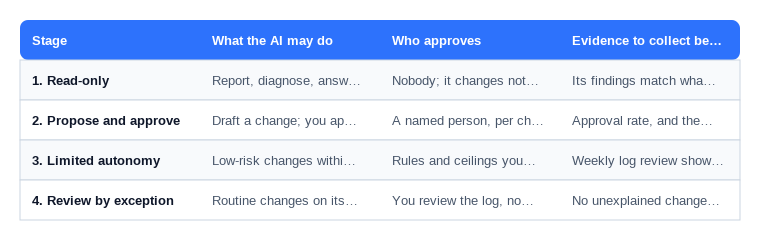
Each stage widens what the AI may do and narrows who has to check it. Do not skip a stage because the tool looks good in a demo.
| Stage | What the AI may do | Who approves | Evidence to collect before moving on |
|---|---|---|---|
| 1. Read-only | Report, diagnose, answer questions | Nobody; it changes nothing | Its findings match what your buyer sees in Ads Manager |
| 2. Propose and approve | Draft a change; you approve each | A named person, per change | Approval rate, and the reasons for each rejection |
| 3. Limited autonomy | Low-risk changes within caps | Rules and ceilings you set | Weekly log review shows no change outside the caps |
| 4. Review by exception | Routine changes on its own | You review the log, not each change | No unexplained change for several cycles |
Why start read-only?
Because read-only costs nothing but time, and it shows whether the AI understands your account. Meta’s ads connector is built around this idea: Meta says any action taken on your behalf requires your authorization through the AI agent, and it lets someone with full control of the business portfolio allow or block specific actions per ad account. Bach.ai’s free trial works the same way: you can run audits and review proposed changes, but applying changes needs a paid plan.
During this stage, run the AI beside your best buyer, in shadow mode. Record what the AI would have changed and what the buyer actually changed, without acting on the AI’s list. After a few weeks you have an agreement rate, which is a better trust signal than any demo.
What should an approval workflow include?
Approval is only real if the approver can see enough to say no. Require four things on every proposed change:
- Show the evidence: the metric, the date range and the account the change is based on.
- State the expected effect and the risk, in the currency of the account.
- Name the approver, and record who approved and when.
- Block anything outside scope, such as budget above a ceiling or new campaigns, at the platform where you can.
Meta’s connector supports that last step: you can set Create campaigns to Blocked, or block any budget set above an amount you enter, and Meta says requests over that amount are denied. Our fuller build guide is How do I build an approval workflow for AI ad changes?, and the permission side is in What permissions should an AI agent have on my ad account?.
How do I audit what the AI changed?
Use the platform’s own log, not only the tool’s. In Meta Ads Manager, select the campaign, ad set or ad, click Activity history, and filter by Changed by to see whether a person, an automated rule, a business identity or Meta made each change. Meta says the history shows who made changes, what changed and when. In Google Ads, Google says applied recommendations appear in a History tab and on the Change History page.
Check the log weekly in stages 2 and 3. A tool that cannot be reconciled against the platform’s log is a tool you cannot trust yet.
How do I roll back a bad AI change?
Plan the rollback before the first approval. Know the previous value of every field the AI may touch, and keep it somewhere you can read. On Meta, Meta says its connector’s draft mode saves new campaign work for review before publishing. On Google, Google Ads Editor lets you revert an import after you review it. Neither platform promises to undo every kind of change, and Bach.ai’s own rule is that rollback is available only where supported, so do not assume it.
How do I get a skeptical team on board?
Make the first win small and visible, and give the skeptic a veto:
- Pick one owner for the pilot and one account, ideally your most stable.
- Agree the success test in advance, such as the agreement rate with your buyer’s decisions.
- Share the weekly log in a team meeting, including proposals that were rejected and why.
- Give every team member the right to block a change type, and honor it.
- Raise the AI’s permissions only when the log supports it, and write the date and the evidence down.
Do not tell the team the AI will replace anyone. What changes is the work, covered in What is left for marketers when AI runs execution?. For vendor questions before you buy, see How do I evaluate an AI ads tool before buying?, and for a checklist of your own account’s health, the Meta ads audit checklist.
FAQ
How long should the read-only stage last?
Long enough to compare its findings with your buyer’s across a full reporting cycle, usually a few weeks. There is no platform rule for this; it is our recommendation. Move on when the agreement rate is high and you can explain the misses.
What if the AI is right but the team still will not use it?
Look at the reason in the log. Often the proposal lacks evidence the approver needs, or lands at the wrong time. Add the missing evidence to the approval screen, and let the skeptic block a change type until the record earns it back.
Should junior staff be allowed to approve AI changes?
Only for low-risk change types within caps you set. Meta lets someone with full control of the business portfolio restrict what agents may do per ad account, and you can mirror that with your own rule: bigger budgets and new campaigns need a senior approver.
Does Bach.ai apply changes automatically?
Not by default. On an active paid plan, Bach.ai applies a Meta or Google Ads change, by default, only after you approve it, and logs it. Auto-Pilot is off by default; if you switch it on for chosen action types, those run within daily limits, while high-risk changes always wait for you.
Sources
Sources, checked 24 Nov 2026: Meta Business Help Center, Manage ads from an AI agent with Meta ads AI connectors, How to view activity history for your ads, About automated rules; Google Ads Help, About applying recommendations automatically; Import a CSV file in Google Ads Editor; Bach.ai access rules from our pricing page.