Read the Search Terms Report and Add Negatives
How do I read Google Ads search terms and add negatives?
Open Campaigns, then Insights and reports, then Search terms. Sort by cost, add the Keyword and Match type columns, and find queries that cost money without converting or that you do not sell. Add them as negative keywords at the right match type, remembering negatives do not cover close variants or plurals.
The search terms report is the one place where Google shows you what people actually typed before your ad appeared. It is also the cheapest source of wasted spend you can remove: a query that costs you clicks and never converts, or that describes a product you do not sell, can be blocked in a minute. This guide shows the exact path, what to look for, and the two negative keyword mistakes that quietly undo the work.
If you run Performance Max as well, see Performance Max or Search for ecommerce for how negatives apply to each. If your campaign is not spending at all, start with why Google Ads is not spending its budget; this report is for campaigns that spend and leak.
What is the difference between a search term and a keyword?
A search term is the word or set of words a person enters on Google or a Search Network site. A keyword is what you add to an ad group to target the right audience. Google’s own example: a florist uses the keyword “roses”, and a shopper types “red roses”. “Red roses” is the search term. Depending on your match types, the search terms that trigger your ads can differ widely from your keyword list (About the search terms report).
Google also notes the report lists search terms that a significant number of people used, so very low-volume queries are omitted for privacy reasons.
How do you open and set up the report?
- In your Google Ads account, select Campaigns in the left navigation panel.
- Open Search terms under the Insights and reports sub-menu.
- Select the Columns button, then Attributes, check Keyword, and select Apply. The Keyword column is not shown by default.
- Add the Match type column, plus Cost, Conversions and Conversion value.
- Sort by Cost, highest first, so the biggest leaks sit at the top.
- Use the Download button if you want to review the list in a spreadsheet.
The Keyword column tells you which of your keywords matched the search term and triggered the ad. The Match type column shows how closely the search term relates to your keyword. Together they tell you which keyword to fix, not just which query to block.
What should you look for in the rows?
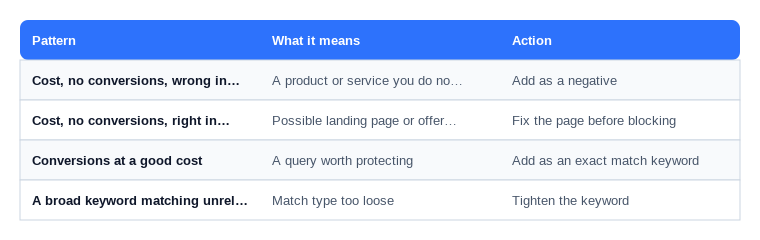
Read each high-cost row against one question: would I be happy to sell to this person?
| Pattern | What it means | Action |
|---|---|---|
| Cost, no conversions, wrong intent | A product or service you do not offer | Add as a negative |
| Cost, no conversions, right intent | Possible landing page or offer problem | Fix the page before blocking |
| Conversions at a good cost | A query worth protecting | Add as an exact match keyword |
| A broad keyword matching unrelated searches | Match type too loose | Tighten the keyword |
Google gives the same example: a broad match keyword “flowers” was triggering ads for “red roses” and “purple orchids” for a store that only sold tulips, so the owner refined the list toward “tulips” (search terms report).
How do you add the negative keywords?
- Decide the scope: all campaigns, one campaign or one ad group.
- For a quick edit, select Edit exclusions: for all campaigns use the option on the exclusions page, or for one campaign click the arrow next to “Show table”, select the campaign, then Edit exclusions. For a reusable list, go to Campaigns, then Audiences, keywords, and content, then Search keywords, then the Negative search keywords tab, and click the plus button.
- Enter one keyword per line.
- For Search campaigns, choose the match type with the standard symbols: quotation marks for phrase, square brackets for exact, nothing for broad (keyword matching options).
- Tick Save to new or existing list if you want to reuse the terms, name the list and click Done.
- Check the new negatives against your active keywords before you save.
The last step matters: Google warns that negative keywords overlapping your regular keywords will stop your ad from showing (Add negative keywords to campaigns).
What are the two mistakes that undo the work?
Negatives do not match close variants. Google says negative keywords will not match close variants or other expansions. For example, a negative broad match keyword “flowers” blocks “red flowers” but not “red flower”. You need to add singular and plural versions and synonyms yourself. Negative keywords do account for casing and misspellings automatically (About negative keywords).
Negatives behave differently on Display and Video. For Display and Video campaigns, all negative keywords are treated as broad match and the match type cannot be changed. Do not copy a Search list into a Display campaign and expect the same result.
You also cannot add negatives straight from the report when you open it through the Report editor path; use the Search terms page itself.
How often should you review it?
Weekly for a new account or a campaign you have just changed, then fortnightly or monthly once the list stabilises. Spend for one review is small; the value compounds because each blocked query stays blocked.
If you run Performance Max, the report helps identify the terms that resulted in conversions, and Google says you can add account-level negative keywords for Performance Max (Add negative keywords to campaigns).
Can Bach.ai help with this?
On Starter and above, Bach.ai reads your Google Ads account and flags spend on campaigns that look weak, with an estimated recoverable amount rather than a promise. On a paid plan it can apply a supported change, such as adding a negative keyword, by default, only after you approve it (Auto-Pilot is opt-in), and each change is logged. The report is still the ground truth, so check any suggestion against your own rows first.
What to do next
Open the report, sort by cost, and add your top five irrelevant terms as negatives this week. Then compare the next month’s wasted spend with the last. Bach.ai can show the same leaks across Meta and Google on Starter and above (pricing); see the Meta ads audit checklist for the Meta side.
FAQ
Can I add negative keywords directly from the search terms report?
Yes, from the Search terms page in the Insights and reports menu. Google notes you cannot do this when you open the data through the Report editor path. Open the Search terms page directly, select the queries you want to block, and add them there as negatives.
Why is the Keyword column missing?
It is hidden by default. Select the Columns button, then Attributes, check Keyword and select Apply. Once it is visible, you can see which keyword triggered each search term and decide whether the query or the keyword needs fixing.
Should I use broad, phrase or exact match negatives?
Use exact for a single bad query, phrase for a bad phrase in any surrounding text, and broad for a single bad word. Add plurals and synonyms separately, because negatives do not cover close variants.
Do negative keywords work in Performance Max?
Yes. Google lists negative keywords as a Performance Max campaign control, which you use to prevent overlaps and block unwanted queries. Add them from the same report so the blocked terms are applied where the campaign runs, and review the list again after a few weeks.
Sources
Checked 24 Nov 2026: About the search terms report; About negative keywords; Add negative keywords to campaigns.