How to Use Performance Planner for Budgets
How do I use Performance Planner to plan my Google Ads budget?
Go to Tools, Planning, Performance Planner, create a plan with a date range, a key metric and the campaigns that share a goal, then read the forecast graph and the suggested budget and bid changes. Apply them manually or export an Ads Editor file. Suggested plans give ready-made starting points. Treat forecasts as estimates, not guarantees.
Most budget decisions in a store are made by feel: last month plus a bit, or whatever the owner is comfortable losing. Performance Planner is Google’s tool for replacing feel with a forecast. It is not a promise, and it works better on stable accounts than on new ones, but for a sale or quarterly planning it is a better starting point than a guess. This guide uses Google’s help pages, read on 25 November 2026.
What does Performance Planner do?
Google says it lets you create plans for your advertising spend and determine how bid and budget changes to campaigns might affect key metrics and overall performance, by modelling the best budget and bid target allocation across your campaigns. It is available for Search, Shopping, App, Demand Gen and Performance Max campaigns, and forecast levers are gradually rolling out, so some accounts may not have them.
How do I create a plan?
- Open Tools, then Planning, then Performance Planner, and select the plus icon.
- Enter the date range, the channel and the key metric to show (clicks, conversions or conversion value).
- Choose conversion goals if you want the plan to use only data from specific goals.
- Add a target such as a ROAS or CPA so the tool can move spend to meet it.
- Select the campaigns. Google recommends campaigns that drive towards the same goal.
- Create the plan to view the forecast page.
Google adds that the tool works best by shifting budgets between multiple campaigns and optimising towards the ones expected to drive a higher return. Campaigns that do not meet requirements are unforecastable; you can exclude them or include them by adding cost and conversion amounts from a past period. Shopping plans with multiple Merchant Centers have rules around Comparison Shopping Services.
What are suggested plans?
Google says Performance Planner now offers suggested plans: ready-made plan frameworks that use your current campaign settings as a baseline. They are organised by campaign type, such as Search, Performance Max, Shopping and App, group forecastable campaigns by type and simulate scenarios to find the settings likely to maximise return for that group. From the Planning page, review the suggestions at the top, select See campaigns to check what is included and Create Plan to go to the forecast page.
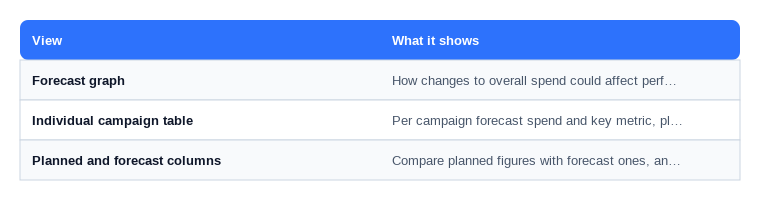
How do I read the forecast?
| View | What it shows |
|---|---|
| Forecast graph | How changes to overall spend could affect performance of all campaigns in the plan; click around the graph to change spend |
| Individual campaign table | Per campaign forecast spend and key metric, plus related metrics and suggested changes |
| Planned and forecast columns | Compare planned figures with forecast ones, and with previous periods |
Treat the numbers as estimates. They are models built on past performance, so a sale, a stock-out or a tracking fault will not be in them.
How do I apply the plan?
Google says the suggested daily budget amount and bid target changes are in the Suggested changes column. You can implement them through Google Ads Editor, by downloading an Ads Editor CSV and importing it, or manually by editing budgets. Do it in steps; large changes at once make results hard to read. See Google Ads Editor and bulk edits and campaign total budgets.
When is it not useful?
New campaigns with little history, accounts whose tracking is unreliable, and plans spanning campaigns with different goals produce weak forecasts. Fix tracking first, using enhanced conversions, and set the target from margin with the break-even ROAS calculator. For splitting spend across platforms see how to split budget between Meta and Google.
How should I use a forecast in a budget meeting?
Bring three scenarios, not one: the current plan, a modest increase and a larger one, with the forecast for each. Show the forecast range and the marginal cost per conversion between scenarios, because the last dollars usually buy the most expensive conversions. Compare that marginal cost with your break-even cost per order; spend stops making sense where the marginal conversion costs more than a sale is worth. Note the assumptions: tracking accuracy, seasonality and campaign changes. After the plan is approved, apply it in steps and compare actual results with forecast over a few weeks, so you learn how reliable the tool is for your account. Record the gap and use it to adjust the next plan.
Where does Bach.ai fit?
Bach.ai is our product. It reviews budget and bidding on a connected Google Ads account and, with your store connected, checks margin ROAS so a plan’s target is realistic. On an active paid plan it can apply a supported budget change after you approve it, by default. It does not replace Google’s forecast.
FAQ
Is Performance Planner free?
Google’s pages describe it as a tool in your account and do not mention a fee. Check the Tools menu in your account.
How accurate are the forecasts?
Google calls them forecasts of how changes might affect performance. They are estimates from past data; do not treat them as guarantees.
Can I include campaigns that cannot be forecast?
Google says you can exclude them or include them by adding cost and conversion amounts for past performance during a selected date range.
Does it work with Performance Max?
Yes. Google lists Search, Shopping, App, Demand Gen and Performance Max as supported campaign types.
Sources
Sources, each opened and read on 25 Nov 2026: Google Help pages, Create and edit a plan with Performance Planner; About Suggested plans in Performance Planner; Viewing your Performance Planner forecasts; How to review and implement your performance planner budget. Menu names and limits change, so check the page before you act.