What Are Search Themes in Performance Max?
What are search themes in Performance Max?
Search themes are phrases you add to a Performance Max asset group to signal the queries your customers use. Google says they are optional and additive to what the campaign already predicts, allows up to 50 per asset group, and applies exclusions and negative keywords on top.
Performance Max has no keyword list, which is why store owners ask how to nudge it toward the searches they care about. Search themes are Google’s answer. This post summarises Google’s help pages on search themes, asset groups and Performance Max, fetched on 25 November 2026. Limits and menus change; the Search Ads 360 version of the feature lists different caps, so check your own interface.
What does Google say a search theme is?
Google says search themes let you add the words and phrases your customers use to find your offerings, to help Performance Max reach the right audience. They are “optional and additive” to the queries and placements the campaign predicts will perform well based on your assets, feeds and landing pages. In other words, a theme adds to what Google would already do; it does not replace it or fence it in.
What are the limits and rules?
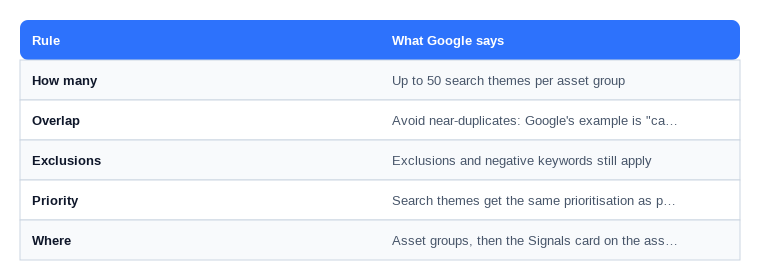
| Rule | What Google says |
|---|---|
| How many | Up to 50 search themes per asset group |
| Overlap | Avoid near-duplicates: Google’s example is “car” and “automobile”, which reach the same audience |
| Exclusions | Exclusions and negative keywords still apply |
| Priority | Search themes get the same prioritisation as phrase match and broad match keywords in Search campaigns |
| Where | Asset groups, then the Signals card on the asset group |
How do I add search themes?
- Open Campaigns, then Asset groups.
- Switch to the Summary view with the Summary icon.
- Click the pencil icon next to Signals on the asset group card.
- On the Signals card, select Search themes.
- Type each theme and press Enter, adding up to 50 unique themes.
- Select Save.
When are search themes worth the effort?
Google’s page does not list when to use them, so this is our judgement: add them when you know something about your customers’ search language that the campaign would learn slowly on its own. For a store, three cases fit: a new product line with little history, a landing page that says little about what the product is, and a market where shoppers use a different word than your catalog titles. If your product feed is the problem, fix that first; see Merchant Center product disapprovals: fixes.
How do search themes fit with asset groups and negatives?
A theme lives on one asset group, so one group per product theme keeps the signals clean; the structure rules are in How should I structure Performance Max asset groups?. Because Google says negative keywords still apply, a shared negative list protects every group from irrelevant queries: How do I add negative keywords in Google Ads? shows where Performance Max accepts them.
How do I know whether a theme helped?
The pages we fetched do not give a threshold. Judge it the way you judge any change: revenue, margin and new customers in your store data, over a window long enough to cover Performance Max’s learning, not clicks alone. Do not add dozens of themes at once, because you cannot then tell which one moved results. The choice between this campaign type and Search is in Performance Max vs Search campaigns for e-commerce.
What mistakes should I avoid with search themes?
Four come straight from Google’s own guidance. Do not list synonyms, because “car” and “automobile” reach the same audience and waste one of your 50 slots. Do not expect a theme to override a negative keyword, since exclusions still apply. Do not treat a theme as a keyword you control: Google says it has the same prioritisation as a phrase or broad match keyword, so it can match related searches. And do not change the themes, assets and budget in the same week, because you will not know which change moved sales. Write down the date and the exact themes you added, then compare store revenue before and after on a window you set in advance.
Bach.ai is our product. Its Google Ads audit reads your account and ranks findings by estimated recoverable spend; search themes are a setting you choose, and Bach.ai does not guarantee a result from them. On a paid plan a supported change is applied on Meta or Google Ads only after you approve it by default (Auto-Pilot is opt-in); the free trial does not apply changes, and recoverable-spend figures are estimates, not guarantees. For a hands-on review, use the Meta Ads audit checklist.
FAQ
Do search themes limit where my ads show?
No. Google says they are additive to the queries and placements Performance Max already predicts will perform. They add signals; they do not restrict the campaign to the themes.
How many can I add?
Google’s Google Ads page says up to 50 per asset group. The Search Ads 360 page lists a different cap, so check the interface you use.
Should I add my brand name as a theme?
Google’s pages do not recommend it either way. If brand searches already convert elsewhere, treat brand and non-brand separately and watch for overlap with your Search campaign.
Do negatives still work with themes?
Yes. Google says exclusions and negative keywords still apply to Performance Max with search themes.
Sources, read on 25 November 2026: Use search themes with your Performance Max campaign; About Performance Max campaigns; How asset groups work.