How Do I Stop Performance Max Bidding on Brands?
How do I stop Performance Max bidding on brand searches?
Build a brand list in Tools, Shared library, Brand lists, then open the campaign's settings and choose Brand exclusions to apply it. Tick the option to allow Shopping ads on excluded brands if you want them. Google says brand settings limit reach, so use them only on campaigns that need them.
Performance Max can take credit for searches that would have found you anyway, including your own brand name, and it can serve on competitor brands you would rather avoid. Google’s brand settings let you steer both. This guide uses Google’s pages on brand exclusions, brand settings and brand lists, fetched on 25 November 2026. Google has been moving brand exclusions for Search into AI Max, so menus differ by campaign type.
What are brand exclusions?
Google says brand exclusions keep your campaigns from serving for branded queries you want to avoid. For Performance Max they apply to Search, Shopping and YouTube search inventory, and you can allow your Shopping ads to appear on searches for excluded brands. Google’s overview of brand settings also lists brand inclusions, which make a campaign serve only for queries associated with the brands you select, and says inclusions are available for Search campaigns while exclusions are available for Search and Performance Max.
Why use a brand list instead of negative keywords?
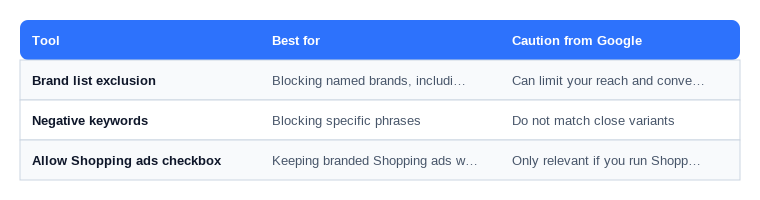
Google says one benefit of brand lists over keywords is not having to enter misspellings, variants or versions in multiple languages. Brands are defined as organizations or trademarked goods and services with a distinct brand, such as Nike, while keywords are words or phrases customers use, such as sports shoes. Plain negatives are covered in How do I add negative keywords in Google Ads?.
| Tool | Best for | Caution from Google |
|---|---|---|
| Brand list exclusion | Blocking named brands, including variants and languages | Can limit your reach and conversions; use only where needed |
| Negative keywords | Blocking specific phrases | Do not match close variants |
| Allow Shopping ads checkbox | Keeping branded Shopping ads while excluding brand text queries | Only relevant if you run Shopping inventory |
How do I set it up?
- In Google Ads open Tools, then Shared library, then Brand lists, and create a list.
- Add the brands you want to include in it: your own brand, competitors or brands from Google’s library. Lists are created at the account level and applied to campaigns.
- For a new campaign, open More settings in Campaign settings and choose Brand exclusions; for an existing one open the campaign’s Settings tab, then Additional settings, then Brand exclusions.
- Select the brand lists to apply, and tick “Allow Shopping ads on searches that mention excluded brands” if you want that.
- Save and record the date, so you can compare results before and after.
If a brand is missing from the library, Google says you can request that it be added, and that its library uses single, global canonical brands, so if a localized brand is unavailable you should add the primary canonical name.
Should a store exclude its own brand?
Often the goal is to push brand searches into a Search campaign where you control the ad and bid, and keep Performance Max on prospecting. Google’s pages say brand settings aim to help with brand traffic needs, and recommend using them only for campaigns that really need them so as not to limit conversion opportunities. So test it: exclude your brand from Performance Max for a few weeks, run a brand Search campaign, and compare total revenue, not just Performance Max ROAS. Read Performance Max vs Search campaigns for e-commerce first, because conversions can move between campaigns without total sales changing.
What should I watch after applying it?
Watch total store orders against ad spend. A lower Performance Max conversion count after exclusions may mean the campaign had been collecting branded conversions that Search now collects; that is expected, not a loss. A fall in total store revenue is the signal that matters. Compare against your store data, as in Shopify and Google Ads conversions differ: why, and keep asset and theme work separate: How should I structure Performance Max asset groups?.
What mistakes should I avoid?
Three are common. Excluding your own brand from every campaign at once removes the traffic that most often converts, so apply it to one Performance Max campaign first. Forgetting the Shopping checkbox can remove branded Shopping ads you wanted to keep. And judging the change on Performance Max ROAS alone misleads, because you also moved conversions elsewhere. Record the date, the brand list and the campaigns it touched, and review total store revenue after two to four weeks. Google’s own caution is to use brand settings only where they are really needed, so the default should be no exclusion until you see brand terms taking spend you could capture more cheaply.
Bach.ai is our product. Its Google Ads audit looks at spend allocation and wasted spend, and with the read-only Shopify connection compares channel-reported revenue with store orders. On a paid plan a supported change is applied on Meta or Google Ads only after you approve it by default (Auto-Pilot is opt-in); the free trial does not apply changes, and recoverable-spend figures are estimates, not guarantees. For a hands-on review, use the Meta Ads audit checklist.
FAQ
Do brand exclusions affect Performance Max the same way as Search?
Google says brand exclusions apply to Search, Shopping and YouTube search inventory in Performance Max, and the Search upgrade into AI Max does not impact Performance Max campaigns.
Can I keep Shopping ads for an excluded brand?
Yes. Google provides an option to allow Shopping ads on searches that mention excluded brands.
Will it block misspellings?
Google says one benefit of brand lists over keywords is not having to enter misspellings, variants or multiple languages.
Where do I manage brand lists?
In Tools, then Shared library, then Brand lists. Lists are created at the account level and applied to individual campaigns.
Sources, read on 25 November 2026: Apply brand exclusions to Performance Max or Search campaigns; About brand settings for Search and Performance Max; Manage a brand list.