How to Set Up Merchant Center Promotions
How do I set up Google Merchant Center promotions?
Activate the Promotions add-on in Merchant Center Settings, then create promotions under Marketing with the promotion builder, a promotions data source or the Merchant API. Each promotion goes through policy and product review before it shows as a special offer link on Shopping ads and free listings.
A sale that lives only on your website is invisible where many shoppers start: Google Shopping. Merchant Center promotions put an offer line on your product listings, so a 15% off or free shipping message sits next to the price. The feature is an add-on with its own rules and review, and mistakes tend to show up as disapproved promotions. This guide follows Google’s Merchant Center help pages, read on 25 November 2026.
What do promotions do?
Google describes Promotions as an add-on feature in Merchant Center for Shopping ads, Local Inventory Ads and free listings that lets you promote offers to increase the appeal of your products. When you add promotions to products, shoppers see a special offer link, for example 15% off or free shipping. Promotions can show across properties such as Google Search, the Shopping tab and Chrome. In the US, Google also has a deals page on Search that shows on-sale products, and promotions eligible to show on Search can place your products there.
Who is eligible?
Google lists the requirements: offers in a listed country (it names Australia, Brazil, Canada, France, Germany, India, Italy, Japan, Korea, the Netherlands, Spain, the UK and the US), no connection to a marketplace, and an active Merchant Center account with at least one active product and one claimed URL. If you have not claimed your site yet, see how to verify and claim your website in Merchant Center.
How do I activate and create a promotion?
- Check whether the add-on was activated automatically, which Google says can happen for eligible accounts.
- Open Settings, then Add-ons, find the Promotions card under Discover and select Add if it is not active.
- Select Promotions under Marketing, then Add promotion.
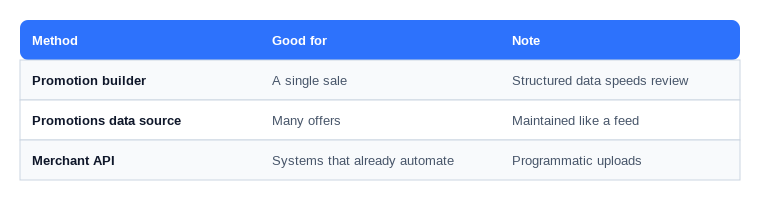
- Choose a method: the promotion builder for one promotion, a promotions data source, or the Merchant API.
- Select the products the offer applies to, ideally in your product data source.
- Submit and wait for review: Google says each promotion goes through a policy review and a SKU review before it can show.
| Method | Good for | Note |
|---|---|---|
| Promotion builder | A single sale | Structured data speeds review |
| Promotions data source | Many offers | Maintained like a feed |
| Merchant API | Systems that already automate | Programmatic uploads |
What gets promotions disapproved?
Google lists common policy disapprovals: shipping code required, conditions overly restrictive, editorial issues, inconsistent applicability, minimum discount not stated and unclear free gift. Product validation disapprovals include unmapped products, free shipping available without a code, invalid coupon code, no or lower discount, insufficient discount value and no active products. Google adds that after you edit a promotion to resolve a disapproval you do not need a new promotion ID when you resubmit; the review starts again.
What are the best practices?
Google’s best-practice page tells you to provide structured data through the promotion builder to speed reviews, to select promotional products in your product data source so the promotion can show quickly, and to make titles specific, accurate and easy to understand. It also notes a limit on the total number of active promotions in an account. For US retailers, it says competitive pricing with sales and discounts can automatically make products eligible for increased visibility.
For a campaign view, a promotion works best alongside a time-boxed budget; see campaign total budgets and the sale countdown steps in sitelinks and sale countdowns. Before you discount, check the maths with the break-even ROAS calculator.
What are dynamic promotions?
Google describes dynamic promotions as a feature that automatically selects the optimal coupon or promotion to apply to Shopping ads to maximise gross profit, using your cost of goods sold, your discounts and conversion feedback. Google states this product is still in beta, so treat it as something to ask Google about, not something to plan around.
What does a promotion plan look like for a sale?
Plan the promotion two weeks before a major sale, because review takes time. Decide the offer: percentage, fixed amount or free shipping, and whether it needs a code. Write a clear title, since Google says specific, accurate titles help. Choose the products: either all, or a group you identify in the product data source. Set start and end dates, including time zone. Make sure the landing page shows the offer clearly and that any code works for everyone. Submit through the builder for a single offer or via a data source for many. After submission, check the status and fix disapprovals; remember you do not need a new promotion ID when you resubmit. During the sale, track clicks and impressions in the promotions summary, and after it ends compare with a normal week.
Where does Bach.ai fit?
Bach.ai is our product. With a Shopify store connected it can compare ad-reported revenue with real orders and show margin ROAS where product costs are available, which is the check a discount needs. It does not create promotions in Merchant Center.
FAQ
Do promotions cost extra?
The pages we read describe Promotions as an add-on in Merchant Center and say nothing about a fee. You still pay for any Shopping ad clicks as usual. Check the add-on card in your account for current terms.
Why is my promotion not showing?
It may still be in review, disapproved, or have no active products mapped. Google says promotions go through policy and SKU review, so check the status card first.
Can a marketplace seller use promotions?
Google says you must not be connected to a marketplace to be eligible, though it runs a closed beta for some marketplaces. Check your account.
How many promotions can I run?
Google says there is a limit on the total number of active promotions in an account and points to its quota page for the figure. Plan around it for holiday periods.
Sources
Sources, each opened and read on 25 Nov 2026: Google Help pages, Get started with Promotions; Promotions best practices; Fix issues with disapproved promotions; About dynamic promotions. Menu names and limits change, so check the page before you act.