How Do I Build White-Label Meta Ads Reports?
How do I build white-label Meta ads reports for clients?
Create a saved report in Ads Reporting with the columns and custom metrics your client uses, schedule it by email for single accounts, and export the data to a spreadsheet or deck you brand yourself. Meta cannot schedule cross-account reports by email, so multi-account views need a manual export.
Clients read reports with your name on them. White-labelling means the numbers come from the platform and the presentation is yours. Meta gives you the data tools; the branding layer is yours to add. This guide shows what the tools do and where they stop.
What can Meta’s reporting do natively?
Meta Ads Reporting lets you create custom reports using breakdowns, metrics and filtering (About breakdowns, metrics and filtering). Breakdowns include level (campaign, ad set, ad), time (day, week, month), demographics, geography and more. You can also save custom metrics: Meta says custom metrics let you formulate and save your own metrics, accessible from the Ads Manager table and Ads Reporting, so you can run analyses without exporting data (About Custom Metrics).
Column presets in Ads Manager give a starting point: Meta lists presets such as Performance, Delivery, Engagement, Sales and others that show different sets of settings and metrics at campaign, ad set and ad levels (About column presets).
How do I schedule the report?
Meta says scheduled recurring reports work for single account reports only; cross-account reports cannot be scheduled for email. You need administrator, advertiser or analyst access to the ad account, and only people with permission on the account can open the report (Run a recurring report). The steps are:
- Open Ads Reporting and open or create your report.
- Turn on schedule email, add subscribers and click apply, or use the cog icon, report settings and the schedule toggle.
- Click Save to confirm.
- Check the first email arrives and opens for the client.
What can I brand?
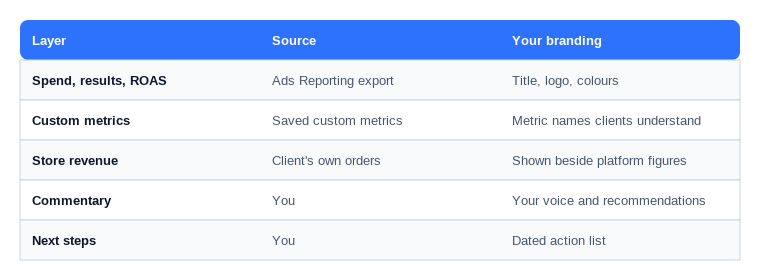
Meta’s emails are Meta-formatted, so branding means taking the data out. Export from the reporting table as .csv or .xlsx, or choose a custom export and schedule it by email (Export performance data). Meta says some columns cannot be exported, among them Tags, Age, Gender, Location, Body, Destination Type, Link (URL), Preview link, Related Page and Title, and the maximum reporting window is 37 months. Build your branded template around what does export.
| Layer | Source | Your branding |
|---|---|---|
| Spend, results, ROAS | Ads Reporting export | Title, logo, colours |
| Custom metrics | Saved custom metrics | Metric names clients understand |
| Store revenue | Client’s own orders | Shown beside platform figures |
| Commentary | You | Your voice and recommendations |
| Next steps | You | Dated action list |
What should a client report contain?
Keep it short and honest: spend, purchases, cost per purchase and ROAS by campaign for the date range, the attribution setting and currency, the client’s own store revenue for the same dates, two lines on what changed, and the next test. How do I report Meta ads results to clients? covers structure and cadence in more depth, and What should a Meta ads dashboard actually show? helps decide what stays off the page.
How do I keep reports consistent across clients?
Consistency is what makes a report feel like a product. Use the same six columns for every client, in the same order, with the same names, so a client who moves between your accounts, or a colleague who covers for you, reads them the same way. Save one master report layout per objective (sales, leads, traffic) and duplicate it for each new account. Keep a naming convention for custom metrics, for example “Blended CPA (store)” versus “Meta CPA”, so nobody confuses the platform’s figure with the store’s.
Build a monthly checklist for every report before it goes out: date range correct, currency shown, attribution setting stated, totals match the Ads Manager summary row, no deleted campaigns missing from the export, commentary written, next test named. Five minutes of checking saves the awkward email when a total is off. Archive each sent report with its date, since you will want to compare quarter to quarter and Meta’s export window is finite.
What are the limits of white-labelling?
It cannot fix a number that is wrong at the source. If Meta and the store disagree, a handsome report only hides it. State the attribution model, because Meta says results cannot be compared in the Campaign Overview table across ad sets with different attribution models. And remember that report data belongs to the client’s account: keep it confidential and handle it under your contract.
Can software help?
Bach.ai lists white-label reporting on its Agency plan, covering up to 20 brands, and answers questions about an account from synced data with the math shown; feature availability depends on entitlement and connected data, so check the pricing page and your plan before you rely on it. It will not decide your report’s structure. The Meta ads audit checklist gives a baseline section you can reuse.
FAQ
Can I schedule one report for all of a client’s accounts?
Not by email. Meta says cross-account reports cannot be scheduled for email, so export them yourself.
Who can receive a scheduled report?
Subscribers you add, but Meta says only people with permissions on the ad account can access the report.
How far back can I report?
Meta lists a maximum reporting window of 37 months from the date of the export request.
Can the client see my custom metrics?
Custom metrics are saved in the account’s reporting tools; whether the client sees them depends on their access. Check with a test login before you promise it.
Sources: Meta Business Help Center, About breakdowns, metrics and filtering, About Custom Metrics in Ads Reporting, About column presets, Run a recurring report, Export performance data (checked 25 Nov 2026); Bach.ai capabilities from our features page and pricing.