How Do I Test a Google Smart Bidding Strategy?
How do I test a Google Smart Bidding strategy?
Change one variable at a time, on a campaign with at least 30 conversions in the last 30 days. Ignore the first 14 days or three conversion cycles, let the test run uninterrupted for at least 30 more days, and exclude recent days where under 90% of conversions have reported before you compare results.
Switching a Google Ads campaign to Target ROAS and judging it after four days is the most common way to conclude that automated bidding “does not work”. Google publishes a test plan that avoids it. This post turns that plan into a checklist.
Which strategy matches which goal?
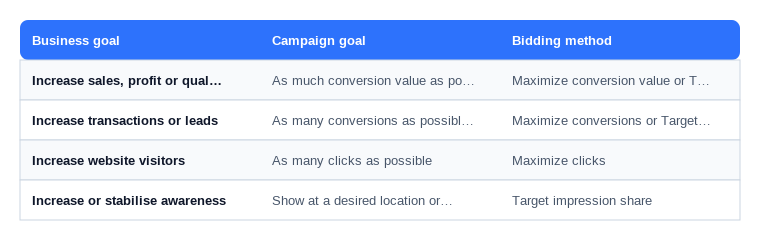
Google’s guide says to choose a strategy that fits your main business goal (Pick the right bid strategy):
| Business goal | Campaign goal | Bidding method |
|---|---|---|
| Increase sales, profit or qualified leads | As much conversion value as possible at a fixed budget or return | Maximize conversion value or Target ROAS |
| Increase transactions or leads | As many conversions as possible at a fixed budget or cost | Maximize conversions or Target CPA |
| Increase website visitors | As many clicks as possible | Maximize clicks |
| Increase or stabilise awareness | Show at a desired location or impression share | Target impression share |
Google adds that since some conversions are worth more than others, it recommends reporting values and using a conversion value strategy. It also notes that from June 2026 it is relabelling strategies: “Maximize conversions with a Target CPA” becomes “Target CPA” and “Maximize conversion value with a Target ROAS” becomes “Target ROAS”, with the underlying behaviour unchanged.
How should I design the test?
From Google’s test guide (Test your bid strategy):
- Keep each test simple and change one variable at a time; do not test new ads or landing pages at the same time.
- Pick the largest campaign you are comfortable experimenting with, one that has been running for a while.
- Aim for campaigns and splits that provide at least 30 conversions in the last 30 days.
- Day 1: launch the experiment.
- Day 1 to 14: let it ramp up, which Google says could be 2 weeks or 3 conversion cycles, whichever is longer. Always exclude this period when evaluating performance.
- Day 14 to 44: let it run uninterrupted for at least 30 days.
- Exclude recent days where fewer than 90% of your conversions have been reported, to account for conversion lag.
How do I read the result?
Use the bid strategy report, which shows the strategy’s status, campaign performance and insights such as conversion day reporting and recommendations, plus top signals Smart Bidding uses, such as audience list, day of week, device, query and time of day (Evaluate your automated bid strategy’s performance). Google says to wait 1 to 2 full conversion cycles before comparing average target ROAS with actual ROAS, and warns that a major change in targets can have a similarly sized impact on spend or volume. It also says bid and budget simulators show conversions your ads might have received at different budgets or targets.
What mistakes ruin the test?
- Changing the budget or creative mid-test.
- Judging after a week when Google says to ignore the first 14 days.
- Ignoring conversion lag, so the newest days look worse than they are.
- Setting an unrealistic target, then calling the strategy broken.
- Testing on a campaign with a handful of conversions.
If you are weighing a Meta bid strategy as well, Which Meta bid strategy should I use? covers the Meta side, and How does AI budget allocation work on Meta and Google Ads? covers the budget layer above bidding.
When should I not test?
Skip a test when the account is tiny, when tracking is unreliable, or when a major promotion falls inside the 44-day window. Google’s guide says seasonality adjustments are for a major change in conversion rates expected for 1 to 7 days for an unprecedented reason such as a promotion; it says not to use them when you expect only the mix of users to change in a seasonal period, or when the period lasts more than 7 days, because Smart Bidding will account for it. Plan the test around your sales calendar, and do not stack a seasonality adjustment on top of an experiment unless you can separate the effects.
If tracking is shaky, fix that first: a bid strategy optimises toward the conversion it sees, and a wrong conversion value teaches it the wrong lesson. Check that purchase value and currency are correct against your store, and that duplicate conversions are not counted. Only then judge the strategy.
What do I record?
Write down before you start: the hypothesis, the strategy and target, the date, the baseline cost per conversion and conversion value over the previous 30 days, and the decision rule, for example “keep if cost per conversion is no worse by more than 10% and volume is stable”. Without a decision rule, results turn into stories. Use your store’s orders to sanity-check conversion value; see the Meta ads audit checklist for the tracking checks that apply on any platform.
Can software help?
Bach.ai reviews budget and bidding on connected Google Ads accounts and flags spend on weak areas, with changes applied only after your approval by default on a paid plan. It does not run Google’s experiment or shorten its timeline; Google’s own guidance on ramp-up and conversion lag applies regardless of tool.
FAQ
Do I need 30 conversions to test?
Google aims for campaigns and splits with at least 30 conversions in the last 30 days. Below that, results are too noisy to read.
How long is the whole test?
Per Google’s timeline, about 44 days: a ramp period of 2 weeks or 3 conversion cycles, then at least 30 days uninterrupted.
What is conversion lag?
The delay between a click and a reported conversion. Google says to exclude recent days where under 90% of conversions are reported.
Can I change targets during the test?
Avoid it. Google says major target changes can change spend or volume by a similar amount, which breaks the comparison.
Sources: Google Ads Help, Pick the right bid strategy, Test your bid strategy, Evaluate your automated bid strategy’s performance (checked 25 Nov 2026); Bach.ai capabilities from our features page.