When to Use Maximize Clicks Bidding
When should an online store use Maximize clicks bidding?
Use Maximize clicks for a new campaign with no conversion data, or for traffic goals such as testing landing pages, and always set a maximum CPC bid limit. Google says it raises and lowers bids to get as many clicks as possible within budget, ignores impression share and does not account for mobile versus desktop conversion rates.
Maximize clicks does exactly what it says, and that is the problem for a store: clicks are not orders. Used at the right moment, it is a sensible starter strategy; used for months, it spends on whoever clicks cheapest. This guide uses Google’s help pages, read on 25 November 2026, to show where the line sits.
How does Maximize clicks work?
Google describes it as an automated bid strategy that adjusts maximum cost-per-click and sets your bids to help get as many clicks as possible within your budget. It does not optimise towards impression share. You can use it for a single campaign or as a portfolio bid strategy, which groups several campaigns. Demand Gen campaigns support it but not portfolio bidding or maximum CPC bid limits.
What does the CPC limit do?
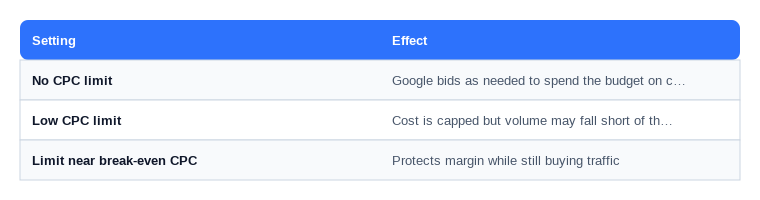
A maximum CPC bid limit caps bids under Maximize clicks, so you steer the most you are willing to pay for each click. Without one, Google Ads adjusts bids to get as many clicks as possible while spending your budget. Google also warns that if your CPC bid limits are too low, the strategy might not be able to help you achieve your goal. Set it near what a click is worth to you, derived from your conversion rate and break-even cost per order, not from a guess.
| Setting | Effect |
|---|---|
| No CPC limit | Google bids as needed to spend the budget on clicks |
| Low CPC limit | Cost is capped but volume may fall short of the goal |
| Limit near break-even CPC | Protects margin while still buying traffic |
Illustrative arithmetic: with a 2% conversion rate and a break-even cost per order of $30, a click is worth about $0.60, so a limit well above that needs a reason.
What is the device catch?
Google says that when Maximize clicks raises and lowers bids, it doesn’t take into account differences between clicks from mobile devices and clicks from desktop or tablet devices. Since mobile conversion rates often differ, Google suggests you may want to adjust for that, which is one reason a conversion-based strategy is better once you have data.
When does it make sense?
- New campaign with no conversion history, where Smart Bidding has little to learn from.
- Traffic test for a landing page or a new category, judged by engagement and add to cart.
- Brand protection with a low CPC limit on a small budget.
- Data gathering before moving to Maximize conversions or Maximize conversion value.
For a store with steady sales, move to a conversion-based strategy; see Target CPA or Maximize conversions and Target ROAS or Maximize conversion value. If you do not yet have conversion data, how to test a Smart Bidding strategy shows the volume to aim for.
How does it relate to Limited by budget?
Google’s status page says Limited by budget can appear in two cases, one being that you use Maximize Clicks bidding and could increase traffic by adjusting your budget. That is a traffic suggestion, not a profit one; check cost per conversion before following it. See what Limited by budget means.
How do I switch off Maximize clicks safely?
Create the new strategy, apply it to one campaign or an experiment rather than the whole account, and compare cost per conversion with the old one. Strategy changes can display a temporary Learning status for up to 7 days; see how long Learning status lasts.
What is a safe way to use it for a new campaign?
Set a daily budget you can afford to lose while learning, and set a maximum CPC well below the break-even cost per click. Start with tightly themed keywords or products, not a broad catalogue. Let it run for a fixed window, for example two weeks, and gather enough conversions to choose a conversion strategy. Review search terms every few days and add negatives, because click-focused bidding buys whatever is cheapest to click. Watch cost per conversion, even if few conversions arrive, and compare it with the number you need. When you have enough conversions to switch, move to Maximize conversions or Maximize conversion value in an experiment so you can compare. If conversions never arrive, the problem is likely the offer, page or tracking, not the bid strategy.
Where does Bach.ai fit?
Bach.ai is our product. It reviews bidding on a connected Google Ads account and flags campaigns still on click-based bidding despite enough conversions. On an active paid plan it can apply a supported change after you approve it, by default. The CPC limit is yours to set.
FAQ
Is Maximize clicks good for sales?
Not directly. It optimises for clicks, not purchases. Use it for traffic or when you lack data, and move to conversion-based bidding afterwards.
Does it work with a budget limit?
Yes. It spends your budget on as many clicks as it can. Google warns that low CPC limits can stop it reaching its goal.
Can I use it in Demand Gen?
Google says Demand Gen supports Maximize clicks but not portfolio bidding or maximum CPC bid limits.
Should I set a CPC limit?
Usually yes, to control cost. Pick it from your break-even cost per click rather than the default.
Sources
Sources, each opened and read on 25 Nov 2026: Google Help pages, About Maximize clicks bidding; Maximize clicks: Definition; Fix Limited by budget status. Menu names and limits change, so check the page before you act.