Google Ads Account Structure for Smart Bidding
How should I structure my Google Ads account for Smart Bidding?
Google's guidance is to base each campaign on one objective, group keywords into themed ad groups instead of single-keyword ones, avoid splitting by match type, geo or device, and keep campaigns from being limited by budget. Simpler, consolidated structures give automated bidding more data per target and are easier to manage.
Most store accounts were built for a world of manual bids: one campaign per match type, one per device, one per country. Smart Bidding changes the economics. It optimises for a target using the conversions it can see, so each split starves part of the account of data. Google’s account structure guidance says so plainly, and it is worth reading before the next rebuild. Sources were read on 25 November 2026.
What does Google recommend?
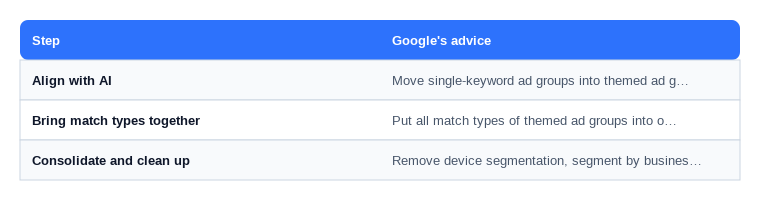
Google says your account structure is critical to maximising Google AI’s potential in Search campaigns, and that simpler, consolidated, tightly themed setups unlock better performance, easier management, clearer trends and fewer errors. Its ABC checklist:
| Step | Google’s advice |
|---|---|
| Align with AI | Move single-keyword ad groups into themed ad groups |
| Bring match types together | Put all match types of themed ad groups into one ad group, then simplify |
| Consolidate and clean up | Remove device segmentation, segment by business objective, clean duplicate and non-serving keywords |
The reasoning: orienting Smart Bidding around a single target lets the system find the most conversions within it, while segmented traffic forces it to optimise multiple targets separately, potentially reducing efficiency. Duplicating a keyword across match types segments the data Smart Bidding works with. Google also says Smart Bidding already takes device into account, so device campaigns add management work without benefit.
On match types, Google’s page goes further: it says there is no additional benefit to multiple match types with Smart Bidding and that broad match is the only type using all available signals; it reports that 62% of advertisers using Smart Bidding use broad match as their primary type (Google internal data, January to February 2023). That is a vendor claim; test it before adopting it wholesale, as in broad match with Smart Bidding.
What is the one-objective rule?
Google’s account setup page says automated bidding is objective-based, so a single campaign should generally have one objective. If you optimise for clicks on some keywords and conversions on others, give them their own campaigns. It adds that automated bidding doesn’t require campaigns or ad groups broken out by keyword match type, geo, device and so on, and that it works across a variety of structures.
What should I still keep apart?
Consolidate data, not different economics. Keep separate campaigns where goals or numbers differ:
- Brand versus non-brand, because cost and conversion rate differ; see brand settings in Performance Max.
- Margin tiers that need different ROAS targets; use custom labels.
- Different currencies or countries with separate budgets and shipping.
- Different objectives, such as acquisition versus a clearance campaign.
Google also advises avoiding campaigns limited by budget, and using Maximize conversions or Maximize conversion value if you have daily budget goals; see what Limited by budget means.
How do I organise ad groups?
Google’s basic guidance is to bundle related ads and keywords into an ad group so related ads show for similar searches, and to organise campaigns and ad groups as you create them, because reorganising after you have created several wipes out valuable data you have accumulated, possibly. Plan the structure before launch, and restructure only with a clear reason, using an experiment; see how to run a Google Ads experiment.
How do I consolidate safely?
- List every campaign with spend, conversions and target.
- Group the ones with the same objective and similar margin.
- Merge one group first, into a new campaign, rather than editing the old ones.
- Expect a learning period; see how long Learning status lasts.
- Compare after a full cycle, not after a few days.
- Use Google Ads Editor for the bulk work.
What does a consolidation plan look like for a small store?
Illustrative starting point: a store has 14 campaigns: brand by match type (3), generic by match type (3), Shopping by device (3), Performance Max (1), Demand Gen (1) and three old tests. A consolidated version might be: one brand campaign, one non-brand Search campaign with themed ad groups, one Shopping or Performance Max campaign on the feed with custom labels for margin tiers, one Demand Gen prospecting campaign and one clearance campaign when needed. That is five or six campaigns, each with a clear objective and enough conversions to learn. Do the change in stages, starting with the largest duplication, such as device splits, and measure each stage against the old setup. Archive paused tests and note why they were stopped. See how to run an experiment and Performance Max versus Search.
Where does Bach.ai fit?
Bach.ai is our product. It audits connected Google Ads accounts and flags fragmented structures, such as many campaigns each below the conversion volume Smart Bidding needs. On an active paid plan any supported change waits for your approval, by default. The structure choices remain yours.
FAQ
Should I stop using exact match?
Google says there is no additional benefit to multiple match types with Smart Bidding. Test before removing; keep tight keywords where brand or compliance matters.
How many campaigns should a store have?
As few as your objectives and margins allow. Google’s rule is generally one objective per campaign.
Should I split by device?
Google says to remove device segmentation, because Smart Bidding already takes device into account.
Does restructuring reset results?
Reorganising can wipe accumulated data and trigger a learning status, so move in steps.
Sources
Sources, each opened and read on 25 Nov 2026: Google Help pages, The ABCs of Account Structure; Account setup best practices; Organize your account with ad groups. Menu names and limits change, so check the page before you act.