What Are Collaborative Ads on Meta?
What are collaborative ads on Meta?
Collaborative ads are a solution built on Advantage+ catalog ads. A retailer or marketing partner shares a catalog segment with a brand advertiser, and the brand runs catalog sales ads using retailer-provided content. The brand cannot edit the segment but can create its own product sets from it.
Many brands sell through retailers whose websites hold the checkout, the product data and the pixel. Collaborative ads are Meta’s way to let that brand advertise those products without owning the retailer’s catalog. This guide explains who shares what, what the brand gives up, how reporting works and what to ask before you agree to a partnership.
What are collaborative ads?
Meta’s Collaborative Ads documentation calls it a solution built on top of Advantage+ catalog ads. It lets brand advertisers collaborate with a retailer or a marketing partner and pursue goals such as sales of target products, using retailer-provided content.
Advantage+ catalog ads themselves, in Meta’s description, create personalized ads based on a set of products. Collaborative ads reuse that machinery with one change: the product data belongs to the retailer, not the brand.
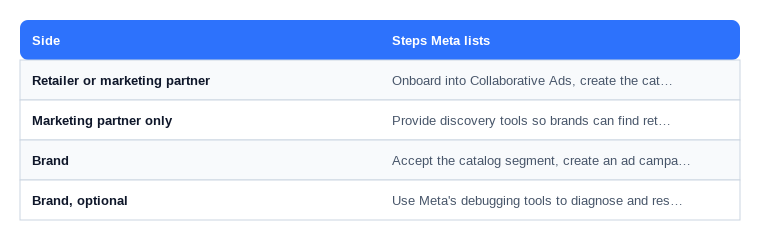
Who does what in a collaboration?
The retailer or marketing partner shares a catalog segment with the brand. A segment is a portion of the retailer’s catalog, or a superset of product sets, and it must hold the products belonging to that prospective brand partner. The brand accepts the segment and runs Advantage+ catalog ads from it. The brand cannot edit the segment, but it can create its own product sets from it.
| Side | Steps Meta lists |
|---|---|
| Retailer or marketing partner | Onboard into Collaborative Ads, create the catalog segment, share it with the brand partner |
| Marketing partner only | Provide discovery tools so brands can find retailers |
| Brand | Accept the catalog segment, create an ad campaign with it, view reporting |
| Brand, optional | Use Meta’s debugging tools to diagnose and resolve problems |
Meta says retailer onboarding is currently not supported through the API and must be done in the interface, starting from the Collaborative Ads Retailer Directory. If you are the retailer, expect your parent catalog to need to be Collaborative Ads compliant, a status you can find in Commerce Manager.
How does a brand accept and start running ads?
The brand’s business admin goes to the Collaboration Center, selects the business whose terms it is accepting, picks Partners and uses the Accept assets button. Meta adds that brands may also have to agree to retailer-mandated terms, such as creating a new ad account, granting view access so the retailer can see ad performance, or both. Accepting these terms is necessary to complete onboarding, so read them before the partnership kicks off.
Once the segment is accepted, the brand creates an ad campaign as it would for its own catalog, but supplies the catalog segment ID instead of a catalog ID. Meta recommends a separate ad account for each retailer. After that ad account is linked to a retailer, it can only select catalog segments belonging to that retailer.
What can a brand not change?
Meta lists four things that are normally available in Advantage+ catalog ads but not with a catalog segment:
- The multi-share end card is off by default and cannot be changed.
- The description in the creative template data cannot be changed.
- Deep-link URLs in the template must point to the merchant’s website.
- Custom tracking specs are disabled.
For a marketer these limits mean less creative control and no custom tracking on those ads, so plan on the retailer’s site and tracking as the source of truth. For general catalog ad creative rules, see Meta’s Advantage+ catalog ads requirements.
How is performance reported?
Because the brand runs a normal catalog sales campaign, it can use standard ads reports that now include metrics related to the catalog segment. Meta also describes product-level and retailer-level reporting that shows only the brand’s purchases to the brand advertiser.
The segment metrics Meta documents include catalog_segment_value, a breakdown of conversion events such as purchases, add to carts and view products for the segment at each ad object level. Return on ad spend figures for shared items are based on information received from the retailer’s connected business tools, and converted product values are recorded by the retailer partner’s pixel or app SDK. The API returns product IDs only, so Meta points to Ads Manager if you want brand names. Meta also labels these as estimated metrics.
Takeaway: your results depend on the retailer’s tracking being healthy. Ask the retailer how its pixel and server events are set up, and use the Meta pixel and Conversions API guide as a shared checklist.
What should I ask a retailer before agreeing?
- Will we have to create a new ad account, and who gets view access to performance?
- Which products are in the segment, and who maintains stock and price data?
- Who owns the pixel that records conversions, and can we see how it is configured?
- How often will the catalog behind the segment refresh? See what a Meta catalog holds.
Where does Bach.ai fit?
Bach.ai is our product. It audits Meta and Google Ads accounts and flags disapproved ads as policy blockers, but it does not set up collaborative ads, share catalog segments or onboard you into Meta’s retailer directory, and findings are estimates, not guarantees. On a paid plan a supported change is applied only after you approve it by default. For a full review of your own account, use the Meta ads audit checklist.
FAQ
Can a brand edit the catalog segment it receives?
No. Meta says brand advertisers cannot edit the catalog segment, but they can create their own product sets from it. Changes to the products themselves have to come from the retailer or marketing partner that shares the segment.
Do I need a separate ad account for each retailer?
Meta says you should use a separate ad account for each retailer you run collaborative ads for. Once a dedicated ad account is linked to a retailer, it can only select catalog segments from that retailer.
Which campaign objective is used?
Meta’s example creates a Product Catalog Sales campaign and passes the catalog segment ID in the promoted object instead of a catalog ID. The brand otherwise creates and runs ads as it does with its own catalog.
Can the retailer see my ad results?
It can be required. Meta says brands may have to agree to retailer-mandated terms, including granting view access so the retailer can see ad performance, and that accepting these terms is necessary to complete onboarding.
Sources, read on 25 November 2026: Collaborative Ads; Advantage+ catalog ads, get started; Catalog overview.