What Is a Meta Catalog and What Can It Hold?
What is a Meta catalog and what can it hold?
A Meta catalog is a structured data file holding information about the items in your inventory. Each row is one product variant, such as a size and colour, and each column is an attribute such as title, description, image, price or inventory. You fill it by feed upload, supplementary feed or batch updates.
Every product ad Meta shows starts as a row in a catalog. If the catalog is thin, stale or full of errors, the ads built on top of it inherit the problem. This guide explains what a catalog is, what each row and column means, the ways you can fill and refresh it, and where Meta tells you that an upload partly failed.
What is a Meta catalog?
Meta’s catalog overview describes a catalog as a structured data file that holds information about the items in your inventory. Before buyers can purchase items from you, the page says, you need to upload your product information into a catalog. If you already advertise with Advantage+ catalog ads (dynamic ads), you already have a catalog and should build on it rather than start another. If you have none, you can create a new E-Commerce catalog in Commerce Manager.
Catalogs are managed inside a Meta Business Manager. If your marketing team already created one, ask them for access instead of creating a second.
What does one row and one column mean?
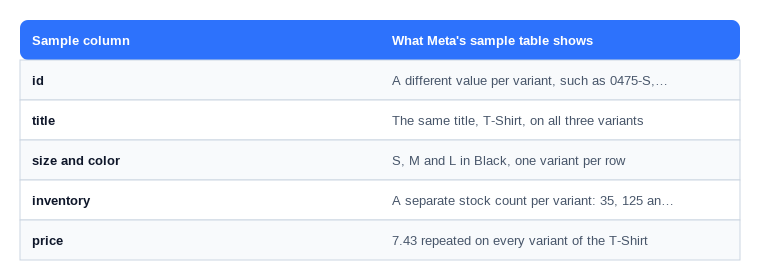
Meta says each row in a catalog represents an individual product, meaning a unique size or colour variant, and each column represents a product attribute such as title, description and image. Its own sample makes the pattern concrete.
| Sample column | What Meta’s sample table shows |
|---|---|
| id | A different value per variant, such as 0475-S, 0475-M and 0475-L |
| title | The same title, T-Shirt, on all three variants |
| size and color | S, M and L in Black, one variant per row |
| inventory | A separate stock count per variant: 35, 125 and 12 |
| price | 7.43 repeated on every variant of the T-Shirt |
| item_group_id | 0475 shared by the three variants so they group as one product |
A product without variants, such as the Shorts row in the same sample, gets its own id and its own item group value. The practical rule for a store owner: one sellable variant is one row, and the group id is what ties variants together.
How do I get products into a catalog?
Meta lists several ways to create, update and delete products:
- Upload a product feed file in bulk, manually or on a schedule, in Commerce Manager.
- For existing products, update the stock count (the field called quantity_to_sell_on_facebook) with the catalog items batch API.
- Upload a supplementary feed, manually, on a schedule or through the Product Feed API.
The feed itself can be CSV, TSV, RSS XML, ATOM XML or Google Sheets. Meta calls a flat file in one of those formats the most common approach, and it supports one or many feeds per catalog.
How often does a catalog refresh?
A feed can be uploaded manually or on a schedule of hourly, daily or weekly. Meta describes two schedule types for a given feed:
- A replace schedule refreshes the entire feed, and items missing from the file are deleted.
- An update schedule changes selected items only.
Meta notes that most businesses set up a replace schedule once a day and run an update schedule more often for incremental changes. One rule catches teams that use more than one feed: a product, identified by its id, can exist in only one feed at a time, because product ids are unique to feeds.
If you sell fast and the hourly cadence is too slow, Meta supports live updates of specific fields through its batch API, mostly used for stock information. Its suggested design is to keep general attributes in the feed and update volatile fields such as inventory and availability separately. For how stock reaches your ads, see how Meta uses inventory and availability data.
How do I know an upload failed?
Meta warns that feed and batch uploads are asynchronous, so one or many products can fail to update without you noticing. Errors can come from missing or incorrect product attributes in your data source, and Meta says it is important to check upload status regularly. There are two manual views:
- Open the catalog’s Diagnostics view to see warnings and errors for each upload session, and download error reports for offline analysis.
- Open the Items section of the catalog and check the Issues tab on an individual product.
Beyond upload errors, Meta runs validations on a regular basis after items are ingested, and some issues it finds can block visibility or checkout. Its APIs can list these errors, but for most store teams the Diagnostics view and the Issues tab are the practical check. If you run the dynamic ads that read the catalog, add a calendar slot to look at Diagnostics weekly, and after any big price or stock change.
What should a store team check first?
A few habits follow directly from how Meta describes the catalog:
- Confirm there is one id per variant and a shared group id for variants of the same product.
- Decide which feed owns which products, since an id cannot sit in two feeds.
- Pick the schedule type deliberately: a replace upload can delete items that are missing from the file.
- Look at Diagnostics after each upload rather than assuming success.
For deeper feed checks, see this Meta catalog data quality diagnostic, and if ads are not delivering, the catalog feed health checklist. If you run several product lines, account architecture for multi-SKU catalogs covers how to split them.
Where does Bach.ai fit?
Bach.ai is our product. It audits Meta and Google Ads accounts, flags disapproved ads as policy blockers and checks tracking and signal health, but it does not build, upload or repair your product catalog or feed, and findings are estimates, not guarantees. On a paid plan a supported change is applied only after you approve it by default. For a wider account review, use the Meta ads audit checklist.
FAQ
Can one catalog hold more than one feed?
Yes. Meta says a catalog supports one or multiple product feeds. The one limit it names is that a product, identified by its id, can exist in only one feed at any time, because product ids are unique to feeds.
What file formats can I upload?
Meta lists CSV, TSV, RSS XML, ATOM XML and Google Sheets as supported formats for a product feed. You can upload manually or set an hourly, daily or weekly schedule, then check the Diagnostics view after each upload.
What happens to items missing from a replace upload?
They are deleted. Meta says a replace schedule refreshes the entire feed and that items not present in the feed file are deleted. An update schedule changes only the items you list, so use that type for incremental edits.
Can I update stock without re-uploading the whole feed?
Yes. Meta says you can update the inventory count with the catalog batch API, and supports live updates of specific fields for near real-time changes, mostly used for stock information on fast-selling items.
Sources, read on 25 November 2026: Catalog overview; Inventory guide; Advantage+ catalog ads, get started.