How Do I Add Instagram to a Meta Business Portfolio?
How do I add my Instagram account to a Meta business portfolio?
In Meta Business Suite on desktop open Settings, then Instagram accounts under Accounts, click Add and log in to Instagram. You need a professional account, full control of the business portfolio, and an account that is not already linked to another portfolio, since each Instagram account can sit in only one.
Before an Instagram account can be used cleanly in Ads Manager it should sit in the same business portfolio as your ad account and Page. The steps are short, but the one-portfolio rule trips up agencies and stores that changed owners. This guide uses Meta’s pages on adding an Instagram account to a portfolio, connecting Instagram and a Facebook Page, and creating Instagram ads, read on 25 November 2026. Menu labels change between the older Business Manager and newer Business Suite pages, so check yours.
What do I need first?
Meta’s page lists three checks: an Instagram professional account for your business, full control of the business portfolio, and an Instagram account that is not linked to another portfolio. It says each Instagram account can be added to only one business portfolio. If the account is already in another portfolio you can be given access to it, or add it after it has been removed from the other one. For what a portfolio is and who owns what, see What is a Meta business portfolio? and, if you need to relocate an account, Can I move an ad account to another Meta business portfolio?.
How do I add the account?
- Open Settings in Meta Business Suite for your business portfolio, on desktop.
- Under Accounts, click Instagram accounts, then Add.
- Review the information and click Add Instagram account.
- In the new window enter your Instagram username and password and click Log in.
- Accept the cookie prompt if shown, set up a professional account if yours is personal, and enter the two-factor security code if you use one.
- Click Confirm and wait for the success message.
Meta adds that new campaigns and ad sets will automatically include Instagram as a placement once the account is in the portfolio.
How do I connect Instagram to a Facebook Page?
This is a separate step. Meta says connecting enables cross-posting, shared insights and access to Instagram’s business tools. You need an Instagram professional account, full control of the Page, and the Instagram account in the same business portfolio as the Page. Two cautions from Meta: once connected, anyone with access to either the Page or the Instagram account can manage both assets, and if a Page is linked you can share Instagram posts to Facebook only through that Page, not another Page or a profile.
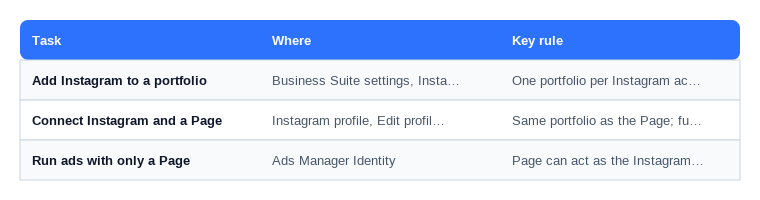
| Task | Where | Key rule |
|---|---|---|
| Add Instagram to a portfolio | Business Suite settings, Instagram accounts | One portfolio per Instagram account |
| Connect Instagram and a Page | Instagram profile, Edit profile, Page | Same portfolio as the Page; full control of the Page |
| Run ads with only a Page | Ads Manager Identity | Page can act as the Instagram identity, see our guide |
Do I need the portfolio to run Instagram ads?
Not strictly. Meta’s Instagram ads page says you can use your Facebook Page or a connected Instagram professional account, and our walk-through of the Page-only route is Can you run Instagram ads without an account?. A portfolio setup is better for stores with several people or an agency, because permissions and ad accounts are managed in one place; see How do I manage many client ad accounts safely on Meta?.
What can go wrong?
If the Add button fails, check whether the Instagram account is already in another portfolio, since Meta allows only one, and whether any involved account is disabled or restricted. If your ads do not show on Instagram after adding the account, read Why aren’t my ads showing on Instagram?. Write down who owns the portfolio and keep a second admin, so a lost login does not lock you out of ads.
What should a store do about access and security?
Two practical rules follow from Meta’s notes. Because anyone with access to either the Page or the connected Instagram account can manage both, give access by task and review the list when staff or agencies change. And because the Add step asks for the Instagram username and password, do it yourself or have the account owner do it, rather than sharing a login in a chat. Turn on two-factor authentication on the Instagram account first, since Meta’s flow supports a security code. Keep a second full-control admin on the portfolio, and record who owns the Instagram account, the Page and the ad account, so that a departure never strands your ads.
Bach.ai is our product. Its audit reads your connected Meta ad account and reports on setup issues; it does not manage your portfolio or logins. On a paid plan a supported change is applied on Meta or Google Ads only after you approve it by default (Auto-Pilot is opt-in); the free trial does not apply changes, and recoverable-spend figures are estimates, not guarantees. For a hands-on review, use the Meta Ads audit checklist.
FAQ
Can one Instagram account be in two portfolios?
No. Meta says each Instagram account can be added to only one business portfolio at a time.
Does adding Instagram connect it to my Page?
No. Connecting to a Page is a separate step with its own requirements, including the same portfolio.
Will Instagram be a placement automatically?
Meta says new campaigns and ad sets will automatically include Instagram as a placement once the account is added.
Do I need a professional account?
Yes. Meta’s steps require an Instagram professional account, and ask you to switch a personal account during the process.
Sources, read on 25 November 2026: Add an Instagram account to your business portfolio; Connect or disconnect your professional Instagram account and a Facebook Page; How to create Instagram ads in Meta Ads Manager.