How Many Ads Can My Facebook Page Run?
How many ads can my Facebook Page run at once?
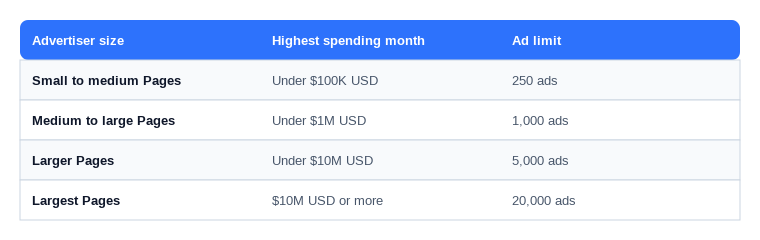
Meta limits ads that are running or in review per Page: 250 for Pages that spent under $100K in their highest month, 1,000 under $1M, 5,000 under $10M and 20,000 at $10M or more. At the limit you cannot run more ads or publish edits, other than turning ads off, until you reduce volume.
Creative testing tempts teams to launch hundreds of ads. Meta limits it per Page, and it also says that more ads usually means worse delivery long before you hit the cap. Both facts matter for anyone running a test-heavy account.
What are the limits?
Meta states that running too many ads at once can hurt performance: generally, when a Page runs too many ads at the same time, fewer ads exit the learning phase and more budget is spent before the delivery system has optimised performance. So there is a limit per Page on ads running or in review, which applies globally regardless of industry (Ad limits per Page).
| Advertiser size | Highest spending month | Ad limit |
|---|---|---|
| Small to medium Pages | Under $100K USD | 250 ads |
| Medium to large Pages | Under $1M USD | 1,000 ads |
| Larger Pages | Under $10M USD | 5,000 ads |
| Largest Pages | $10M USD or more | 20,000 ads |
Meta says tier upgrades typically occur 2 to 3 days after the Page has spent the qualifying amount, and the spend must be within a single calendar month. You can see your Page’s limit in the Ad Limits Per Page tool in Meta Business Suite, and when a Page is within 20% of its limit, the Ad limits per Page tab in Account Overview shows the limit and ways to reduce volume.
What happens at the limit?
Meta says if your Page exceeds its limit, you cannot run more ads or publish edits to existing ads, other than turning them off, until you reduce ad volume below the limit. The limit counts ads that are running or in review.
Why is “fewer ads” usually better before the limit?
Meta’s page on managing ad volume explains that each time an ad is shown, the delivery system learns more about where to show it; when you run too many ads, each delivers less often, fewer exit the learning phase and more budget is spent before optimisation (About managing ad volume). It still says testing creative is important, but to balance it with giving the system room to learn.
How do I reduce ad volume without losing tests?
Meta’s best practices include:
- Combine ad sets, which helps reach the conversions needed to exit learning sooner.
- If you target small geographic areas, combine them into larger areas.
- If you create separate ad sets for placements, combine them and use Advantage+ placements and asset customisation.
- If you create separate ad sets for languages, set multiple languages in one ad set.
- Decrease ads per ad set but keep diverse creative assets; one ad can hold up to 10 creative assets.
- For text variants, use multiple text options in one ad instead of several ads.
- For creative variants, use dynamic creative so the system finds the best combination with one ad.
What does a sensible test volume look like?
Write a rule per ad set: a small number of ads, each with distinct concepts. How many creative variants should I test at once on Meta? gives a four-variant method that stays far below any limit, and When does Advantage+ help and when does it waste budget? explains the automation side. Remember that adding a new ad to an ad set is a significant edit and can send it back into learning (Significant edits), which is another reason to add ads in batches. The Meta ads audit checklist has a structure check you can use before a creative sprint.
How do I check my current volume?
Open the Ad Limits Per Page tool from the menu in Meta Business Suite to see your limit, and compare it with the number of ads running or in review. Do this monthly, and before any large creative sprint. If you are within 20% of the limit, Meta shows ways to reduce ad volume in Account Overview. Count ads, not ad sets: a campaign with 20 ad sets of 5 ads each is 100 ads, which is a quarter of a small Page’s limit before you add a second campaign.
A practical habit is to retire losers on a schedule. Every two weeks, turn off ads that have had enough spend to judge and did not win, keep the winners, and add the next batch. That keeps the count steady, lets the delivery system concentrate on fewer ads and keeps the account readable. Write the ad count in your monthly report so a client sees that the account is not growing ads for the sake of it.
What if I manage many clients?
Each Page has its own limit, so an agency running one Page per client rarely hits it, but a brand running many ad accounts on one Page can. Count ads per Page, not per ad account, and keep a monthly figure per client so you see growth before the cap. If you use bulk import, check volume first; see How do I bulk create ads in Meta Ads Manager?.
Can software help?
Bach.ai reviews account structure, learning health and creative fatigue, which shows where too many ads are splitting budget, and proposes changes for your approval by default on a paid plan. It does not change Meta’s limit, which depends on your Page’s spend.
FAQ
Which ads count toward the limit?
Meta says the limit counts ads that are running or in review.
Do paused ads count?
Meta’s wording I fetched counts running or in review ads; confirm in your Ad Limits Per Page tool for your own Page.
Can I raise my limit?
Meta’s tiers rise automatically after the Page spends the qualifying amount in a single calendar month, typically in 2 to 3 days.
Is the limit per ad account?
No. Meta describes it per Page.
Sources: Meta Business Help Center, Ad limits per Page, About managing ad volume, Significant edits and learning phase (checked 25 Nov 2026); Bach.ai capabilities from our features page.