How Do Meta Lead Ad Forms Work?
How do Meta lead ad forms work and what can I ask?
A lead ad shows a mobile-friendly form that uses information people already shared with Facebook, and the leads belong to your Facebook Page. You can ask full name, email, phone, custom and dropdown questions, appointment times, store choice and, in some countries, a national ID. Settings add a review step or a gated file.
A lead ad captures the sign-up in a form attached to the ad. Meta’s documentation describes the result as quick and privacy-safe for people and as accurate contact information for you to follow up. This guide covers what a form can ask, the settings that change lead quality, and the build order if you create forms through the Marketing API.
How do lead ad forms work?
Meta’s lead ads guide says the form is mobile-friendly and uses information people already shared with Facebook, which makes it easier and faster for people to reach businesses. You need a Facebook Page, because all leads generated via a lead ad belong to the Page. An Instagram account is optional and is needed only if you want to run the ad on Instagram; the leads still belong to the Page.
You can build the ad in Ads Manager or with the Marketing API and associate the form ID. To read leads through the API your app must pass App Review with the leads_retrieval and pages_manage_ads permissions, followed by Business Verification. Meta also says you cannot retrieve leads while your app is in Development mode.
What questions can I ask in a lead form?
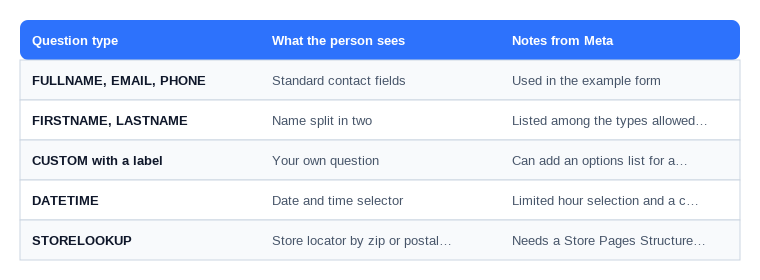
Meta’s creation guide shows the standard and specialised types:
| Question type | What the person sees | Notes from Meta |
|---|---|---|
| FULL_NAME, EMAIL, PHONE | Standard contact fields | Used in the example form |
| FIRST_NAME, LAST_NAME | Name split in two | Listed among the types allowed in Messenger forms |
| CUSTOM with a label | Your own question | Can add an options list for a dropdown of answers |
| DATE_TIME | Date and time selector | Limited hour selection and a confirmation message |
| STORE_LOOKUP | Store locator by zip or postal code | Needs a Store Pages Structure and LOCATION_MANAGER |
| National ID | Country-specific ID question | Argentina, Brazil, Chile, Colombia, Ecuador, Peru |
For a national ID question you can ask for only one ID per form, and you can target only people in the corresponding country. Meta says validation checks for a valid format; it does not verify that the ID belongs to a real person.
Which form settings improve lead quality?
Meta lists advanced form settings that aim for higher quality leads:
- Performance tracking. Add
tracking_parametersas key-value pairs. They do not appear in your ad, but Meta provides metadata about leads from the form. - Higher intent. By default lead ads are optimized for volume. Setting
is_optimized_for_qualityto true adds a step where the person reviews and confirms their answers before submitting. - Filter organic leads. Setting
block_display_for_non_targeted_viewerto true filters out organic leads. - Gated content. Upload a file with
upload_gated_fileand add a thank-you page whose button lets people download it.
Forms for Messenger conversations have stricter rules. The question types must come from CUSTOM, EMAIL, FIRST_NAME, FULL_NAME, LAST_NAME and PHONE, and block_display_for_non_targeted_viewer must be false, which marks the form as Open Sharing. That is the opposite of the organic-lead filter, so decide the placement first.
How do I build a lead ad step by step?
Meta lists six steps for the API route:
- Create a campaign with the
OUTCOME_LEADSobjective, set to PAUSED as in Meta’s example. - Create an ad set whose optimization goal is
LEAD_GENERATIONorQUALITY_LEAD, with destination typeON_ADand your Page as the promoted object. - Create the lead form on your Page with your questions.
- Create an ad creative with a call to action that references the form ID. The CTA type must be APPLY_NOW, DOWNLOAD, GET_QUOTE, LEARN_MORE, SIGN_UP or SUBSCRIBE, and the link can only be
https://fb.me/. - Create the ad from the ad set and the creative.
- Publish: the ad is reviewed with status PENDING_REVIEW and becomes ACTIVE once approved.
The same creative works with a single image, a carousel (one form ID for all cards) or a video. Ads Manager does the same job without code.
How do I manage and retire forms?
You can list forms for a Page, read the questions on one, and archive it. Meta says deleting is not supported. An archived form does not appear by default in the Forms Library and cannot be used in an ad; reactivating means setting its status back to ACTIVE. Meta’s retrieval guide notes that a form can be reused for many ads, so one form may hold far more leads than a single ad using it. Keep one named form per offer so your CRM mapping stays clean, and see how to get leads into your CRM for the delivery side.
Where does Bach.ai fit?
Bach.ai is our product. It audits Meta and Google Ads accounts and flags disapproved ads as policy blockers. It does not build lead forms, collect or store your leads, and findings are estimates, not guarantees. On a paid plan a supported change is applied only after you approve it by default. For a wider review use the Meta ads audit checklist, and read the Meta pixel and Conversions API guide for sending lead quality back to Meta.
FAQ
Do I need an Instagram account to run lead ads?
No. Meta lists a Facebook Page as required and an Instagram account as optional, needed only to run the lead ad on Instagram. Leads from Instagram placements still belong to the Facebook Page.
Can I delete a lead form?
No. Meta says deleting is not supported; you can only archive a form. Archived forms leave the default Forms Library view and cannot be used in an ad, and you can reactivate one by setting its status to ACTIVE.
Can a lead form include a download?
Yes. Meta’s gated content setting rewards people with a file download after they submit. You add the file with upload_gated_file and a thank-you page, and the download appears as a call-to-action button on that page.
Can I ask for a national ID?
Only for the listed countries, one ID per form, and only when your targeting is limited to that country. Meta says validation checks the format, not whether the ID belongs to a real person.
Sources, read on 25 November 2026: Lead ads; Creating lead ads; Retrieving leads.