Sitelinks and Sale Countdowns in Google Ads
How do I add sitelinks and a sale countdown to Google Ads?
Create sitelink assets at account, campaign or ad group level, each with a link text and its own landing page, and schedule them with start and end dates. For a sale, add a countdown customizer to a responsive search ad using a brace and the Countdown option, with an end date and time.
A sale is the one time a store changes its ads on a deadline, and it is where small mistakes show: a countdown that ends after the discount does, or a sitelink that still points at last month’s collection. Sitelinks and countdowns solve different halves of the problem. Sitelinks give shoppers extra routes into the site; countdowns put the deadline in the ad text. This guide uses Google’s help pages, read on 25 November 2026.
What are sitelink assets and why do stores use them?
Google says sitelinks take people to specific pages on your site, for example a specific product or store hours. You can create them at account, campaign, ad group or asset group level. Google lists these benefits: you can change link text and URLs whenever you want without making new ads; sitelinks contribute to Ad Strength; you get click data when sitelinks appeared; and you can edit sitelinks without resetting their performance statistics.
For a store the useful sitelinks are the ones that skip steps: a bestseller page, a size guide, shipping and returns, a sale collection. Each sitelink needs a descriptive link text and a landing page that works on its own.
How do I schedule sitelinks for a sale?
Google lets you specify the dates, days of the week or times of day your sitelinks are eligible to show. That is the safe way to run a promotion: create the sale sitelink with a start and an end date, so it disappears when the offer does.
- Open Ads & assets in your Google Ads account and choose Assets, then Sitelinks.
- Create the sitelink with link text and a final URL that opens the sale collection.
- Add two description lines if you want the expanded format.
- Set the start and end dates, and the days or hours if the offer is time-limited.
- Choose the level: account for every campaign, or campaign or ad group for a specific one.
- Check the landing page on mobile before saving.
Google also recommends conversion tracking for the landing pages sitelinks send people to, and says to optimize those pages for light conversion events such as a visit or an add to cart.
How do countdowns work in ad text?
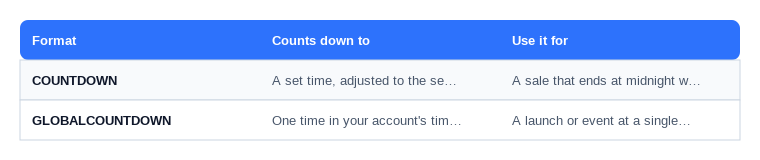
A countdown customizer shows the time left to a sale inside a responsive search ad. Google offers two formats. COUNTDOWN counts down to a set time, adjusted to the timezone of the person searching. GLOBAL_COUNTDOWN counts down to a global time consistent with your account’s timezone, so a line that says it ends in 4 hours in California says the same in New York. Countdowns count down by day, then by hour, then by minute.
To add one, edit or create a responsive search ad, type a brace where you want it, select Countdown from the drop-down, and fill in the end date and time. If you leave the start blank, it starts showing 5 days before the end date.
| Format | Counts down to | Use it for |
|---|---|---|
| COUNTDOWN | A set time, adjusted to the searcher’s timezone | A sale that ends at midnight wherever the shopper is |
| GLOBAL_COUNTDOWN | One time in your account’s timezone | A launch or event at a single moment |
What should I check before a sale goes live?
- The countdown end time matches the real end of the discount, in the right timezone format.
- Every sitelink URL returns a working page with the sale price visible.
- The sale ad still reads well without the countdown, because assets can be shown in different combinations.
- Ad Strength is not worse after you add the line. Google says Ad Strength measures the relevance, quality and diversity of your ad assets.
- Sitelinks have an end date, so they do not outlive the offer.
For ad text see how to write responsive search ads for an online store. For budgets during a peak read how to test a Smart Bidding strategy, and use the break-even ROAS calculator to check that the discount still pays.
Where does Bach.ai fit?
Bach.ai is our product. It audits Google Ads accounts and flags where ads or assets point at weak spend. It does not write your promotion; on an active paid plan it can apply a supported change after you approve it, by default.
FAQ
Do sitelinks cost extra?
For Search and Performance Max, Google says sitelinks are free to add and you are only charged for clicks, and a click on a sitelink costs the same as a click on the headline in the same ad. Video and Demand Gen can bill differently, so check the page for those.
Can I edit a sitelink during a sale?
Yes. Google says you can edit sitelinks without resetting their performance statistics, so a typo fix does not lose your data.
Where do sitelinks show?
Sitelinks can show in Search and Performance Max campaigns, and Google’s page also covers Video and Demand Gen. Whether an ad shows them depends on the ad, the query and the auction.
What happens when a countdown ends?
Google says ads with countdown customizers automatically stop showing after their end date, and reminds you to unpin or change the headline when the countdown is over so the ad keeps serving.
Sources
Sources, each opened and read on 25 Nov 2026: Google Help pages, About sitelink assets; Highlight upcoming events with countdowns; About Ad Strength. Menu names and limits change, so check the page before you act.