Can Shopify Discounts Be Combined? Limits Explained
Can Shopify discounts be combined on one order?
Yes, when both discounts are set to combine with each other's class. Shopify groups discounts into product, order and shipping classes. Limits: 25 active automatic discounts, and up to 5 product or order codes plus 1 shipping code per order. Combinations work on Online Store, Storefront API and POS orders.
Stacked discounts are where store margins quietly disappear: a welcome code, an automatic sale and free shipping can all land on one order. Shopify’s help center sets out which discounts can combine and where the limits are. This guide reads its pages on discount combinations, automatic discounts and managing discounts, fetched on 25 November 2026. Limits change, so check the live pages.
How does Shopify classify discounts?
Shopify says each discount has a class that depends on what it applies to: product discounts apply to specific items or collections, order discounts apply to cart subtotals, and shipping discounts modify shipping costs. When you let a discount combine, you choose which classes it can combine with. For example, a 10% off order code can be set to combine with product discount codes. Both automatic discounts and discount codes can be set to combine, and an app can create a single discount with more than one saving, such as 10% off plus free shipping.
What are the limits?
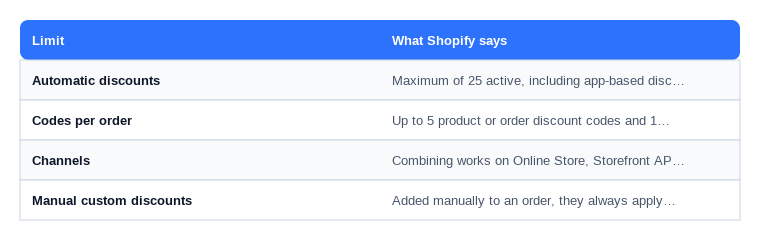
| Limit | What Shopify says |
|---|---|
| Automatic discounts | Maximum of 25 active, including app-based discounts |
| Codes per order | Up to 5 product or order discount codes and 1 shipping discount code |
| Channels | Combining works on Online Store, Storefront API and Shopify POS orders |
| Manual custom discounts | Added manually to an order, they always apply regardless of combination settings |
Automatic discounts, Shopify adds, can be amount off, free shipping, buy X get Y or app-based, and they apply in the cart and at checkout when eligibility conditions are met. Automatic discounts created in the Shopify admin do not apply to the post-purchase page at checkout.
How should I plan combinations without wrecking margin?
Our judgement, using Shopify’s rules: decide the maximum total discount you can afford per order first, then allow combinations only up to it.
- List every active automatic discount and code, with its class.
- Pick the highest combined saving you can afford on your lowest-margin product.
- Switch off combining on any discount that would exceed it.
- Keep one shipping discount at most, since Shopify allows 1 shipping code per order.
- Test the real cart with each code and read the total before announcing a sale.
The effect on ad economics is not small. Our worked example of how a code moves your break-even is How does a 20% off code change my break-even ROAS?, and the ad-side setup is How do I add a discount code offer to my Facebook ads?.
What changes when an app changes prices?
Shopify says that if an app changes cart line prices with functions, such as a bundles app, automatic discounts are calculated after the app changes the prices, so they are based on the changed price. If you run bundles and a sale together, test the final price rather than assuming the sum of two percentages.
How do I manage and share discounts?
Shopify’s managing page says you can edit, duplicate, share, deactivate and delete discounts, use a discount timeline, and promote a discount using a shareable link or QR code. A shareable link applies the discount; to shop without it a customer goes to the store directly, since reopening the link reapplies it. You can filter the list by status, method, type, whether it combines, start date and times used, which helps audit stacking.
What should I check before a big sale?
Run a short pre-sale test. Add a typical basket to the cart on the live store and apply every code you plan to promote, one at a time and together. Record the final price and compare it with your margin floor. Then repeat on a mobile browser, since that is where most ad clicks land. Finally, filter the discount list by Combines with and by Times used to see which discounts already stack in practice. If a discount cannot combine and a customer holds two, Shopify applies the better one for the customer, so expect the cart total to differ from a plain sum of your offers.
Which discounts do ads send people to?
If an ad promises a code, the checkout should honour it with the sale running, so test the exact path from ad to checkout. Mismatches create refund requests and distort your reported revenue; see Meta and Google claim more sales than Shopify. To judge profit rather than revenue, use margin ROAS from Shopify product costs.
Bach.ai is our product. Shopify’s connection in Bach.ai is read-only (from Starter): it reads orders, revenue, products, inventory and abandoned checkouts to compare ad-reported revenue with real store orders, and never changes your store. Margin ROAS is shown where product costs are available, and recoverable-spend figures are estimates, not guarantees. On a paid plan a supported ad change is applied only after you approve it by default (Auto-Pilot is opt-in); the free trial does not apply changes. See also the Meta Ads audit checklist.
FAQ
How many automatic discounts can be active?
Shopify says a maximum of 25 active automatic discounts, including app-based ones.
How many discount codes can a customer use?
Shopify says up to 5 product or order discount codes and 1 shipping discount code on the same order.
Do combined discounts work in all channels?
Shopify says discounts can only be combined on orders made through the Online Store, Storefront API and Shopify POS.
Does a manual custom discount follow combination rules?
No. Shopify says custom discounts added manually to an order always apply, regardless of combination settings.
Sources, read on 25 November 2026: Discount combinations; Automatic discounts; Managing and editing discounts.