Which Shopify Automations Should I Turn On?
Which Shopify marketing automations should I turn on first?
Start with the recover automations in Shopify Messaging: abandoned checkout, abandoned cart and abandoned product browse, then a welcome and post-purchase flow. By default they send only to customers subscribed to marketing, and abandoned checkout emails can be changed to all customers.
Automations are the lowest-effort revenue a store can switch on, and they interact with your ad retargeting. Shopify’s help pages list the types, channels and consent rules. This guide uses its pages on marketing automations, creating them in Shopify Messaging and recovering abandoned checkouts, read on 25 November 2026. Pricing varies by channel and Shopify updates the feature set, so check your admin.
What automation types does Shopify offer?
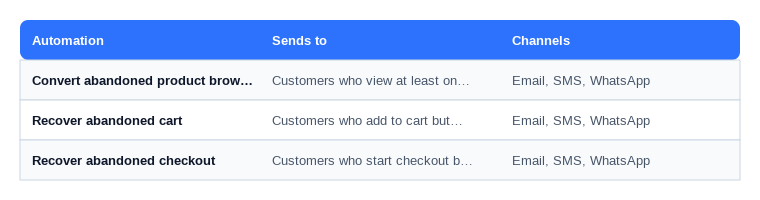
Shopify says marketing automations send emails, SMS and WhatsApp messages automatically when customers take actions, such as abandoning a cart or signing up for a newsletter. The recovery types:
| Automation | Sends to | Channels |
|---|---|---|
| Convert abandoned product browse | Customers who view at least one product but do not add to cart or buy before leaving | Email, SMS, WhatsApp |
| Recover abandoned cart | Customers who add to cart but do not start checkout | Email, SMS, WhatsApp |
| Recover abandoned checkout | Customers who start checkout but do not complete the order | Email, SMS, WhatsApp |
There are also welcome, post-purchase and customer appreciation automations. For custom logic or third-party apps Shopify points to a workflow in Shopify Flow.
Who receives them?
By default automations are sent only to customers subscribed to marketing for the channel the automation uses. For Recover abandoned checkout email automations you can change this to all customers. Consent matters for ads too: only upload customers you have a lawful basis to use. Shopify also says that abandoned checkout emails do not count towards your emails sent with Shopify Messaging, but SMS and WhatsApp abandoned checkout messages are charged, and that pricing varies by channel.
Which should I turn on first?
- Abandoned checkout: these shoppers entered an email and started paying, so they are the warmest. If emails are not arriving, see Why aren’t my Shopify recovery emails sending?.
- Abandoned cart: shoppers who added products but did not start checkout.
- Browse recovery: the lowest intent; try it after the first two.
- Welcome series for new subscribers.
- Post-purchase thank-you and review request.
Judge them by orders and revenue attributed in Shopify and your own margin, and keep discounts for the steps where they help; see How do I recover abandoned carts without offering a discount? and Is a browse abandonment flow worth building?.
How do automations fit with paid retargeting?
They reach the same people. Avoid paying for a retargeting ad to someone the email is about to reach, and avoid showing a discount ad to a customer who just received one by email. Our guide to coordinating the two is How do I sequence a win-back campaign across channels?. A segment-based approach to who gets what is in How do I build customer segments in Shopify?.
How do I check the automation works?
Open the automation’s metrics and reports after activation, as Shopify suggests, and place a test checkout with your own email to confirm the message arrives. For recovery flows check Orders, then Abandoned checkouts, where the Email status and Recovery status columns show what happened to each checkout.
What should each message do?
Keep the first message short and specific: show the product left behind, state any shipping or returns promise you can keep, and give one clear button. For checkouts, Shopify says a discount can be added to the recovery email, so decide in advance whether a discount is part of your margin plan; if it is, test it against a plain reminder before you make it permanent. For the welcome flow, introduce the brand in one line and point to best sellers. For post-purchase, thank the buyer and ask for a review only after delivery. Revisit each flow every quarter and compare its attributed orders with the work it costs.
How many automations is too many?
Start with three and measure. Each extra flow adds messages to the same shoppers, so check the combined number of messages one person can receive in a week, and use consent rules to keep it reasonable. If a customer is in several flows at once, decide which takes priority, and turn one off where they overlap. Fewer well-written flows usually beat many thin ones, and an unsubscribe rate that climbs is the signal to cut.
Bach.ai is our product. Shopify’s connection in Bach.ai is read-only (from Starter): it reads orders, revenue, products, inventory and abandoned checkouts to compare ad-reported revenue with real store orders, and never changes your store. It does not send your messages, and recoverable-spend figures are estimates, not guarantees. On a paid plan a supported ad change is applied only after you approve it by default (Auto-Pilot is opt-in); the free trial does not apply changes. See the Meta Ads audit checklist.
FAQ
Do automations send to everyone?
No. Shopify says by default they send only to customers subscribed to marketing for that channel. Abandoned checkout emails can be changed to all customers.
Are abandoned checkout emails charged?
Shopify says they do not count towards your emails sent with Shopify Messaging, but SMS and WhatsApp abandoned checkout messages are charged.
Can I build a custom automation?
Shopify says to create a workflow in the Shopify Flow app for custom automations or ones that include a third-party app.
Where do I see results?
Shopify says you can review metrics and reports for each automation after activating it.
Sources, read on 25 November 2026: Shopify Messaging marketing automations; Creating and managing marketing automations in Shopify Messaging; Recovering abandoned checkouts.