Why Aren't My Shopify Recovery Emails Sending?
Why are my Shopify abandoned checkout emails not sending?
Shopify skips a recovery email when the customer completes a sale first, a payment error occurred, shipping to the address is unsupported, a phone number was entered instead of an email, items are out of stock or free, or Shopify Payments blocks the attempt as high risk. Tooltips on the Abandoned checkouts page explain each skip.
A recovery email is the cheapest sale a store can win back, so a silent failure is expensive. Shopify’s help center lists the exact cases in which it does not send one, and it separates the older automatic emails from the newer Messaging automation. This guide uses Shopify’s pages on recovering abandoned checkouts and recovery discounts, read on 25 November 2026. Shopify revises these pages, so confirm in your admin.
When does Shopify consider a checkout abandoned?
Shopify says an abandoned checkout is one that stays incomplete after the customer has provided email information and does not proceed to payment. A checkout is considered abandoned if it remains incomplete for more than ten minutes after the email was provided. Items in the cart at the time are not saved. Recovery is available only for the Online Store and Buy Button sales channels, so checkouts on Shopify POS or third-party sales channels will not receive a recovery email.
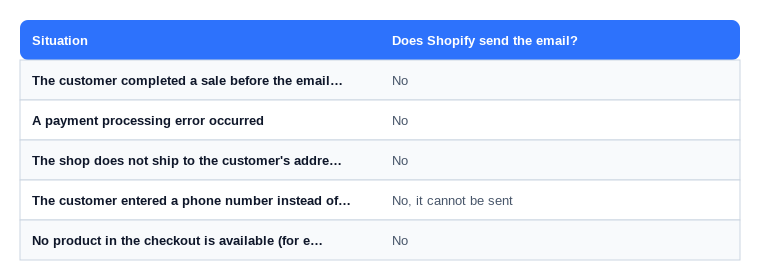
Why was no recovery email sent?
| Situation | Does Shopify send the email? |
|---|---|
| The customer completed a sale before the email was due | No |
| A payment processing error occurred | No |
| The shop does not ship to the customer’s address | No |
| The customer entered a phone number instead of an email | No, it cannot be sent |
| No product in the checkout is available (for example empty inventory) | No |
| All products are free and shipping is free | No |
| Shopify Payments blocked it as high risk | No |
Shopify adds that if automatic recovery emails are on, the Abandoned checkouts page shows tooltips explaining why emails were not delivered. Some attempts identified as suspected card testing or bot activity are not in the abandoned list at all.
How do I turn on and time the emails?
Shopify’s steps for the Messaging automation: from the admin go to Apps, then Messaging, then Automations; in Abandoned checkout emails by Shopify choose Edit settings; select Send abandoned checkout emails automatically; set who receives it under Send to and how long to wait under Send after; save, and optionally customize the template. Shopify says the Email status and Recovery status columns under Orders, then Abandoned checkouts, show what happened to each one. A checkout counts as recovered after the customer completes the order, whether through the email link or by returning on their own.
How do I add a discount to the recovery email?
Shopify says you can apply a discount automatically so customers receive a pre-filled cart at a discounted price. The steps: create a percentage or fixed amount code and note its name, open the notification template editor, and add the code to the abandoned checkout notification. Two details matter. A message explaining the discount is not added automatically, so write one into the template. And if the customer had entered another code before abandoning, Shopify says the original code is replaced by the recovery code. Whether a discount is wise is a margin question: see How does a 20% off code change my break-even ROAS? and How do I recover abandoned carts without a discount?.
What should I check first when emails seem missing?
- Open Orders, then Abandoned checkouts, and read the Email status for a recent checkout.
- Hover the tooltip to read why a recovery email was not delivered.
- Check whether the customer gave an email or a phone number, since phone-only checkouts cannot be emailed.
- Check inventory and shipping zones for the items involved.
- Check Apps, then Messaging, then Automations to confirm the automation is on and the Send after delay is set.
What does this mean for my ads?
Recovery emails and paid retargeting often chase the same shoppers. Run them in sync so a customer is not shown a discount ad after already getting one by email; see Win-back in sync: email, SMS and paid retargeting and What does a checkout abandonment actually cost me?.
Bach.ai is our product. Shopify’s connection in Bach.ai is read-only (from Starter): it reads orders, revenue, products, inventory and abandoned checkouts to compare ad-reported revenue with real store orders, and never changes your store. It does not send your recovery emails, and recoverable-spend figures are estimates, not guarantees. On a paid plan a supported ad change is applied only after you approve it by default (Auto-Pilot is opt-in); the free trial does not apply changes. Our Meta Ads audit checklist covers the ad side of the same funnel.
FAQ
Why does a customer with an email still get nothing?
Shopify lists several skip cases, including a completed sale, payment errors, an unsupported shipping address, unavailable products and Shopify Payments blocks. Check the tooltip on the Abandoned checkouts page.
Do POS checkouts get recovery emails?
No. Shopify says recovery is available only for the Online Store and Buy Button sales channels.
Can I email an abandoned checkout manually?
Yes. Shopify’s page describes a manual option that sends the customer a link to their abandoned checkout.
Does the discount code replace a code the customer used?
Shopify says that if the customer entered another discount code before abandoning, the original code is replaced by the recovery discount code.
Sources, read on 25 November 2026: Recovering abandoned checkouts; Abandoned checkout emails in marketing; Discounts for abandoned checkout recovery emails.