How Do I Cap Spend on a Client's Ad Account?
How do I set a spending cap on a client's ad account?
As an ad account admin, open Payment settings, find Account spending limit and set an amount. It is a lifetime cap across all campaigns, takes about 15 minutes to apply and cannot be lower than what is already spent. Ads pause at the limit. Accounts that use available funds cannot set one.
A client who agrees to spend $5,000 does not want a surprise $9,000. A spending cap on the ad account is the hard backstop under your budgets. It is simple to set and easy to misread, because it is a lifetime cap, not a monthly one.
What is an ad account spending limit?
Meta describes it as a flexible lifetime cap on the total money your ad account can spend across all campaigns from the time you set it (About ad account spending limits). When spending reaches the limit, your ads pause and the account stops spending. Meta says the limit does not affect ad delivery or performance before it is reached. If an ad pauses and you have reached neither your budget nor your limit, you may have hit the daily spending limit, which Meta sets and resets daily.
How do I set it?
You have to be an admin of the ad account. Meta says accounts set up for available funds cannot set an account spending limit (How to set an ad account spending limit).
- In Ads Manager, open Payment settings.
- In the Account spending limit section, click Options.
- Click Set limit.
- Enter the amount. It cannot be less than what the account has already spent. If it is rejected, enter a higher figure or reset the amount spent to $0.
- Click Save, then Done.
- Wait about 15 minutes for it to take effect, then confirm the amount spent toward the limit in Payment settings.
What are the limit’s quirks?
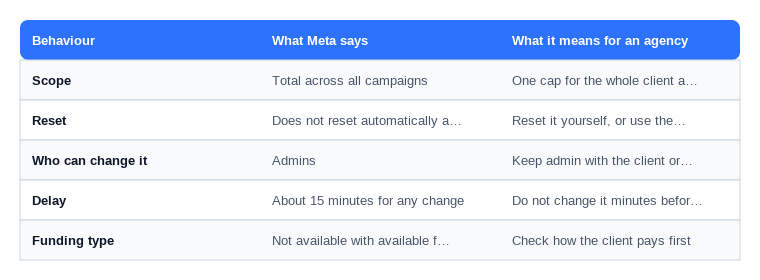
| Behaviour | What Meta says | What it means for an agency |
|---|---|---|
| Scope | Total across all campaigns | One cap for the whole client account |
| Reset | Does not reset automatically at month end | Reset it yourself, or use the monthly option if offered |
| Who can change it | Admins | Keep admin with the client or one senior |
| Delay | About 15 minutes for any change | Do not change it minutes before a launch |
| Funding type | Not available with available funds | Check how the client pays first |
How do I resume ads after the cap is reached?
Meta says you can change the limit, remove it, or reset the amount spent to $0 (How do I reset the amount spent). Resetting keeps the limit the same while letting ads resume, and the change takes about 15 minutes. Meta also says you may have the option to set an automatic reset on the 1st of every month in addition to the lifetime limit. Removing it is done from the same Options menu (How to remove an ad account spending limit).
For the client-facing side of this, What happens when my Facebook account spending limit is reached? explains the pause from the buyer’s view.
When should I use a cap and when a budget?
Budgets control pacing inside a campaign; a cap controls the total that can ever leave the account. Use both. A practical pattern for a fixed-fee month:
- Agree the month’s media budget in writing.
- Set campaign budgets that add up to it.
- Set the account cap slightly above it, so a small overrun does not stop ads but a runaway cannot go far.
- Reset the cap to the next month’s agreed budget on day one.
- Put the reset date in your calendar and in the client file.
Meta also notes that actual spend can differ from budget, since budgets are distributed over a period (How Meta charges for ads), which is why a cap above, not equal to, the budget is practical.
What can go wrong?
A cap set once and forgotten pauses a healthy account in week three of the next month. A cap set below the agreed budget makes the client think you underspent. A cap set on an account that runs on available funds cannot be set at all. And a cap is not a substitute for monitoring, so keep your weekly checks from the Meta ads audit checklist and the routine in How do I manage many client ad accounts safely on Meta?.
Can software help?
Bach.ai reviews budget and bidding and checks pacing for connected accounts, and its Agency plan covers up to 20 brands, but the spending limit is a Meta setting an admin changes in Payment settings. Use it as a second pair of eyes on pacing, not as the cap.
FAQ
Can I set a monthly limit instead of a lifetime one?
Meta describes the limit as a lifetime cap, and says you may have an option to set an automatic reset on the 1st of each month. Check Payment settings to see what your account offers.
Does hitting the cap delete my campaigns?
No. Ads pause and the account stops spending. You can change, remove or reset the limit to resume.
Does the cap apply to a single campaign?
The account limit applies to all campaigns. Meta documents campaign spending limits separately.
Who can change the cap?
Meta says you have to be an ad account admin to set, change or remove it.
Sources: Meta Business Help Center, About ad account spending limits, How to set an ad account spending limit, How do I reset the amount spent toward my account spending limit, How to remove an ad account spending limit, How Meta charges for ads (checked 25 Nov 2026); Bach.ai capabilities from our features page and pricing.