How Do I Set Up Website-to-WhatsApp Ads?
How do I set up website-to-WhatsApp ads in Ads Manager?
Create a campaign, choose Website as the destination and add WhatsApp as a browser add-on: under Personalized destinations for the Sales objective, or Browser add-ons then Messaging app for others. You need a mobile number connected to a WhatsApp Business account, and the ad opens your site in the in-app browser.
A buyer who has questions about size, shade or delivery often leaves a product page without asking. A website-to-WhatsApp ad keeps your page as the destination and adds a way to ask. It differs from a click-to-WhatsApp ad, which opens the chat directly. Here is how Meta documents the setup.
What is a website-to-WhatsApp ad?
Meta describes it as an ad that guides potential customers from your website to a direct WhatsApp conversation with your business. When a customer taps the ad on mobile, your website opens in the in-app browser, inside Facebook or Instagram, where a Chat on WhatsApp button lets them start a conversation about products or services (How to set up website to WhatsApp ads). You give your website as the destination and select WhatsApp as an additional contact method in the mobile browser experience.
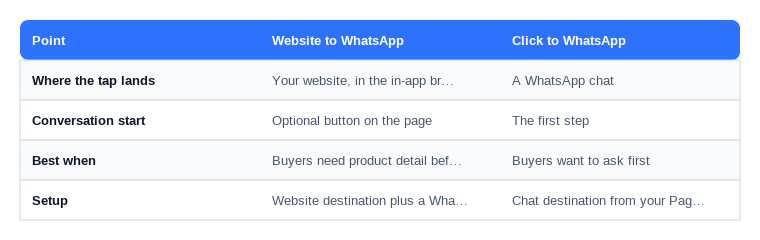
How is it different from a click-to-WhatsApp ad?
| Point | Website to WhatsApp | Click to WhatsApp |
|---|---|---|
| Where the tap lands | Your website, in the in-app browser | A WhatsApp chat |
| Conversation start | Optional button on the page | The first step |
| Best when | Buyers need product detail before they ask | Buyers want to ask first |
| Setup | Website destination plus a WhatsApp browser add-on | Chat destination from your Page (create ads that click to WhatsApp) |
Our guide to click-to-WhatsApp ads for an online store covers the other route and its economics.
What do I need before I start?
Meta lists one requirement: a mobile phone number connected to a WhatsApp Business account. The setup also asks you to connect that number to a Facebook Page if it is not already.
What are the steps?
- In Ads Manager on desktop, click Create and choose an objective: Awareness, Traffic, Engagement, Leads or Sales.
- Name the campaign and set Website as the conversion location where the objective asks.
- Set your budget, audience and placements.
- In the ad creative step, scroll to Destination, choose Website and enter your URL.
- For the Sales objective, open Personalized destinations, click Edit, choose the Browser add-ons tab, turn on Browser add-ons and select WhatsApp.
- For other objectives, open Browser add-ons, select Messaging app, click Options and choose WhatsApp.
- If your number is not connected to a Page, click Connect account and follow the prompts.
- Review the preview and publish.
What should I check before publishing?
Open the live landing page in the Facebook or Instagram in-app browser on a phone, not in Chrome. Confirm the Chat on WhatsApp button appears and opens the right number. Confirm the page loads quickly, since the in-app browser is where your buyer lands. Check that the pixel still fires on the page, because the main conversion event is still your website purchase unless you choose otherwise. If events are missing, Why does my Meta pixel track PageView but not Purchase? is the first thing to read.
Meta also notes that you may see recommendations in opportunity score for these ads and that a high score does not reflect actual or future performance; see Should I apply Meta’s opportunity score recommendations? before you apply any.
What does it cost to reply?
The ad itself is billed like any other ad. The messaging is separate. Meta’s WhatsApp pricing page, updated 18 November 2026 as fetched, says it charges per delivered message, by message category and by the recipient’s country calling code, and only for messages from businesses to users. Template messages can be marketing, utility or authentication. Non-template messages can only be used to respond to users inside an open 24-hour customer service window that resets with each user message. In practice this means a reply to a buyer who just messaged you sits in a different category from a promotional template you send later. Read the rate card before you plan follow-up messages, and keep promotional templates out of your first-reply flow.
How do I run the chats afterwards?
Decide who answers and how fast before the ad goes live. A chat started at midnight with no reply until noon is a lost sale. Write three canned replies: stock and delivery, size or fit, and payment options. Label every chat that becomes an order, because purchase optimisation for message ads relies on labels; the rules are in How do I optimize click-to-message ads for purchases?. Use the Meta ads audit checklist to confirm tracking before you scale.
Can software help?
Bach.ai checks tracking and signal health and compares ad-reported revenue with store orders, which helps you see whether chats lead to sales that Meta credits to the ad. It does not answer WhatsApp chats or set up the add-on; the steps above stay manual.
FAQ
Do I need a separate campaign for this?
No. Meta describes adding WhatsApp as an add-on within the ad’s destination settings on several objectives, so it can sit inside a normal Traffic or Sales campaign.
Will people always see the WhatsApp button?
Meta describes the button inside the in-app browser when someone taps the ad on mobile. Test on your own phone and do not assume desktop shows it.
Does it work for any objective?
Meta lists Awareness, Traffic, Engagement, Leads and Sales as the objectives you can choose in the setup; the add-on path differs for Sales.
Do I pay when a customer messages me?
Meta’s pricing page says it charges per message, by category and market, only for messages from businesses to users, and does not charge for messages from users to businesses. Businesses are charged only when a message is delivered. Check the current rates for your market before you plan volume (Pricing on the WhatsApp Business Platform).
Sources: Meta Business Help Center, How to set up website to WhatsApp ads, How to create ads that click to WhatsApp; Meta for Developers, Pricing on the WhatsApp Business Platform (checked 25 Nov 2026); Bach.ai capabilities from our features page.