How Do I Create a Customer List Audience on Meta?
How do I create a customer list custom audience on Meta?
In Ads Manager open Audiences, choose Create audience, then Custom audience and Customer list. Upload or paste your file, pick inclusions or exclusions, map the identifiers such as email and phone, then import. Meta hashes the data, matches it to profiles and shows a match score out of ten.
A customer list audience lets you show ads to people you already know, or keep them out of prospecting. The steps are short; the traps are permissions, list age and the choice between an inclusion list and an exclusions-only list. Everything below is from Meta’s help pages, read on 25 November 2026. Meta revises these pages, so confirm the live steps before a large upload.
What do I need before I create the audience?
Meta says you must be the owner of the ad account connected to a business portfolio, or have admin or advertiser permissions on that ad account. If your account is new or recently linked to an existing account, it may take a few weeks before you can create or share a customer list custom audience. Meta also asks you to review its terms to confirm you have a legal basis for the information you upload, and says that under GDPR advertisers act as the data controller for uploaded lists. Our compliance walk-through is in Is uploading a customer list to Meta compliant?.
The list may not be named, include, or be based on prohibited information, which Meta describes as sensitive categories such as social security numbers, health information or financial information.
How do I create it in Ads Manager?
- Open Audiences, select Create audience, then Custom audience, then Customer list, then Next.
- Prepare the list: follow Meta’s formatting instructions for your file.
- Choose Inclusions or exclusions, or Only exclusions.
- Upload a file or paste comma-separated values, and say whether the file has a customer value column.
- Add an audience label, name and description, accept the custom audience terms and select Next.
- Map identifiers: a check icon means an identifier mapped correctly, an exclamation point means you left it out or it needs a manual fix.
- Select Import and create, then watch the audience status go from Populating to Ready.
What is the difference between inclusions and exclusions-only?
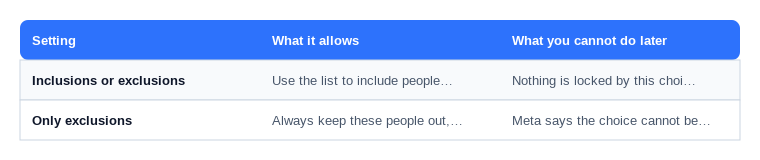
| Setting | What it allows | What you cannot do later |
|---|---|---|
| Inclusions or exclusions | Use the list to include people, exclude people, or build a lookalike | Nothing is locked by this choice |
| Only exclusions | Always keep these people out, for example people who opted out of marketing | Meta says the choice cannot be changed later and the audience cannot be used to make a lookalike |
If someone in the ad account tries to pick an exclusions-only list under Include these custom audiences, it appears grayed out. For the store use case of keeping buyers out of prospecting, read Suppression audiences: stop paying Meta for customers you own.
How does matching work, and what is the match score?
Meta says the information, called identifiers (email, phone number, address and so on), is hashed before use, then matched with profiles on Facebook, Instagram and Meta Audience Network. It also says the more information you provide, the better the match rate, and that it learns no new identifying information about customers from hashed data. Hashing is described as a one-way method that cannot be reversed.
In the Audiences tab you can add a Match score column. Meta defines it as a score out of ten for how well the identifiers matched profiles on the last successful upload, calculated by dividing matched rows by uploaded rows and shown in increments of 0.5. Adding more emails, phone numbers and device IDs can improve it, and the score has limited retention, so you may need to update the list to see one. If the score is low, see Why is my customer list match rate so low on Meta?.
How long does a customer list stay fresh?
Meta says an audience can show Outdated when the customer list has not been updated in over 30 days, which may impact ad delivery, and you can choose Update list. Treat the 30 days as a reminder to refresh a list that changes, such as recent purchasers, instead of a one-time upload. For which audiences to build in what order, see Which custom audiences should an online store build first on Meta?.
What can I do with the audience once it is ready?
Meta says you can create an ad to reach the audience, or create a lookalike audience to find new people who share similar behaviors and interests with your customers. Meta’s lookalike page adds that audience quality matters: you may get better results if the source is your best customers rather than all customers. The source question is covered in What makes a good lookalike audience source?.
Bach.ai is our product. Its audit flags audience saturation and overlap risks and ranks them by estimated recoverable spend; it does not upload your customer lists for you. On a paid plan a supported change is applied on Meta or Google Ads only after you approve it by default (Auto-Pilot is opt-in); the free trial does not apply changes, and recoverable-spend figures are estimates, not guarantees. For a hands-on review, use the Meta Ads audit checklist.
FAQ
Is my customer data readable by Meta?
Meta says it hashes identifiers before the matching process and that hashing turns them into randomized code that cannot be reversed. It is still your responsibility to have a legal basis for the upload.
Why is the audience stuck on Populating?
Meta says the audience shows Populating while creation finishes and that it will let you know when the audience is Ready. If it does not complete, re-check the identifier mapping and file format.
Can I turn an exclusions-only list into a lookalike source?
No. Meta says an exclusions-only list cannot be used to make a lookalike audience, and the setting cannot be changed later.
Do I need to refresh the list?
If the list has not been updated in over 30 days Meta shows Outdated and warns it may impact delivery. Refresh lists that track recent customers.
Sources, read on 25 November 2026: How to create a customer list custom audience in Ads Manager; About customer list custom audiences; About lookalike audiences.