Does Advantage+ Lookalike Ignore Your 1% Setting?
Does Advantage+ lookalike ignore my lookalike percentage?
Not ignore, but it is a guide, not a limit. Advantage+ lookalike lets Meta deliver beyond the percentage you chose when it sees better performance, and it is switched on automatically for new and duplicated ad sets. To keep your 1% strict, add the lookalike as a control and untick Use as a suggestion.
You build a 1% lookalike of your purchasers because you want the people closest to them. Then you duplicate the ad set, and the 1% may not be a 1% any more. That is Advantage+ lookalike working as designed, and whether it helps you depends on how much you want control against reach.
What does Advantage+ lookalike actually do?
Meta’s About Advantage+ lookalike says it lets the system deliver to people outside your defined lookalike when that is likely to improve performance. Delivery uses the custom audience you based the lookalike on as a guide while it assesses performance, and if it finds better opportunities beyond the percentage you chose, it may expand the audience to include similar people.
Meta says it is enabled automatically for new, duplicated and draft campaigns and ad sets that use lookalikes created from mobile, website or customer-list custom audiences. It was previously called lookalike expansion, and Meta’s page presents using a lookalike audience as a suggestion as the way it applies.
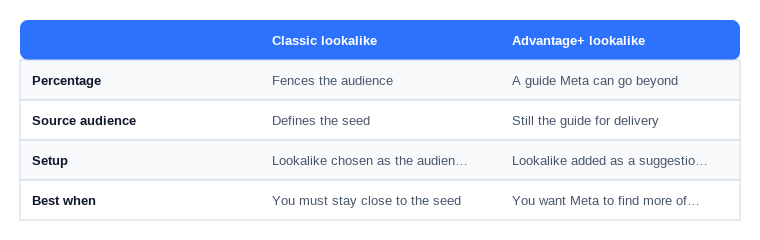
How is that different from a normal lookalike?
| Classic lookalike | Advantage+ lookalike | |
|---|---|---|
| Percentage | Fences the audience | A guide Meta can go beyond |
| Source audience | Defines the seed | Still the guide for delivery |
| Setup | Lookalike chosen as the audience | Lookalike added as a suggestion, or expansion left on |
| Best when | You must stay close to the seed | You want Meta to find more of the pattern |
Per Meta’s lookalike creation steps, you no longer select a location when you create a lookalike; Meta uses the ad set’s location settings, so new lookalikes show an estimated size only once used in an ad set.
How do I build a lookalike that will perform?
- Choose the seed first. Meta needs a source of at least 100 people and generally recommends 1,000 to 5,000.
- Open Audiences in Ads Manager, click Create audience, then Lookalike audience.
- Select your source; Meta says saved audiences cannot be used as a source.
- Choose the audience size as a percentage of the population and, if wanted, the number of lookalikes.
- Click Create audience and wait for the status to change from Populating to Ready; Meta says populating can take up to 3 days, though you can start running ads immediately.
Meta notes that people in the source audience are excluded from the lookalike, and you can create up to 500 lookalike audiences from one source. The quality of the seed matters more than the percentage: see What makes a good lookalike audience source? and What is the minimum source audience size for a Meta lookalike?
How do I keep my 1% strict?
Use Meta’s route for turning a suggestion into a limit, from its custom and lookalike audience steps:
- On a Sales, Leads or App promotion ad set, open the Audience section and click Add suggestions.
- Under Custom audience inclusions, add your lookalike.
- Select Further limit the reach of your ads to constrain the audience.
- Select your lookalike again as a control and untick Use as a suggestion.
- Publish and check the estimated audience size matches what you expect.
Expect two trade-offs: a strict lookalike narrows delivery, and Meta says Further limit your audience is how you turn Advantage+ audience off. Use it when the seed is excellent and the market is small, not by default.
When should I let it expand?
Let it expand when your seed is a good one and the goal is volume at the best cost, since Meta says it expands only where it sees better performance. Hold it strict when you are testing a hypothesis, such as whether a repeat-buyer seed beats an all-buyer seed, because expansion blurs a test. Compare the two as a duplicate pair on cost per purchase after learning, and read the result with the cautions in Should I use broad or narrow targeting on Meta?
Can software help?
Bach.ai audits a connected Meta account for audience saturation, learning health and spend on weak ad sets, ranked by estimated recoverable spend, and applies a supported change, by default, only after you approve it (Auto-Pilot is opt-in) on an active paid plan. It does not build your seed list. Use Advantage+ audience controls vs suggestions alongside this post to set the limits by hand, and the Meta ads audit checklist for the wider account review.
FAQ
Is Advantage+ lookalike on by default?
For new, duplicated and draft campaigns and ad sets that use lookalikes built from mobile, website or customer-list custom audiences, Meta says it is enabled automatically. Meta’s page does not describe a change for older ad sets, so check the setting on any you reuse.
What lookalike percentage should I choose?
The Meta pages we read give no recommended percentage; you choose a share of the population. Start with a small one on a strong seed and test a wider one, remembering that Advantage+ lookalike may extend delivery beyond either.
Can I exclude a lookalike audience?
Not under Advantage+ audience. Meta says it is not possible to exclude lookalike audiences there, because an exclusion constrains the audience and reduces delivery opportunities. You can exclude custom audiences such as current customers.
Does a lookalike include my existing customers?
No. Meta says people in the source audience are excluded from the lookalike. They can still appear through other audiences in the ad set, so exclude customers explicitly as in How do I exclude existing customers from Meta ads?
Sources: Meta Business Help Center, About Advantage+ lookalike, Create a lookalike audience, How to use custom or lookalike audiences, How to create a campaign using Advantage+ audience (all checked 24 Nov 2026).