How Does Meta Ads Location Targeting Work?
How does location targeting work in Meta Ads?
Set locations at the ad set level under Audience. Meta shows ads to people who live in, recently spent time in or often visit your chosen areas, picks a default radius you can adjust, and warns that complete accuracy cannot be guaranteed, so some impressions and leads may come from outside the area.
Location is the one targeting control every store uses, and it is also the one that surprises people: impressions arrive from outside the area, a city radius spills into the next town, and an excluded place still shows ads to people who live elsewhere. This guide uses Meta’s help pages on choosing locations and location selection, plus the international targeting page, all read on 25 November 2026. Meta updates the options often, so check Ads Manager before you rely on a limit.
Where do I set locations in Ads Manager?
Meta says to open Ads Manager, create or edit an ad, go to the ad set level, then Audience, then Locations. If you cannot see Locations or cannot select an option, check that you have full access to the ad account and that your Special Ad Category settings allow location selection. Meta also notes that because Locations is an audience control, it will not target beyond your locations unless “Reach more people likely to respond to your ads” is selected.
Who counts as being in a location?
Meta says that choosing locations lets you reach people based on their country, region or city, such as people who live there, recently visited or often visit. It uses a variety of signals, and says that due to signal variations, complete accuracy cannot be guaranteed. You might see some impressions, or receive messages or leads, from outside your settings, and people may see an ad organically, leading to engagement outside the selected location. Preview ads shown to people connected to the business are not charged.
What can I target, and what are the limits?
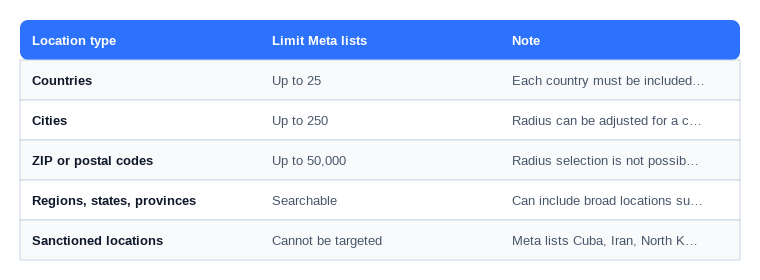
| Location type | Limit Meta lists | Note |
|---|---|---|
| Countries | Up to 25 | Each country must be included separately for radius work |
| Cities | Up to 250 | Radius can be adjusted for a city |
| ZIP or postal codes | Up to 50,000 | Radius selection is not possible for postal codes, states, regions or countries |
| Regions, states, provinces | Searchable | Can include broad locations such as Worldwide |
| Sanctioned locations | Cannot be targeted | Meta lists Cuba, Iran, North Korea, Russia, Sudan and parts of Ukraine |
Meta recommends entering one location at a time for best results and bulk uploading when you want many. It also says countries with very small populations may not meet Estimated Audience Size checks to be targeted individually.
How do radius and exclusions behave?
When you enter a location or drop a pin, Meta chooses a default radius for you and you can adjust it with a slider. Radius minimums and maximums vary by location type and do not extend into other countries, even when the map extends beyond a border. Your reach includes all locations that fall within the radius. If you choose a city you can adjust the radius or choose Current city only.
Exclusions follow a surprising rule. Meta says that when you exclude locations, who sees your ad depends on whether their current location or home location is excluded: someone who lives in an included location may see your ad while visiting an excluded one, and if both their current and home locations are excluded they will not see it.
How do I set up a delivery-area campaign?
- Open the ad set and go to Audience, then Locations.
- Add your delivery cities or postal codes, one at a time or by bulk upload.
- Decide whether to leave “Reach more people likely to respond to your ads” on; uncheck it only if you want to stay inside your selected city or region.
- Use Only include cities or Exclude cities where Meta offers it, and check the Estimated Audience Size.
- Preview the ad, publish and review results broken down by location.
For stores that ship nationwide, the opposite problem usually appears: ads reaching people outside the targeted countries. See Why are my Facebook ads reaching people outside my targeting?, and if the audience is tiny, How small is too small for a Meta audience?.
Can I target several countries at once?
Meta’s international targeting page says you can target multiple countries, a country group, a free trade area or a sub-region, and that Meta delivers to the countries with the best cost per action while showing results by location. If an area performs better, Meta says it will start spending more of the budget there. That is useful for learning where an offer works but unhelpful if you need an even split; run a separate ad set per country when you do. Budget structure is covered in Is CBO or ABO better for my account?.
Why do my location reports not match Google Analytics?
Meta notes that third-party reporting may not match Meta’s campaign reporting because different tools use different location targeting methods. Compare trends, not exact counts, and reconcile orders against your store. The workflow is in Why do Meta and GA4 report different numbers?.
Bach.ai is our product. Its audit reads your Meta ad sets and flags audience problems such as saturation and spend on weak ad sets, with estimated recoverable spend; it does not guarantee that a location change will lift sales. On a paid plan a supported change is applied on Meta or Google Ads only after you approve it by default (Auto-Pilot is opt-in); the free trial does not apply changes, and recoverable-spend figures are estimates, not guarantees. For a hands-on review, use the Meta Ads audit checklist.
FAQ
Is there a minimum radius?
Meta says radius minimums and maximums vary by location type. Check the slider in Ads Manager for your chosen city.
Can I target by postal code?
Yes, up to 50,000 ZIP or postal codes, but radius selection is not possible with postal codes, states, regions or countries.
Will excluded cities see my ads?
Not if both their current and home locations are excluded. Meta says someone who lives in an included place can see the ad while visiting an excluded one.
Why did I get a lead from outside my area?
Meta says complete accuracy is not guaranteed, so some impressions, messages or leads may come from outside your location settings.
Sources, read on 25 November 2026: How to choose locations for your ad; About location selection in Meta Ads Manager; About international location targeting.