How Do I Optimize Click-to-Message Ads for Sales?
How do I optimize click-to-message ads for purchases?
Select Maximize number of purchases through messaging as the performance goal on a sales or engagement campaign. Meta requires 10 or more purchase events shared within 30 days for the channel you use, and chats must carry its purchase labels, so set up event sharing first, then launch.
A click-to-message ad starts a chat, not a sale. If Meta optimises for chats, you get chats. To have it optimise for purchases that follow the chat, you have to tell Meta which chats became purchases. This guide sets out what Meta requires, channel by channel.
What is the purchase goal for message ads?
Meta lets you select “Maximize number of purchases through messaging” as the performance goal for ads that click to Messenger, Instagram Direct and WhatsApp. It targets and measures campaigns on purchases made after someone starts a conversation with your business (How to optimize click-to-message ad campaigns for purchases). To see whether you have it, create a campaign with the sales or engagement objective and look in the Performance goal dropdown, under Conversion, at ad set level.
Meta lists these benefits: lower cost per purchase through delivery to people more likely to buy in messaging, targeting with custom audiences and lookalikes built on people who bought after starting a Messenger conversation, and measurement aligned to the goal. Treat those as Meta’s claims, and test them against your own order data.
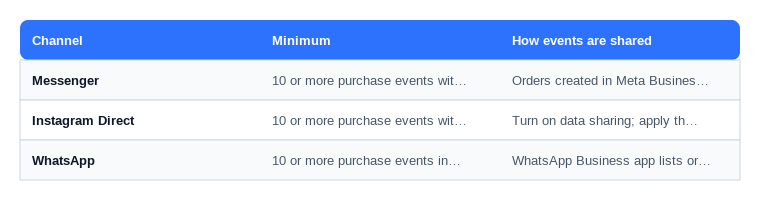
What does Meta require for each channel?
| Channel | Minimum | How events are shared |
|---|---|---|
| Messenger | 10 or more purchase events within 30 days | Orders created in Meta Business Suite and confirmed in Messenger, or messaging events via Conversions API |
| Instagram Direct | 10 or more purchase events within 30 days from Instagram Professional Inbox | Turn on data sharing; apply the labels Ordered, Paid or Shipped |
| 10 or more purchase events in a prior 30 days | WhatsApp Business app lists or Conversions API for Business Messaging |
For WhatsApp, Meta adds that chats must originate from ads that click to WhatsApp and be identified as a purchase within 7 days of the customer clicking the ad. In the WhatsApp Business app you first enable sharing of customer-related activities with Meta, then share events by adding chats to a list when they become purchases, using New order, Pending payment, Paid or Order complete. Meta warns that if you use a custom list, events may not be attributed as purchases. On Instagram, if you use labels other than the predefined purchase labels, the events you share may not be attributed.
How do I set it up?
- Decide the channel. Run one channel first so you can read the results.
- Turn on event sharing in that channel’s tool: Instagram Professional Inbox data sharing, or the WhatsApp “Allow Meta to receive information about events” setting.
- Train your team to label purchases consistently, using only Meta’s listed labels. One person mislabelling can leave you under 10 events.
- Wait until you have shared 10 or more purchase events in 30 days.
- Create a sales or engagement campaign, pick the channel and choose the purchase performance goal.
- For scale or a developer-built flow, send events with the Conversions API for Business Messaging; Meta documents an onboarding guide for it (Conversions API for Business Messaging).
- Compare the orders Meta reports with your store’s orders after two weeks.
What if I cannot reach 10 events?
Then optimise for conversations first and build the volume, while capturing the data. Our guide on whether click-to-WhatsApp ads are worth it for an online store covers the economics, and Can I build a Meta custom audience from WhatsApp engagement? shows a retargeting use of the same chats. Meta also notes that certain messaging metrics and features are unavailable for ads delivered to and from Europe and Japan, so check your market.
How do I read the results honestly?
Message-sold orders often close offline: a person pays by bank transfer a day later. Count them only if your team labels them. Keep a simple sheet of chat start date, label date and order number, and reconcile it with your store weekly. If Meta’s purchases and your store disagree, see Why does Meta show more purchases than Shopify?. The Meta ads audit checklist includes a tracking check you can adapt for chat-based sales.
Can software help?
Bach.ai reads your Meta account and compares ad-reported revenue with real orders from a read-only Shopify connection, which helps reveal gaps between chat-attributed sales and store orders. It does not manage your inbox or label chats. The labelling discipline above has to live in your team’s routine.
FAQ
Do I need the Conversions API to optimise for message purchases?
Not always. Meta allows sharing through Instagram Professional Inbox labels and the WhatsApp Business app, as well as the Conversions API for larger flows.
How long does a chat have to turn into a purchase?
For WhatsApp, Meta says the chat must be identified as a purchase within 7 days of the click.
Why can’t I see the purchase goal?
You may not meet the event requirement, or your market may be restricted. Meta says to create a sales or engagement campaign and check the Performance goal dropdown at ad set level.
Can I optimise across Messenger and Instagram Direct together?
Meta says if you are eligible for Messenger purchase optimisation, you can also maximise purchases on ads that click across Messenger and Instagram Direct in one campaign.
Sources: Meta Business Help Center, How to optimize your click-to-message ad campaigns for purchases; Meta for Developers, Conversions API for Business Messaging (checked 25 Nov 2026); Bach.ai capabilities from our features page.