How to Get Meta Lead Ads Into Your CRM
How do I get leads from Meta lead ads into my CRM?
Use a CRM partner that supports lead ads, or build it with Meta's webhooks and the Graph API. A webhook notifies your endpoint of each new lead and you fetch its data by lead ID. Bulk reads suit a few fetches a day, and Leads Center covers manual downloads.
Getting lead ad submissions out of Meta and into your CRM starts with a choice. Meta gives you three retrieval routes and two ways to wire them into a CRM, and each one has different permissions, delays and limits. This guide compares them, then walks through the webhook route, which is the one Meta points to for real-time CRM integration.
What are my options for moving leads into a CRM?
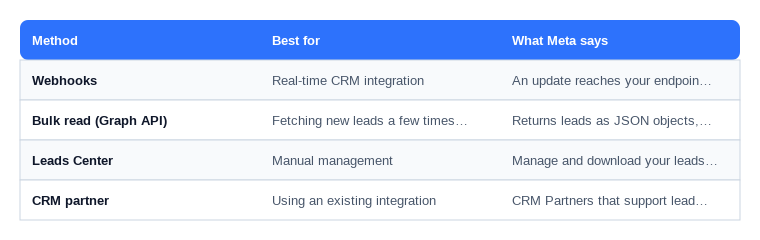
Meta’s lead ads guide says you can set up the leads you receive from Facebook to be updated into your CRM. Your options are CRM partners that support lead ads, or a custom integration using Webhooks and the Graph API.
| Method | Best for | What Meta says |
|---|---|---|
| Webhooks | Real-time CRM integration | An update reaches your endpoint on every new lead; you then fetch the lead’s data |
| Bulk read (Graph API) | Fetching new leads a few times a day | Returns leads as JSON objects, easy to map |
| Leads Center | Manual management | Manage and download your leads in Meta Business Suite |
| CRM partner | Using an existing integration | CRM Partners that support lead ads |
For more frequent updates than a few times a day, Meta says to use webhooks.
Which permissions and access do I need?
To read lead data you need Page Admin access or flexible permissions; with flexible permissions you can retrieve leads without Page Admin access. Meta’s retrieval guide lists what a token needs for all lead and ad-level data:
- A Page or User access token requested by a person who can advertise on the ad account and on the Page
ads_management,leads_retrieval,pages_show_list,pages_read_engagementandpages_manage_adspages_manage_metadataas well, if you use webhooks
Your app must go through App Review with leads_retrieval and pages_manage_ads, then Business Verification. Apps in Development mode cannot retrieve leads, though Development mode users can access leads submitted by someone with a role in that app. Meta recommends Page access tokens, because they are rate-limited by active users on the Page, while user tokens are limited by active users on the app. If the Page admin has not customized lead access with the Leads Access Manager, all Page admins have lead access.
How do I set up the webhook route?
- Follow Meta’s Webhooks Get Started guide to set up your endpoint and configure the webhook.
- Generate a long-lived Page access token so you can fetch data continuously without worrying about expiry.
- Install your app on the Page, using the Webhooks for Pages guide.
- Configure the webhook for the
leadgenfield so a new lead triggers a notification. - When a notification arrives, read
leadgen_idfrom it. - Request the lead by that ID from the Graph API to get
field_data,ad_id,form_idandcreated_time. - Write the lead into the CRM, mapping each field name to a CRM field.
The webhook payload does not carry the answers. Each change in it holds the leadgen_id, page_id, form_id, adgroup_id, ad_id and created_time. The answers come back in a field_data list of names and values when you fetch the lead. Meta says real-time pings occur with a delay of up to a few minutes, so a short lag is normal.
How do I use a bulk read as a backup?
You can read leads by ad with /<AD_ID>/leads or by form with /<FORM_ID>/leads, asking for fields such as created_time, id, ad_id, form_id and field_data. A form can be reused for many ads, so the form may contain far more leads than one ad that uses it. To fetch only new rows, filter on time_created with a Unix timestamp and an operator such as GREATER_THAN, which Meta documents with LESS_THAN, GREATER_THAN and GREATER_THAN_OR_EQUAL.
A scheduled bulk read is a sensible safety net for a webhook, because it can pick up anything the endpoint missed. That is advice, not a Meta rule.
What limits and quirks should I plan for?
- Rate limit. Meta states it as 200 multiplied by 24 multiplied by the number of leads created in the past 90 days for the Page. Over that in a 24-hour period, requests return an error.
- Missing ad IDs. If an export row lacks Ad IDs or Adgroup IDs, Meta gives three reasons: the lead came from organic reach, in which case
is_organicshows 1, it was submitted from an Ad Preview, or the person requesting leads lacks advertiser privileges on the ad account. - Optional disclaimer boxes.
field_datadoes not contain responses to optional custom disclaimer check boxes; use thecustom_disclaimer_responsesfield. - Custom field IDs. If a form has customized field IDs, the returned fields and values use the specified ones, so map those names in the CRM.
Meta’s Conversion Leads guide assumes you already have an integration established to download leads from Meta to your CRM. Once leads flow, you can send quality back to Meta: see how to send CRM lead quality back to Meta. For forms, read how lead ad forms work.
Where does Bach.ai fit?
Bach.ai is our product. It audits Meta and Google Ads accounts and flags disapproved ads as policy blockers. It does not build lead webhooks, store leads or write to your CRM, and findings are estimates, not guarantees. On a paid plan a supported change is applied only after you approve it by default. For a review of the account around the forms, use the Meta ads audit checklist.
FAQ
Do I need App Review to read my own leads?
For API retrieval, yes. Meta says your app must pass App Review with leads_retrieval and pages_manage_ads, then complete Business Verification. Leads Center in Meta Business Suite is the manual route Meta lists for managing and downloading leads.
Which is better, webhooks or bulk read?
Meta describes bulk read as suitable for fetching new leads a few times a day, and webhooks as good for CRM integration, delivering every new lead in real time. Pick webhooks when speed matters.
Why do some leads have no ad ID?
Meta lists three causes: an organic lead, a submission from an Ad Preview, or a requester without advertiser privileges on the ad account. The is_organic column shows 1 for organic leads.
Why is my API call returning a rate-limit error?
Meta’s limit is 200 times 24 times the number of leads created in the past 90 days for the Page, per 24 hours. Fetch new leads by timestamp instead of re-reading everything.
Sources, read on 25 November 2026: Lead ads; Retrieving leads; Conversion Leads CRM integration.