How to Send CRM Lead Quality Back to Meta
How do I send CRM lead quality back to Meta?
Use Meta's Conversion Leads setup. Keep the Meta lead ID in your CRM, create or pick a pixel for CRM events, and send down-funnel stage changes back through the Conversions API with a developer, Zapier or a partner integration. Meta says it suits lead ad advertisers with at least 200 leads a month.
A lead ad reports leads, not sales. Meta’s Conversion Leads route closes that gap: your CRM tells Meta which leads moved forward, and the Conversion Leads performance goal can then optimize toward leads that are more likely to convert. Meta also sets entry conditions, so the first job is checking that your business qualifies.
Does my business qualify for Conversion Leads?
Meta’s Conversion Leads integration guide says integrating your CRM and using the Conversion Leads performance goal may yield higher quality leads that are more likely to convert. The goal is currently compatible only with Facebook and Instagram Lead Ads (Instant Forms). It lists these guidelines:
- Use Facebook or Instagram Lead Ads (Instant Forms).
- Store the 15 to 17 digit Meta Lead ID in your CRM. Sending a lead ID with each event is recommended; if you have none, send customer parameters such as click ID, phone number or email.
- Generate at least 200 leads per month.
- Be able to upload data regularly, at least once per day.
- Pick a lead stage to optimize for that occurs within 28 days after you generate the leads.
- That stage must have a conversion rate between 1% and 40%.
If one of these fails, such as a stage that happens after 28 days, pick an earlier stage or fix the gap before you build anything.
What is the difference between this and the normal Conversions API setup?
Meta says this is a separate integration from your current Conversions API setup, because the required parameters are different and the data comes from your CRM, not your web servers. It uploads offline events from the CRM. Meta’s lead ads guide says sharing CRM data about which leads turned out to be quality leads lets Meta optimize for quality leads. Meta’s Conversions API reference describes lead_id as the ID associated with a lead generated by Meta’s Lead Ads, sent unhashed. The wider offline-event method is in how to send offline sales to Meta.
What does the project timeline look like?
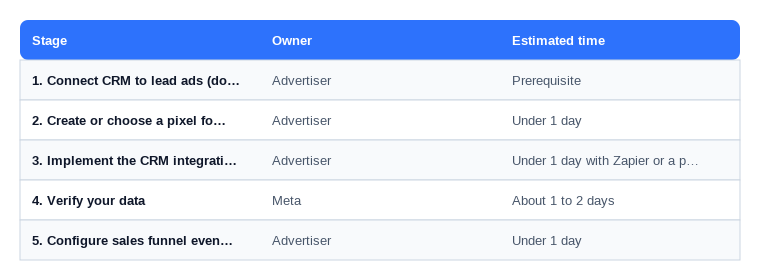
Meta estimates about one month to value, with the actual timeline varying by advertiser:
| Stage | Owner | Estimated time |
|---|---|---|
| 1. Connect CRM to lead ads (download leads) | Advertiser | Prerequisite |
| 2. Create or choose a pixel for CRM events | Advertiser | Under 1 day |
| 3. Implement the CRM integration | Advertiser | Under 1 day with Zapier or a partner; 3 to 4 weeks as a developer build |
| 4. Verify your data | Meta | About 1 to 2 days |
| 5. Configure sales funnel events in the CRM | Advertiser | Under 1 day |
| 6. Learning phase | Meta | 2 to 4 weeks |
Total time to value is listed as roughly 3 to 4 weeks. Meta adds that you may run Conversion Leads campaigns during the training period but will not benefit from the full lift until it is complete.
How do I set it up?
- Confirm you already download leads from Meta into your CRM automatically. This is the prerequisite.
- Create a new pixel, or choose one, to receive CRM events.
- Choose one build path: a developer implementation, Zapier, the Salesforce app, or another partner integration.
- Make sure each CRM record keeps the Meta Lead ID, and send it with each stage-change event.
- Upload events at least daily, and keep the stage you optimize for inside the 28-day window.
- Wait for Meta’s data validation, which Meta estimates at about 1 to 2 days.
- Configure the sales funnel events in your CRM.
- Create a campaign with the Conversion Leads goal. You may run it during training, but Meta says the full lift comes after the training period.
On the API side, Meta’s lead ad creation guide says that if you have a CRM data source and choose QUALITY_LEAD as the optimization goal, you may add the pixel_id to the promoted_object for further optimization on quality, without a pixel_rule.
Who needs to be involved?
Meta names three roles. The marketing and sales team usually starts the project, defines the funnel and needs permissions in Ads Manager and Events Manager. The CRM admin knows the CRM’s fields and creates custom fields or flows. The developer builds the integration for a manual route and checks that it works. In a small business one person may hold all three roles.
Where does Bach.ai fit?
Bach.ai is our product. It audits Meta and Google Ads accounts and checks tracking and signal health, including pixel and Conversions API event coverage. It does not connect your CRM or send CRM events to Meta, and findings are estimates, not guarantees. On a paid plan a supported change is applied only after you approve it by default. See the Meta pixel and Conversions API guide and the pixel and CAPI signal-health audit.
FAQ
Can I use Conversion Leads with website forms?
Meta says the Conversion Leads performance goal is currently compatible only with Facebook and Instagram Lead Ads (Instant Forms). If you want this goal, collect leads with Instant Forms, and check your form type before you plan the CRM build.
What if I do not store the lead ID?
Meta says to send customer parameters such as click ID, phone number or email instead. It recommends storing the 15 to 17 digit Lead ID in the CRM, so fix that capture step first if you can.
How many leads do I need?
Meta’s guideline is at least 200 leads per month. It also asks for daily uploads, a stage that happens within 28 days, and a stage conversion rate between 1% and 40%.
How long until it works?
Meta estimates about 3 to 4 weeks in total, including 1 to 2 days of data validation and a 2 to 4 week learning phase. A developer-built integration can add 3 to 4 weeks first.
Sources, read on 25 November 2026: Conversion Leads CRM integration; Lead ads guide; Creating lead ads; Customer information parameters.