What Are Meta Marketing API Rate Limits?
What are Meta Marketing API rate limits and how to avoid them?
Rate limits cap how many requests a tool can send to Meta for your ad account in a given time. Limits differ for reads, creating and editing ads, budget changes and reports, and apps with full access get more room than development apps. You avoid them by pacing requests, batching and not editing the same object repeatedly.
If you use an ad tool, a reporting connector or an agency dashboard, every number it shows and every change it makes passes through Meta’s Marketing API. Meta limits how fast that traffic can flow. When the limit is hit, a report stalls, a budget change is refused or a bulk edit stops halfway. This guide translates Meta’s limits into what they mean for the people who use these tools, and what to ask a vendor.
What is a rate limit on the Marketing API?
Meta’s rate limiting documentation says the Marketing API has its own rate limiting logic and is excluded from the general Graph API limits. Most requests are also subject to separate “business use case” limits that depend on the endpoint being called.
The main account-level limit works on points. Meta says each call gets a score, a read counts as 1 point and a write as 3 points, and when the account reaches its maximum score Meta returns a throttling error. The limit is applied per ad account in real time.
Do all tools get the same limit?
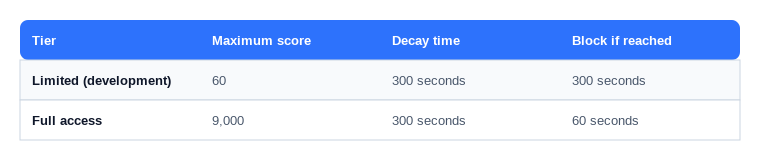
No. The limit depends on the access tier of the tool’s app. Meta renamed the tiers: Standard Access is now Limited Access and Advanced Access is now Full Access. A new Marketing API app starts in the limited tier by default, which Meta describes as development access with a basic quota.
| Tier | Maximum score | Decay time | Block if reached |
|---|---|---|---|
| Limited (development) | 60 | 300 seconds | 300 seconds |
| Full access | 9,000 | 300 seconds | 60 seconds |
To move up, Meta says an app needs 500 or more Marketing API calls in the past 15 days and an error rate below 15% for the last 500 calls, then must upgrade through App Review. So a home-built script or a very new tool can be capped far lower than an established connector. Ask which tier your tool’s app holds.
Which actions are limited the most tightly?
Several limits are specific to actions marketers care about:
- Creating and editing campaigns, ad sets and ads is capped at 100 requests per second for each combination of app and ad account.
- Edits to the same object are limited: Meta’s default is one edit per object every 30 seconds, separate from the per-account limit.
- An ad set’s daily or lifetime budget can change only 4 times per hour. Beyond that, budget changes to that ad set are blocked for an hour.
- Account spending limits can be changed 10 times per day.
- Ad creation is limited for an account based on its daily spend limit.
The budget rule is the one most likely to affect you. A tool that nudges budgets every few minutes can run into it, and it is also a reason to follow safe budget scaling rather than constant small changes.
How do limits affect reports?
Reporting has its own limits. Meta says insights calls are limited at the app level, and when an app is rate limited, all insights calls for that app are limited. Its insights guidance recommends spreading queries over time, watching the usage information Meta returns and slowing down as an app nears its capacity. If you pull large reports yourself, read how to pull large Meta ads reports without timeouts.
A connector that serves many customers from one app shares that app’s capacity, which is one reason a report can be slow at busy times even though your account is small. Meta also notes that insights data refreshes every 15 minutes, so polling more often than that does not produce fresher numbers.
How does Meta say to avoid throttling?
Meta’s mitigation list translates into behaviours you can ask a tool to follow:
- Spread requests evenly instead of bursts.
- Combine many small requests into batch requests.
- Back off and retry later with growing gaps when throttled.
- Cut calls that are not needed, and use filtering to reduce reporting calls.
- Use asynchronous reports for large data pulls.
What should I ask a tool vendor?
- Which Marketing API access tier does your app hold?
- What happens to my change if Meta throttles it: does it retry, queue it or fail silently?
- How do you pace bulk edits on accounts with many campaigns?
- Do you limit how often budgets are changed for one ad set?
- Can I see throttling or error events in the tool?
For more on choosing tools, see the best Meta ads tools guide and what access a tool needs.
Where does Bach.ai fit?
Bach.ai is our product. It audits Meta and Google Ads accounts and flags disapproved ads as policy blockers, but it does not raise Meta’s limits or change a third-party tool’s access tier, and findings are estimates, not guarantees. On a paid plan a supported change is applied only after you approve it by default. For a full account review, use the Meta ads audit checklist.
FAQ
Why was my budget change refused?
One documented cause is the ad set budget limit. Meta says the daily or lifetime budget of an ad set can change only 4 times per hour, and beyond that further changes to that ad set are blocked for an hour.
Does a bigger account get more room?
Partly. Meta’s ads management quota adds capacity per active ad, and Meta’s formula for insights adds more room for each active ad as well. The tier of the tool’s app is the larger factor.
Is a throttling error a sign my account is in trouble?
Not by itself. Meta describes throttling as a protection against bursts and heavy traffic. A separate abuse-prevention limit exists for abnormal traffic, and Meta suggests contacting its support if you see it.
Can I see how close a tool is to its limit?
Meta returns usage information in response headers that a developer can read. As a marketer, ask the vendor to show throttling events or usage in their product or support logs.
Sources, read on 25 November 2026: Rate limiting; Insights API best practices; Error reference.