How Long Does Meta Support Each API Version?
How long does Meta support each Marketing API version?
Meta supports the previous Marketing API version for at least 90 days after a new version releases, and says versions arrive about every four months. After the grace period the old version stops working, and its calls may fail or be upgraded to the next available version. Unversioned calls always fail.
Behind most ad tools sits a version number that you never see: the version of Meta’s Marketing API the tool is built on. Meta retires old versions on a published schedule, and a tool that falls behind can start returning errors or missing data overnight. This guide explains the support window, what the versions table says, and which questions to put to a vendor so a version change does not surprise your reporting.
How long is each Marketing API version supported?
Meta’s versioning documentation says that when a new Marketing API version releases, Meta continues to support the previous version for at least 90 days. During that grace period, you can call both the current version and the deprecated one. After it ends, the deprecated version stops working.
Meta also states that versions are released approximately every four months. Its own example: v17.0 was released on 23 May 2023, and v16.0 expired on 6 February 2024, which gave at least 90 days to move over. Meta notes that it may not always release a new version at the end of the previous version’s grace period.
What does Meta’s table of versions show?
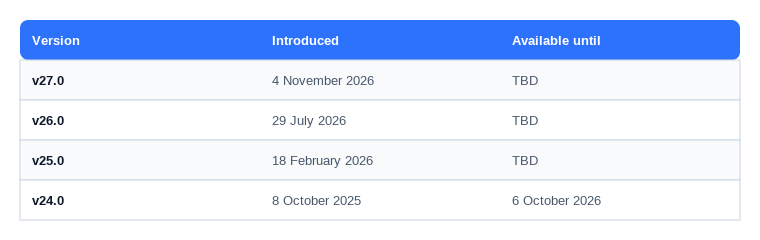
Meta publishes the version list on its changelog page. At the time of reading, the page said the latest version is v27.0 and listed these Marketing API versions.
| Version | Introduced | Available until |
|---|---|---|
| v27.0 | 4 November 2026 | TBD |
| v26.0 | 29 July 2026 | TBD |
| v25.0 | 18 February 2026 | TBD |
| v24.0 | 8 October 2025 | 6 October 2026 |
The “available until” date for v24.0 has already passed on the day this was checked, so ask any vendor still built on that version how it is handled. The same page separately lists Graph API versions with longer end dates, and the versioning page says Graph API core versions carry a two year guarantee while the Marketing API runs on the shorter 90 day schedule. Do not treat the longer Graph API dates as the Marketing API’s.
What happens when a version expires?
Meta says that once a version is unavailable, calls made to that number may fail or be upgraded to the next available version. The upgrade rule is called auto-upgrade. It applies when an endpoint is not affected between the expiring version and the next one: the platform upgrades the call instead of failing it. If the endpoint is affected by changes in the next version, the call fails.
Meta’s example: after v17.0 was deprecated on 14 May 2024, a call to change an ad set on v17.0 would fail because that endpoint changed in v18.0, while a call to read insights on v17.0 was upgraded to v18.0. Meta also says developers should still upgrade before a version is deprecated, since they may need to upgrade affected endpoints manually and may want new features. The two Meta pages describe the auto-upgrade feature with different dates, May 2024 on the versioning page and a July 29, 2026 note on the changelog page, so ask your vendor what applies to their app.
A tool owner can see when this happens: Meta adds a warning header to a response that was auto-upgraded, and it lets developers opt out in the app settings.
Why does this matter to a marketer?
Because the failures are uneven. Under auto-upgrade, reads of unchanged endpoints can keep working while edits to changed endpoints fail, so a tool can look healthy on reports and stop saving changes. The symptoms to watch for are:
- A change that works in Ads Manager but not in the tool.
- A metric or breakdown that suddenly returns blank values.
- Errors on actions that worked last month. Look up the code in what common API errors mean.
- A vendor status note about a migration or a Meta API update.
Meta’s error reference includes examples of the kind of change that arrives with versions, such as a crop key that will no longer be available in the newest API version, and targeting categories that have been removed. Removals like these are normal parts of the lifecycle.
What should I ask a tool vendor?
- Which Marketing API version does your tool use today, and when do you plan to upgrade?
- How do you track Meta’s version schedule and test before an old version expires?
- Do you rely on auto-upgrade, or do you move versions yourself?
- How will I be told if a feature changes because of a Meta version?
- Do you pin every request to a version? Meta says calls without a version fail.
For more on judging tools, see the best Meta ads tools guide, the Meta ads glossary and what access a tool needs.
Where does Bach.ai fit?
Bach.ai is our product. It audits Meta and Google Ads accounts and flags disapproved ads as policy blockers, but it does not control which Marketing API version Meta supports or the versions that other tools use, and findings are estimates, not guarantees. On a paid plan a supported change is applied only after you approve it by default. For a full account review, use the Meta ads audit checklist.
FAQ
What does “at least 90 days” mean for my tool?
It is the minimum grace period after a new version ships. During it, both versions work. Meta says it may not release a new version exactly when the previous version’s grace period ends, so the real window can be longer.
Do unversioned calls work?
No. Meta says unversioned calls are invalid and fail when made against Marketing API endpoints, so every request has to carry a version number in its path. A tool that skips the version cannot work, which is why vendors pin one.
Which version will my tool be able to call?
Meta’s FAQ says an app can call the version that was latest when the app was created, if not yet deprecated, plus newer undeprecated versions. It may also upgrade selected endpoints from deprecated versions to the next available one.
Is there a way to see if a call was upgraded?
Yes. Meta says an API response header is included for auto-upgraded calls, and the app owner can disable auto-upgrade in the Marketing API settings of the app product page.
Sources, read on 25 November 2026: Marketing API versioning; Marketing API changelog; Error reference.