How Does Meta Use Catalog Inventory Data?
How does Meta use catalog inventory and availability data?
Meta treats the inventory value you upload as the source of truth and overwrites its cached copy with it. It subtracts orders you have not acknowledged to get available inventory, and marks an item out of stock when the count reaches zero. Meta also warns that sales on several channels can oversell.
Stock numbers in a catalog look like a back-office detail, yet they decide what a shopper can buy and when a product shows as sold out. Meta’s inventory guide explains the counts it keeps, how orders change them and which update methods suit slow and fast sellers. This article summarises it for store owners and marketers, and is clear about what the guide does and does not cover.
What is the inventory field in a Meta catalog?
According to Meta’s inventory guide, the inventory field represents the stock level of each product available to sell on your Facebook Shop or Instagram Shopping account. The value appears on the product details page and helps buyers see how many items are available. Meta says that accuracy dictates when products are out of stock and that a wrong value can lead to overselling.
The guide also notes that the field is being replaced by a new field called quantity_to_sell_on_facebook. The old name is supported for the near term, but Meta recommends the new one. If your feed tool still exports “inventory”, ask the vendor or your developer when it will switch.
One more line matters for advertisers: Meta says an item without inventory setup cannot be tagged or purchased, but it can still be used for Advantage+ catalog ads without checkout. Those ads, in Meta’s description, are personalized ads built on a set of products from a catalog.
Which inventory counts does Meta keep?
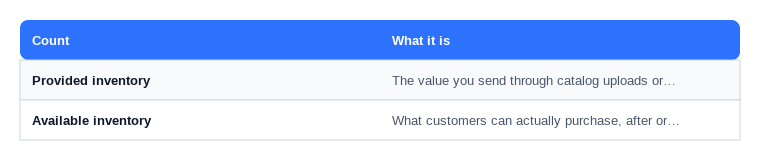
Meta keeps two kinds of counts on its side.
| Count | What it is |
|---|---|
| Provided inventory | The value you send through catalog uploads or other update techniques |
| Available inventory | What customers can actually purchase, after orders that are not yet processed are considered |
The relationship Meta states is: available inventory equals provided inventory minus orders not acknowledged. After you acknowledge an order, there is a 30 minute buffer to process it and update your inventory numbers before Meta removes acknowledged orders from its counter. The value you provide is described as the source of truth and always overwrites the value cached on Meta’s backend.
What happens when a product sells out?
As people buy through your Facebook Shop or Instagram Shopping account, the inventory value goes down. At zero, Meta marks the product Out-Of-Stock and stops anyone from buying more units. If a buyer lands on an out-of-stock product, Meta tries to switch the product details page to a variant that has units in stock, based on the variant values in your catalog.
When a buyer cancels, Meta restocks automatically. For a seller-initiated cancellation, you can restock at cancellation time by setting the restock_items field of the cancellations endpoint.
This guide describes the shop experience. It does not say how out-of-stock items are treated in ad delivery, so if your concern is ads promoting sold-out items, read what to do when catalog ads show out-of-stock products.
Why can I oversell on Meta?
Meta states plainly that it chose not to support synchronous inventory management. In its words, it does not support atomic purchase transactions tied to decrementing stock levels in your warehouse. If your inventory is shared across several channels, you can unexpectedly oversell on Facebook or Instagram, especially for fast-selling products available in limited quantity.
When you cannot fulfil an order for that reason, Meta says to start a cancellation and set the reason code to OUT_OF_STOCK. If overselling happens often, it suggests processing orders more frequently and adjusting inventory levels to match.
Which update method fits slow and fast sellers?
Meta describes four ways to integrate inventory: the Commerce Manager interface, a scheduled or manual feed upload, the Feed API and the Batch API. It then recommends different strategies depending on the product.
- Pre-allocate inventory. Dedicate stock to your Facebook Shop and Instagram channels so sales elsewhere do not interfere. Meta calls this the most effective way to avoid overselling and says it can apply to part or all of the catalog.
- For slow sellers or deep stock, keep it simple with a scheduled feed, daily or hourly, containing every field including current inventory.
- For fast sellers, schedule a feed that omits volatile fields such as inventory, and send inventory changes through the real-time batch API when the value changes in your backend or at a fixed interval. Meta says the fields you update this way should not also be in the feed, for consistency.
- Use inventory thresholds: when an item is close to running out in your warehouse, set the catalog value to zero. Meta calls this an optimisation for under-selling and suggests different thresholds for fast and slow products.
Batch requests are asynchronous, so Meta says to check the request status and result to make sure every update succeeded. Updating products one by one through the Graph API is only practical for a small number of products, with Meta’s rule of thumb being to use the batch API for more than a dozen at a time.
Should I delete discontinued products?
Meta does not recommend it. Deleting can cause undesirable effects such as product tags and images disappearing. Its advice is to set the visibility field of a discontinued product to staging and to delete products only after a significant time, months, has passed.
What should I ask my feed or ad tool?
If a tool or agency manages your feed, these questions follow from the guide: which inventory field name does it send, how often does it update stock, does it use the batch API for fast sellers, and how does it handle a sell-out on another channel. See also the catalog data quality diagnostic and the basics in what is a Meta catalog.
Where does Bach.ai fit?
Bach.ai is our product. It audits Meta and Google Ads accounts and, when a Shopify store is connected, compares ad-reported revenue with real orders on a read-only connection, but it does not manage your stock counts or push inventory to Meta, and findings are estimates, not guarantees. On a paid plan a supported change is applied only after you approve it by default. For a full account review, use the Meta ads audit checklist.
FAQ
Is the inventory number I upload the final word?
Meta says the value you provide through uploads or other techniques is the source of truth and always overwrites the value cached on its backend. Available inventory is then calculated after unacknowledged orders are subtracted.
How long after an order does Meta wait?
Meta describes a 30 minute buffer after orders are acknowledged. It lets you process orders and update inventory numbers through the catalog before Meta removes those acknowledged orders from its counter.
Can I stop overselling completely?
Not by uploads alone. Meta says it does not support synchronous inventory management, so shared stock can oversell. Pre-allocating inventory to Meta channels is the method it calls most effective.
What is the new name of the inventory field?
Meta names quantity_to_sell_on_facebook as the replacement and says it will support the old inventory field name for the near term while recommending the new name.
Sources, read on 25 November 2026: Catalog inventory guide; Catalog overview; Advantage+ catalog ads, get started.