How to Check Your Conversions API Events Arrive
How do I check my Conversions API events are arriving?
Open Events Manager, select the pixel you posted to and click Overview. Meta says events should appear within 20 minutes of sending. Then check event freshness for delay, the Event Deduplication tab for overlap with the pixel, and Event Match Quality, where Meta typically recommends a score of 6.0 or higher.
Sending a request that returns success is not the same as Meta receiving, matching and using the event. Meta’s verification page splits the check into four questions: were the events received, are they fresh, are they deduplicated, and are they matched to people. This guide follows those four in order and adds the two tools Meta recommends for testing a payload before launch.
How do I confirm Meta received my events?
Meta’s verification page says that after you send events, you should confirm in Events Manager that Meta received them, and that you should be able to verify them within 20 minutes after they were sent.
- Open Events Manager and go to the Data Sources page.
- Click the pixel that matches the
PIXEL_IDin your POST request. - Click Overview.
- Read the counts: the page shows events received before deduplication, those discarded due to consent controls and other policies, and those processed.
- Under Connection Method, see the channel each event arrived through.
- Click an event type for more detail.
If a count is zero after 20 minutes, check the pixel ID and event names in your request before suspecting Meta.
How do I test a payload before going live?
Meta’s best practices recommend two tools. The Test Events tool validates your Conversions API connection: it lets you verify that Meta received your server events, see which events were processed and deduplicated, and debug unusual activity. Meta suggests developers use their own customer information for test events, because events may be discarded if they do not match a Facebook or Meta account.
The Payload Helper builds the request structure from the required and recommended fields, generates code, and offers to send the payload to Test Events or open it in Graph API Explorer. It shows “There are no errors found” when the payload is valid. If you want to understand the fields it asks for, see what parameters every event needs.
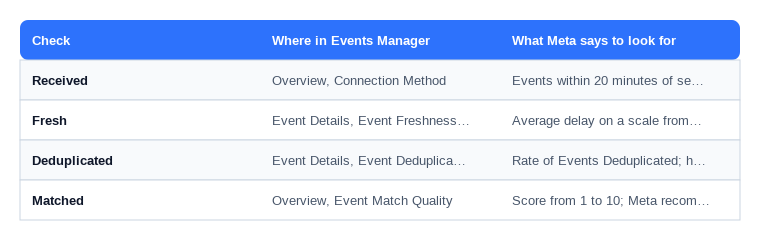
What do the four checks show?
| Check | Where in Events Manager | What Meta says to look for |
|---|---|---|
| Received | Overview, Connection Method | Events within 20 minutes of sending |
| Fresh | Event Details, Event Freshness tab | Average delay on a scale from Real Time to Weekly |
| Deduplicated | Event Details, Event Deduplication tab | Rate of Events Deduplicated; higher is better |
| Matched | Overview, Event Match Quality | Score from 1 to 10; Meta recommends 6.0 or higher |
How do I check event freshness?
Meta recommends minimizing the time between when an event occurs, as set in event_time, and when it is shared, to be as close to real time as possible. On the pixel’s Overview page, click Event Details for an event and open the Event Freshness tab to see the average delay on a scale from Real Time to Weekly. The best-practices page says you can share events in real time or in batches close to real time.
How do I check deduplication?
When the Conversions API runs alongside the pixel, Meta says you must set up a deduplication method so the ad system can tell distinct events from overlapping ones. In the Event Details view, open the Event Deduplication tab. It shows:
- Rate of Events Deduplicated: the share of events deduplicated from each source. Higher is better, and a warning appears when the rate is too low. Adding more deduplication parameters to the event may help.
- Rate of Deduplication Key Usage: the share of events from each source that carried each key. Overlap is the share with a given key received from both sources, relative to the source with fewer events. Meta says low overlap means non-unique keys from one or both sources, or keys sent from only one source.
For the fix side, see the event deduplication diagnostic and the walkthrough of Events Manager diagnostics.
How do I check match quality?
Event Match Quality measures how effective your server event’s customer information may be at matching events to a Facebook account. It is scored from 1 to 10 and appears on the pixel’s Overview page, or you can read it through the Setup Quality API. Meta says a high score can help decrease your cost per action and typically recommends aiming for 6.0 or higher. It is available only for web events. See how to improve event match quality for what to add.
Where does Bach.ai fit?
Bach.ai is our product. It audits Meta and Google Ads accounts and checks tracking and signal health, including pixel and Conversions API event coverage and deduplication. It does not send or repair your server events, and findings are estimates, not guarantees. On a paid plan a supported change is applied only after you approve it by default. Pair it with the Meta pixel and Conversions API guide.
FAQ
How long until events show in Events Manager?
Meta says you should be able to verify them within 20 minutes after they were sent. If nothing appears after that, recheck the pixel ID in the request, the event names and the Test Events tool.
What is a good Event Match Quality score?
Meta typically recommends aiming for 6.0 or higher on its 1 to 10 scale. Click the score in Events Manager to see details and recommendations. Meta says the score is currently available only for web events.
Why is my deduplication rate low?
Meta says you may improve the rate by adding more deduplication parameters, and that low overlap means non-unique keys or keys sent from only one source. Send the same event_id from the pixel and the server.
Which customer data should I use in Test Events?
Meta advises developers to use their own customer information, such as name, email address and phone number, because test events may be discarded if they do not match a Facebook or Meta account.
Sources, read on 25 November 2026: Verifying your Conversions API setup; Conversions API best practices; Payload Helper.