How Do I Run More Than One Meta Pixel on a Page?
How do I run more than one Meta pixel on a page?
Only when there is a real reason, such as separate agencies owning separate tags. Meta warns that once several pixels are initialized, an ordinary track call fires for all of them. Ask your developer to use the single-pixel calls, trackSingle and trackSingleCustom, or consolidate to one pixel.
Most sites need one Meta pixel. Some have two by accident, such as a store app plus a manual install. A few have two on purpose, because separate teams own separate tags. In every case there is a trap: Meta’s own documentation shows that an event meant for one pixel can fire on the other. Here is what happens, why, and how to check your own site.
When is it legitimate to have more than one pixel?
Meta’s Track Multiple Events with Meta Pixels guide says there are cases where multiple pixels are viable, “especially when there are multiple stakeholders involved”. Its example is a large organization that uses one agency for performance marketing and another for branding. Each agency has its own process for updating tags, such as separate tag manager containers and ownership, and plans its work separately.
Meta frames the question as how to consolidate those codes to reduce the maintenance burden, keep tracking accurate and minimize technical errors. So two pixels are tolerated for organizational reasons, not recommended as a starting point. If you control the whole site, start with one. If you do not, make sure someone owns the list of pixels and what each one should record.
What goes wrong when two pixels share a page?
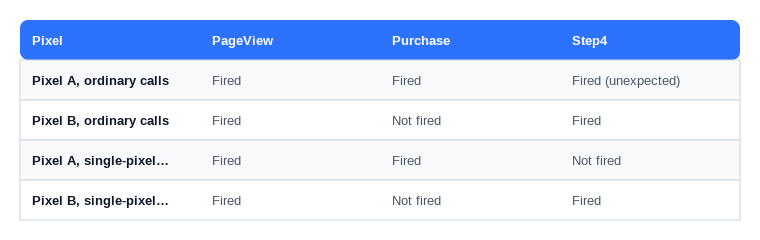
Meta shows a scenario: Agency A wants a Purchase in Pixel A, and Agency B wants a custom event named Step4 in Pixel B. Each installs a base code on the same page. The expected result is Purchase in A only and Step4 in B only.
| Pixel | PageView | Purchase | Step4 |
|---|---|---|---|
| Pixel A, ordinary calls | Fired | Fired | Fired (unexpected) |
| Pixel B, ordinary calls | Fired | Not fired | Fired |
| Pixel A, single-pixel calls | Fired | Fired | Not fired |
| Pixel B, single-pixel calls | Fired | Not fired | Fired |
Pixel A recorded Step4 even though only Pixel B was meant to. Meta says it happens whether you install two separate base codes or put two pixel IDs in one base code, because the script file loads only once even if two base codes are present.
Why do events fire on both pixels?
Meta explains that initializing a pixel stores its ID in a global queue. Any later track or custom-track call then fires for every pixel previously initialized. So putting the Step4 call after Pixel B’s setup does not limit it to Pixel B.
The consequence is not cosmetic. An extra event can distort reporting, and Meta warns that this “could skew reporting and yield undesirable results”. If a custom step feeds a conversion goal or an audience in the wrong pixel, you may optimize toward the wrong thing without any error message. Treat unexpected volume in a pixel as a lead to investigate, not as free data.
What is the fix?
In early November 2017, Meta added two calls, trackSingle and trackSingleCustom. They fire an event for one named pixel even when several are initialized. In Meta’s example, a general PageView still fires for both pixels, Purchase fires only for Pixel A, and Step4 fires only for Pixel B, matching the result in the table above.
Meta’s takeaway is that you should understand the difference between track, trackSingle and trackSingleCustom whenever pixels might interact on a page. Marketers do not write this code, but you can ask three questions of whoever does: which calls are used for each event, which pixel is named in each, and where the general PageView should go.
How do I audit a site that already has multiple pixels?
These steps are advice rather than Meta rules. They use only free tools.
- List every pixel ID that appears on your site, including those from store apps, tag managers and agency snippets.
- Write down which team owns each pixel and which events each one should record.
- Visit a product page, the cart and the thank-you page with a pixel-checking browser extension and note which pixels fire which events.
- Look for any event firing on a pixel that does not own it. That is the overfire Meta describes.
- Ask the owner to move the event calls to the single-pixel versions, or retire the redundant pixel.
- Compare event counts in each dataset before and after, and keep a short note of the change date.
For a related failure where a store app and a manual install both fire, read what to do when the Shopify app and GTM both install the pixel. If a pixel looks quiet instead of noisy, see what broke when the pixel shows no recent activity.
Does server-side tracking change this?
Partly. Meta’s Conversions API Gateway documentation says the Gateway supports multiple Meta pixels and multiple domains in one instance, so a business with several domains does not need one gateway per domain. The Signals Gateway page says the same about multiple domains. That helps with server-side routing, but it does not cancel the browser-side overfire above, so fix the page first. If you share a dataset with an agency instead of installing a second pixel, see how to share a Meta Pixel dataset with a partner.
Where does Bach.ai fit?
Bach.ai is our product. It audits Meta and Google Ads accounts and checks tracking and signal health, including pixel, Conversions API, event coverage and deduplication; it does not rewrite your site’s pixel code, and findings are estimates, not guarantees. On a paid plan a supported change is applied only after you approve it by default. See the Meta ads audit checklist and the Meta Pixel and Conversions API hub.
FAQ
Can two pixels share one base code?
Yes, but Meta shows the overfiring problem is the same: initializing two pixel IDs in a single base code still sends a later ordinary event to both. The base code is not the issue; the choice of calls is.
Does PageView fire on both pixels by design?
Meta’s corrected example deliberately fires a general PageView for both initialized pixels, then uses single-pixel calls for Purchase and the custom event. Decide whether each pixel should receive PageView, and confirm it with the owner.
Is one pixel better than two?
Meta’s guide treats multiple pixels as viable mainly for multiple stakeholders and frames consolidation as the way to reduce maintenance and errors. If one team can own everything, one pixel is simpler to audit.
Why do my pixel event counts look inflated?
One possible cause is the overfire Meta describes, where events fire on pixels that did not own them. Check which pixels fire which events on the page before you trust the number, and compare against your store’s order count.
Sources, read on 25 November 2026: Track Multiple Events with Meta Pixels; Conversions API Gateway; Signals Gateway.