How Do I Share a Meta Pixel With a Client or Agency?
How do I share a Meta pixel with a client or agency?
In the owner's Meta Business Suite, open Settings, Data sources, Datasets, click Assign partners, enter the partner's business portfolio ID and set the access level. The owner needs a portfolio that owns the dataset and full control of it, and the partner needs their own separate portfolio.
The pixel is the client’s tracking, and the agency needs it to build audiences and optimise for purchases. Sharing it wrongly causes duplicate pixels and lost history. The right way is a partner assignment on the dataset, not a copy of the code.
What is a dataset, and who owns it?
A Meta Pixel sends website events to Meta, and Meta describes setting one up as two steps: create the pixel in Events Manager and set up the base code on your website, then set up events such as purchases using a partner integration, the point-and-click tool or manual code (How to set up a Meta Pixel and events). Pixels live in datasets that a business portfolio owns. The owning portfolio decides who else can use it.
Meta also recommends using the Conversions API alongside the pixel when you share events. For the tracking choices themselves see Should events come from the browser or the server?.
What do I need before I share?
Meta lists three requirements for adding a partner to a dataset (How to add a partner to a dataset): you need a business portfolio that owns a dataset, you must have full control of the portfolio, and your partner needs their own, separate business portfolio.
What are the steps?
- In Meta Business Suite, open Settings.
- Click Data sources, then Datasets.
- Select the dataset and click Assign partners.
- Enter your partner’s business portfolio ID.
- Toggle the level of access you want the partner to have.
- Click Next. The partner is now assigned.
Meta documents related steps for adding people to a dataset, adding ad accounts to a dataset and removing access, so you can manage the whole lifecycle from the same area.
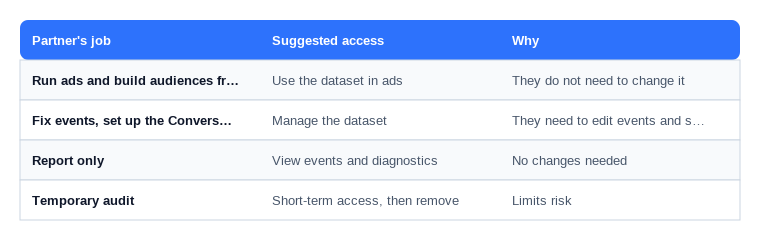
Which access should I grant?
| Partner’s job | Suggested access | Why |
|---|---|---|
| Run ads and build audiences from events | Use the dataset in ads | They do not need to change it |
| Fix events, set up the Conversions API | Manage the dataset | They need to edit events and settings |
| Report only | View events and diagnostics | No changes needed |
| Temporary audit | Short-term access, then remove | Limits risk |
Meta’s own access names may differ on screen, so read each toggle before you accept; the table is a role guide, not Meta’s wording.
What should I check after sharing?
- In the partner’s portfolio, confirm the dataset appears.
- In Events Manager, open Test events and complete a test purchase; Meta describes the Test events tool for checking that events arrive (Test events tool).
- Check there is one purchase event per order, with a value and currency, without double counting between pixel and Conversions API; see How do I diagnose duplicate events between pixel and CAPI?.
- Attach the dataset to the ad account if the client runs ads from it. Meta says you can add ad accounts to a dataset from the same area.
- Record the date, the access level and who approved it.
What should the client keep control of?
The client should remain the owner of the dataset, the website and the store. If the agency installs the pixel in the client’s store through a partner integration, the client should still be able to see and remove it. Ask for the dataset ID in writing and keep a record of which events fire on which pages, so a future agency, or the client’s own developer, can pick it up without a rebuild. If your team sets up the Conversions API, note who holds the access token and where; a token held only by a departing agency is a future outage. Agree in the contract that the dataset, its history and any audiences built on it belong to the client, and that the agency returns or deletes tokens on exit.
When two parties edit tracking, changes collide. Agree a change log: who edits events, who tests them and where the result is recorded. Meta’s activity history shows ad account changes, and your own log should cover website and dataset edits that fall outside it.
What are common mistakes?
- Installing a second pixel for the agency. Two pixels fire two sets of events and split history. Share the client’s, do not create a new one.
- Sharing the ad account but not the dataset, so ads cannot optimise for purchases.
- Giving manage access when use access would do.
- Forgetting to remove the partner when the contract ends; see How do I offboard a client from Meta ads?.
Run the tracking part of the Meta ads audit checklist on day one to catch missing events early.
Can software help?
Bach.ai checks tracking and signal health on a connected account: pixel, Conversions API, event coverage, attribution windows and deduplication. It reports what it finds; the dataset sharing itself is a Meta Business Suite step the owner performs.
FAQ
Does the partner need their own pixel?
No. They use the client’s dataset through the assignment. Creating another splits the data.
Can the client share to my personal Facebook account?
Meta describes partner sharing business-portfolio to business-portfolio. Add individual people to the dataset only through the owner’s portfolio.
Who owns the audiences I build from the pixel?
Audiences live in the ad account that created them; check ownership in your contract, and see Who should own a client’s Meta ad account?.
How do I remove a partner from a dataset?
Meta documents how to remove access from your dataset in the same help area. Use the dataset’s partner list in Settings, Data sources.
Sources: Meta Business Help Center, How to add a partner to a dataset in your business portfolio, How to set up a Meta Pixel and events on your website, Test events tool (checked 25 Nov 2026); Bach.ai capabilities from our features page.